Register now



December 5, 2025
December 5, 2025
December 5, 2025
December 5, 2025
Choosing between Amazon RDS and Aurora requires a deep understanding of key differences in performance, scalability, and pricing. RDS is ideal for stable workloads with predictable needs, while Aurora excels in high-demand environments requiring fast performance and automatic scaling. Aurora’s pay-per-I/O pricing can be more efficient for dynamic applications, but RDS offers simpler management and lower costs for smaller applications. By evaluating your workload’s performance requirements, traffic patterns, and scalability needs, you can make an informed decision.
Choosing the wrong database can create performance bottlenecks, drive up cloud costs, and add unnecessary complexity for your engineering team. Amazon RDS and Aurora are both fully managed relational database services, but they serve different needs.
RDS offers simplicity and reliability, scaling compute resources up to 32 vCPUs and 244 GiB RAM, but may struggle with high-throughput or low-latency workloads.
Aurora, on the other hand, provides stronger performance and automatic storage scaling up to 128 TiB, though it comes with higher costs and added complexity.
If you want to optimize for performance, scalability, and cost, understanding how these two services differ is essential. It helps you make informed decisions that save time, reduce costs, and ensure your applications run smoothly.
So, in this blog, you’ll explore a detailed comparison of RDS and Aurora to help you identify which option aligns best with your application’s requirements and workload patterns.
Amazon RDS (Relational Database Service) is a fully managed database service that makes it easy to set up, operate, and scale relational databases in the cloud.
It supports popular database engines such as MySQL, PostgreSQL, MariaDB, Oracle, and SQL Server, which allows you to choose the engine that best fits your applications.
RDS handles time-consuming administrative tasks automatically, including backups, software patching, monitoring, and scaling. It helps you focus on improving application performance and architecture.
Amazon RDS is a solid choice for many cloud applications, but it comes with a few trade-offs depending on your workload. Understanding its strengths and limitations helps you make the right decision for your infrastructure.
For example, a SaaS company running a project management tool used RDS for its PostgreSQL database. Traffic was stable, so RDS provided predictable costs and simple management without requiring extra scaling effort
Once you understand what Amazon RDS offers, it’s easier to see how Amazon Aurora builds on those capabilities to deliver even higher performance.
Suggested Read: Reduce Amazon RDS Costs: 2026 Pricing Breakdown
Amazon Aurora is a fully managed, high-performance relational database service built for the cloud. It’s compatible with MySQL and PostgreSQL, delivers superior performance, and scales efficiently for cloud-native applications.
Aurora takes care of routine administrative tasks like backups, patching, and scaling, so you can focus more on building and optimizing your applications. It is an excellent choice for applications that demand both speed and reliability.
Amazon Aurora delivers strong performance, smooth scalability, and high availability for cloud-native applications, but it also introduces a few trade-offs. Understanding its strengths and limitations helps you determine the best fit for your infrastructure.
For example, a gaming platform with millions of concurrent players switched to Aurora. The auto-scaling and high throughput allowed them to handle sudden traffic spikes during game launches without manual intervention.
Once you understand what Aurora is designed to do, it becomes easier to see how it differs from traditional Amazon RDS.
Amazon RDS and Amazon Aurora are both fully managed relational database services, but they differ in important ways across performance, scalability, and ideal use cases.
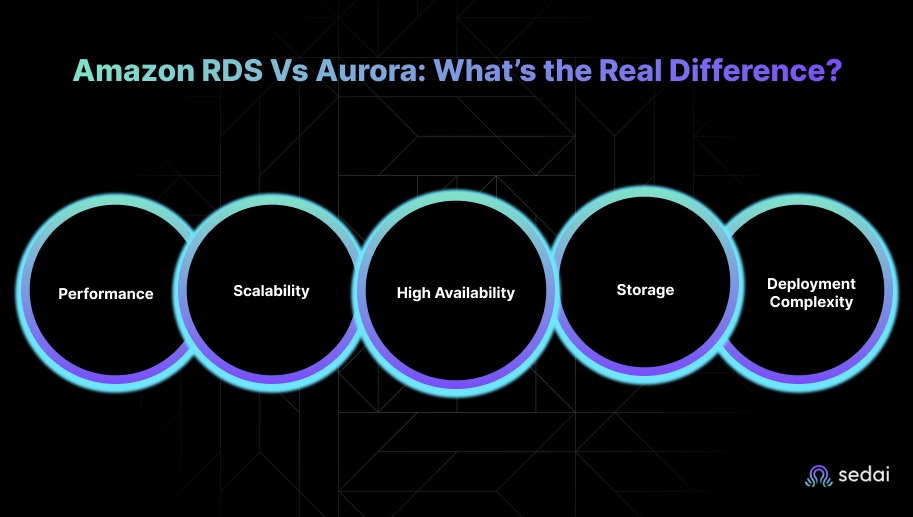
Understanding these distinctions helps you evaluate which service aligns better with your application architecture and long-term operational needs.
Amazon RDS provides reliable performance for typical workloads but may struggle with high-throughput or low-latency applications.
Aurora, designed for demanding environments, delivers up to 5x the throughput of MySQL and 3x that of PostgreSQL, using a cloud-native architecture and distributed storage system.
For example, during Black Friday, a large e-commerce platform using RDS saw delayed queries under peak load. After migrating to Aurora, the same queries executed 4–5x faster, and storage scaled automatically as orders surged.
RDS scaling requires manual adjustments to compute and storage resources, which can lead to downtime or increased operational effort.
On the other hand, Aurora scales both compute and storage automatically without interruption. It maintains performance as workloads fluctuate and is better suited for dynamic applications.
RDS supports Multi-AZ configurations, but failover can take several minutes and may not satisfy strict uptime needs.
Whereas Aurora replicates data across three Availability Zones and performs automatic failover in under 30 seconds, offering stronger resilience and minimal downtime.
RDS relies on fixed storage allocations that need manual resizing, which can cause downtime during scaling.
However, Aurora uses self-healing, distributed storage that automatically expands. It provides continuous availability and smoother handling of growing or unpredictable datasets.
RDS is easier to deploy and manage for standard applications, requiring minimal configuration.
Aurora, however, includes advanced capabilities such as cross-region replication and automatic scaling, but these features add complexity. This makes it a better fit for teams with advanced performance and scalability requirements.
After looking at how RDS and Aurora differ in performance and architecture, it is helpful to see how their pricing stacks up.
Must Read: Amazon RDS for Beginners: How to Optimize & Save Costs in 2025
When you’re comparing Amazon RDS and Amazon Aurora pricing, you need to consider the key cost factors driven by workload characteristics.
Both services follow distinct pricing models, and choosing between RDS and Aurora depends on your application’s performance, scalability, and I/O demands. Here’s a breakdown of how their pricing stacks up.
RDS charges based on instance hours, provisioned storage, and optional provisioned IOPS. This predictable model works well for workloads with consistent storage and I/O demands, but costs can rise if you over-provision IOPS or storage.
Example: General-purpose (gp3) storage costs $0.115 per GB per month, while provisioned IOPS storage (io3) costs $0.125 per GB per month plus $0.02 per additional IOPS.
RDS suits workloads that require stable, predictable costs without heavy scaling or I/O spikes.
Aurora charges for instance hours, actual storage used (per GB per month), and I/O operations. Its pay-per-I/O model ensures you don’t pay for unused capacity, making it more efficient for workloads with variable or unpredictable I/O demands.
Example: Aurora Standard storage costs $0.10 per GB per month, with I/O billed at $0.20 per million requests. In I/O-Optimized mode, Aurora includes I/O costs in a higher storage rate of $0.225 per GB per month, ideal for I/O-intensive workloads.
Aurora is best suited for high-performance, high-availability applications that require automatic scaling without manual provisioning.
Amazon RDS:
RDS uses fixed storage sizes, and you pay for the full provisioned capacity even if it isn’t fully used. This makes RDS predictable but less flexible when workloads fluctuate.
Example: gp3 storage is $0.115 per GB per month, io3 storage is $0.125 per GB per month, plus additional IOPS charges.
Amazon Aurora:
Aurora automatically scales storage as your database grows, and you pay only for what you use. Its pricing is efficient for workloads with unpredictable I/O spikes because charges are based on actual I/O usage.
Example: Aurora Standard storage costs $0.10 per GB per month, with $0.20 per million I/O requests. I/O-Optimized mode reduces I/O charges but increases storage costs to $0.225 per GB per month, better suited for throughput-heavy workloads.
Amazon RDS:
Instance pricing depends on type and size, with Reserved Instances offering savings over on-demand rates. RDS provides solid performance but is less scalable than Aurora for compute-intensive workloads.
Example: db.r5.4xlarge costs roughly $1.008 per hour (on-demand, US East – N. Virginia).
Amazon Aurora:
Aurora instances are generally pricier, reflecting higher performance and scalability. Its automatic scaling of compute and storage helps maintain cost efficiency for large workloads.
Example: db.r5.4xlarge for Aurora costs about $1.263 per hour (US East – N. Virginia).
Amazon RDS:
Costs rise if you over-provision storage or IOPS. You need to carefully select instance types and I/O levels. While predictable for steady workloads, frequent scaling or large-scale applications can increase expenses.
Amazon Aurora:
Aurora is cost-effective for applications needing seamless scaling, particularly I/O-heavy workloads. Though upfront costs are higher, auto-scaling storage and pay-per-I/O prevent overpayment.
Its I/O-Optimized mode is ideal for high-demand workloads that would be expensive on RDS with provisioned IOPS.
Here’s a quick comparison table for your better clarity:
For small, stable workloads, RDS is cost-efficient. For large, dynamic, or I/O-heavy workloads, Aurora provides better performance and scaling with optimized costs
Once the pricing differences are clear, the next question is which service offers the better overall value for your needs.
When choosing between Amazon RDS and Amazon Aurora, you should weigh performance, scalability, cost, and application requirements. Both are fully managed relational databases, but each caters to different workloads.
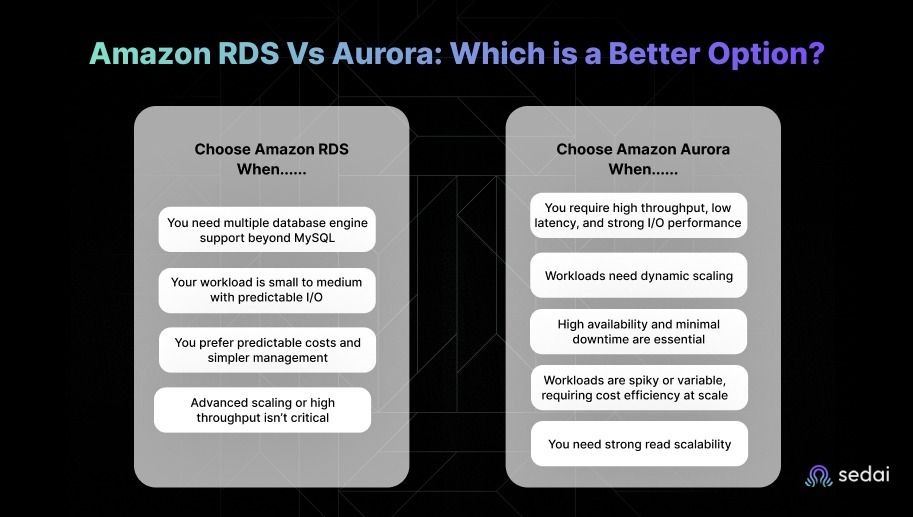
RDS is ideal for smaller, stable workloads where simplicity, predictable costs, and multi-engine support are priorities.
Aurora excels in high-performance, scalable environments requiring dynamic growth, high I/O, minimal downtime, and advanced read or failover capabilities.
For example, if your app is a content platform with predictable daily traffic, RDS is sufficient. But if you run a live sports streaming app that experiences sudden spikes in viewership, Aurora ensures smooth performance without downtime.
Must Read: AWS Database Migration Service: An In-Depth Guide for 2025
Many tools claim to optimize RDS and Aurora, but most rely on static configurations or predefined thresholds that cannot respond to changing workloads in real-time. This often results in inefficient resource usage and higher cloud costs.
Sedai stands out with its autonomous optimization platform. It continuously analyzes real-time workload behavior, detects inefficiencies, and dynamically adjusts resources to maintain optimal performance and cost efficiency.
By automating scaling, rightsizing, and resource management, Sedai keeps your databases running at peak performance while reducing operational overhead.
Here’s what Sedai offers for RDS & Aurora optimization:
Sedai’s autonomous optimization platform keeps your RDS and Aurora environments running efficiently at all times.
By continuously monitoring usage and making real-time adjustments, Sedai reduces cloud costs, improves database performance, and minimizes operational overhead.
When optimizing RDS and Aurora with Sedai, use the ROI calculator to estimate potential savings from reduced resource waste, improved database performance, and automated scaling, eliminating the need for manual adjustments.
Choosing between Amazon RDS and Aurora is only the starting point. As your application grows, continuously tuning the database to match changing usage patterns becomes essential.
Tools like Sedai automate these adjustments, helping your infrastructure stay efficient and high-performing without manual effort. By optimizing early, you can future-proof your architecture, reduce unnecessary costs, and let your team focus on development.
Start optimizing with Sedai today to keep your cloud database environment cost-effective and scalable over the long term.
A1. RDS is suitable for stable, predictable workloads with moderate traffic and broader engine support. Aurora is better when you need high throughput, low latency, and smooth scaling for large or dynamic applications that require high availability.
A2. RDS uses a predictable pricing model based on instance hours, storage, and optional IOPS, making it cost-efficient for steady workloads. Aurora charges for actual storage and I/O requests, which can cost more upfront but become efficient for variable workloads that benefit from automatic scaling.
A3.Yes, if you’re running MySQL or PostgreSQL, you can migrate to Aurora using AWS Database Migration Service (DMS). It’s still best to test in a staging setup before moving any critical production workload.
A4. RDS can scale vertically by adjusting instance sizes, but the process isn’t fully automated. Aurora scales compute and storage automatically without downtime, making it more suitable for applications that require continuous, dynamic scaling.
A5. RDS offers reliable performance for standard workloads but may not keep up with high-throughput needs. Aurora is built for speed, delivering up to 5x the throughput of MySQL and 3x that of PostgreSQL. This makes it a stronger option for performance-driven applications.
December 5, 2025
December 5, 2025
Choosing between Amazon RDS and Aurora requires a deep understanding of key differences in performance, scalability, and pricing. RDS is ideal for stable workloads with predictable needs, while Aurora excels in high-demand environments requiring fast performance and automatic scaling. Aurora’s pay-per-I/O pricing can be more efficient for dynamic applications, but RDS offers simpler management and lower costs for smaller applications. By evaluating your workload’s performance requirements, traffic patterns, and scalability needs, you can make an informed decision.
Choosing the wrong database can create performance bottlenecks, drive up cloud costs, and add unnecessary complexity for your engineering team. Amazon RDS and Aurora are both fully managed relational database services, but they serve different needs.
RDS offers simplicity and reliability, scaling compute resources up to 32 vCPUs and 244 GiB RAM, but may struggle with high-throughput or low-latency workloads.
Aurora, on the other hand, provides stronger performance and automatic storage scaling up to 128 TiB, though it comes with higher costs and added complexity.
If you want to optimize for performance, scalability, and cost, understanding how these two services differ is essential. It helps you make informed decisions that save time, reduce costs, and ensure your applications run smoothly.
So, in this blog, you’ll explore a detailed comparison of RDS and Aurora to help you identify which option aligns best with your application’s requirements and workload patterns.
Amazon RDS (Relational Database Service) is a fully managed database service that makes it easy to set up, operate, and scale relational databases in the cloud.
It supports popular database engines such as MySQL, PostgreSQL, MariaDB, Oracle, and SQL Server, which allows you to choose the engine that best fits your applications.
RDS handles time-consuming administrative tasks automatically, including backups, software patching, monitoring, and scaling. It helps you focus on improving application performance and architecture.
Amazon RDS is a solid choice for many cloud applications, but it comes with a few trade-offs depending on your workload. Understanding its strengths and limitations helps you make the right decision for your infrastructure.
For example, a SaaS company running a project management tool used RDS for its PostgreSQL database. Traffic was stable, so RDS provided predictable costs and simple management without requiring extra scaling effort
Once you understand what Amazon RDS offers, it’s easier to see how Amazon Aurora builds on those capabilities to deliver even higher performance.
Suggested Read: Reduce Amazon RDS Costs: 2026 Pricing Breakdown
Amazon Aurora is a fully managed, high-performance relational database service built for the cloud. It’s compatible with MySQL and PostgreSQL, delivers superior performance, and scales efficiently for cloud-native applications.
Aurora takes care of routine administrative tasks like backups, patching, and scaling, so you can focus more on building and optimizing your applications. It is an excellent choice for applications that demand both speed and reliability.
Amazon Aurora delivers strong performance, smooth scalability, and high availability for cloud-native applications, but it also introduces a few trade-offs. Understanding its strengths and limitations helps you determine the best fit for your infrastructure.
For example, a gaming platform with millions of concurrent players switched to Aurora. The auto-scaling and high throughput allowed them to handle sudden traffic spikes during game launches without manual intervention.
Once you understand what Aurora is designed to do, it becomes easier to see how it differs from traditional Amazon RDS.
Amazon RDS and Amazon Aurora are both fully managed relational database services, but they differ in important ways across performance, scalability, and ideal use cases.
Understanding these distinctions helps you evaluate which service aligns better with your application architecture and long-term operational needs.
Amazon RDS provides reliable performance for typical workloads but may struggle with high-throughput or low-latency applications.
Aurora, designed for demanding environments, delivers up to 5x the throughput of MySQL and 3x that of PostgreSQL, using a cloud-native architecture and distributed storage system.
For example, during Black Friday, a large e-commerce platform using RDS saw delayed queries under peak load. After migrating to Aurora, the same queries executed 4–5x faster, and storage scaled automatically as orders surged.
RDS scaling requires manual adjustments to compute and storage resources, which can lead to downtime or increased operational effort.
On the other hand, Aurora scales both compute and storage automatically without interruption. It maintains performance as workloads fluctuate and is better suited for dynamic applications.
RDS supports Multi-AZ configurations, but failover can take several minutes and may not satisfy strict uptime needs.
Whereas Aurora replicates data across three Availability Zones and performs automatic failover in under 30 seconds, offering stronger resilience and minimal downtime.
RDS relies on fixed storage allocations that need manual resizing, which can cause downtime during scaling.
However, Aurora uses self-healing, distributed storage that automatically expands. It provides continuous availability and smoother handling of growing or unpredictable datasets.
RDS is easier to deploy and manage for standard applications, requiring minimal configuration.
Aurora, however, includes advanced capabilities such as cross-region replication and automatic scaling, but these features add complexity. This makes it a better fit for teams with advanced performance and scalability requirements.
After looking at how RDS and Aurora differ in performance and architecture, it is helpful to see how their pricing stacks up.
Must Read: Amazon RDS for Beginners: How to Optimize & Save Costs in 2025
When you’re comparing Amazon RDS and Amazon Aurora pricing, you need to consider the key cost factors driven by workload characteristics.
Both services follow distinct pricing models, and choosing between RDS and Aurora depends on your application’s performance, scalability, and I/O demands. Here’s a breakdown of how their pricing stacks up.
RDS charges based on instance hours, provisioned storage, and optional provisioned IOPS. This predictable model works well for workloads with consistent storage and I/O demands, but costs can rise if you over-provision IOPS or storage.
Example: General-purpose (gp3) storage costs $0.115 per GB per month, while provisioned IOPS storage (io3) costs $0.125 per GB per month plus $0.02 per additional IOPS.
RDS suits workloads that require stable, predictable costs without heavy scaling or I/O spikes.
Aurora charges for instance hours, actual storage used (per GB per month), and I/O operations. Its pay-per-I/O model ensures you don’t pay for unused capacity, making it more efficient for workloads with variable or unpredictable I/O demands.
Example: Aurora Standard storage costs $0.10 per GB per month, with I/O billed at $0.20 per million requests. In I/O-Optimized mode, Aurora includes I/O costs in a higher storage rate of $0.225 per GB per month, ideal for I/O-intensive workloads.
Aurora is best suited for high-performance, high-availability applications that require automatic scaling without manual provisioning.
Amazon RDS:
RDS uses fixed storage sizes, and you pay for the full provisioned capacity even if it isn’t fully used. This makes RDS predictable but less flexible when workloads fluctuate.
Example: gp3 storage is $0.115 per GB per month, io3 storage is $0.125 per GB per month, plus additional IOPS charges.
Amazon Aurora:
Aurora automatically scales storage as your database grows, and you pay only for what you use. Its pricing is efficient for workloads with unpredictable I/O spikes because charges are based on actual I/O usage.
Example: Aurora Standard storage costs $0.10 per GB per month, with $0.20 per million I/O requests. I/O-Optimized mode reduces I/O charges but increases storage costs to $0.225 per GB per month, better suited for throughput-heavy workloads.
Amazon RDS:
Instance pricing depends on type and size, with Reserved Instances offering savings over on-demand rates. RDS provides solid performance but is less scalable than Aurora for compute-intensive workloads.
Example: db.r5.4xlarge costs roughly $1.008 per hour (on-demand, US East – N. Virginia).
Amazon Aurora:
Aurora instances are generally pricier, reflecting higher performance and scalability. Its automatic scaling of compute and storage helps maintain cost efficiency for large workloads.
Example: db.r5.4xlarge for Aurora costs about $1.263 per hour (US East – N. Virginia).
Amazon RDS:
Costs rise if you over-provision storage or IOPS. You need to carefully select instance types and I/O levels. While predictable for steady workloads, frequent scaling or large-scale applications can increase expenses.
Amazon Aurora:
Aurora is cost-effective for applications needing seamless scaling, particularly I/O-heavy workloads. Though upfront costs are higher, auto-scaling storage and pay-per-I/O prevent overpayment.
Its I/O-Optimized mode is ideal for high-demand workloads that would be expensive on RDS with provisioned IOPS.
Here’s a quick comparison table for your better clarity:
For small, stable workloads, RDS is cost-efficient. For large, dynamic, or I/O-heavy workloads, Aurora provides better performance and scaling with optimized costs
Once the pricing differences are clear, the next question is which service offers the better overall value for your needs.
When choosing between Amazon RDS and Amazon Aurora, you should weigh performance, scalability, cost, and application requirements. Both are fully managed relational databases, but each caters to different workloads.
RDS is ideal for smaller, stable workloads where simplicity, predictable costs, and multi-engine support are priorities.
Aurora excels in high-performance, scalable environments requiring dynamic growth, high I/O, minimal downtime, and advanced read or failover capabilities.
For example, if your app is a content platform with predictable daily traffic, RDS is sufficient. But if you run a live sports streaming app that experiences sudden spikes in viewership, Aurora ensures smooth performance without downtime.
Must Read: AWS Database Migration Service: An In-Depth Guide for 2025
Many tools claim to optimize RDS and Aurora, but most rely on static configurations or predefined thresholds that cannot respond to changing workloads in real-time. This often results in inefficient resource usage and higher cloud costs.
Sedai stands out with its autonomous optimization platform. It continuously analyzes real-time workload behavior, detects inefficiencies, and dynamically adjusts resources to maintain optimal performance and cost efficiency.
By automating scaling, rightsizing, and resource management, Sedai keeps your databases running at peak performance while reducing operational overhead.
Here’s what Sedai offers for RDS & Aurora optimization:
Sedai’s autonomous optimization platform keeps your RDS and Aurora environments running efficiently at all times.
By continuously monitoring usage and making real-time adjustments, Sedai reduces cloud costs, improves database performance, and minimizes operational overhead.
When optimizing RDS and Aurora with Sedai, use the ROI calculator to estimate potential savings from reduced resource waste, improved database performance, and automated scaling, eliminating the need for manual adjustments.
Choosing between Amazon RDS and Aurora is only the starting point. As your application grows, continuously tuning the database to match changing usage patterns becomes essential.
Tools like Sedai automate these adjustments, helping your infrastructure stay efficient and high-performing without manual effort. By optimizing early, you can future-proof your architecture, reduce unnecessary costs, and let your team focus on development.
Start optimizing with Sedai today to keep your cloud database environment cost-effective and scalable over the long term.
A1. RDS is suitable for stable, predictable workloads with moderate traffic and broader engine support. Aurora is better when you need high throughput, low latency, and smooth scaling for large or dynamic applications that require high availability.
A2. RDS uses a predictable pricing model based on instance hours, storage, and optional IOPS, making it cost-efficient for steady workloads. Aurora charges for actual storage and I/O requests, which can cost more upfront but become efficient for variable workloads that benefit from automatic scaling.
A3.Yes, if you’re running MySQL or PostgreSQL, you can migrate to Aurora using AWS Database Migration Service (DMS). It’s still best to test in a staging setup before moving any critical production workload.
A4. RDS can scale vertically by adjusting instance sizes, but the process isn’t fully automated. Aurora scales compute and storage automatically without downtime, making it more suitable for applications that require continuous, dynamic scaling.
A5. RDS offers reliable performance for standard workloads but may not keep up with high-throughput needs. Aurora is built for speed, delivering up to 5x the throughput of MySQL and 3x that of PostgreSQL. This makes it a stronger option for performance-driven applications.


.svg)
.svg)


%201.svg)
%202.svg)


.svg)