Register now



December 9, 2025
December 9, 2025
December 9, 2025
December 9, 2025
Optimizing AWS Config Costs requires a solid grasp of its pricing components, including configuration items (CIs), rule evaluations, and data retention. Failing to manage these aspects can lead to unnecessary costs, such as over-tracking resources or excessive rule evaluations. By optimizing the number of tracked resources, reducing evaluation frequency, and adjusting retention periods based on compliance needs, you can effectively reduce AWS Config costs.
Watching AWS Config track every change across your resources can lead to unexpected costs faster than most teams realize, especially as the environment grows.
Each configuration item recorded every time a resource changes incurs a cost of $0.003 under continuous recording and $0.012 under periodic recording. It’s easy for teams to over-track resources or run rules more frequently than needed, and that extra activity can quickly inflate the bill.
Understanding how configuration items, rule evaluations, and long-term data retention contribute to your AWS Config costs makes it much easier to spot unnecessary spend.
In this blog, you’ll get a clear breakdown of how AWS Config pricing works and effective ways to optimize it.
AWS Config is a fully managed service that offers you continuous visibility into how your AWS resources are configured and how those configurations change over time.
It tracks resource relationships, monitors configuration drift, and evaluates compliance against internal policies or regulatory standards. This turns your AWS environment into something you can audit, reason about, and enforce consistently.
AWS Config becomes essential as infrastructure grows. It provides a reliable audit trail for changes and surfaces configuration drift before it becomes an incident.
Once you know what AWS Config does, it becomes easier to understand how its pricing model is structured.
AWS Config pricing is based on three key components: the number of configuration items (CIs) recorded, the number of rule evaluations, and the duration of data retention. As your infrastructure grows, these costs can scale quickly.
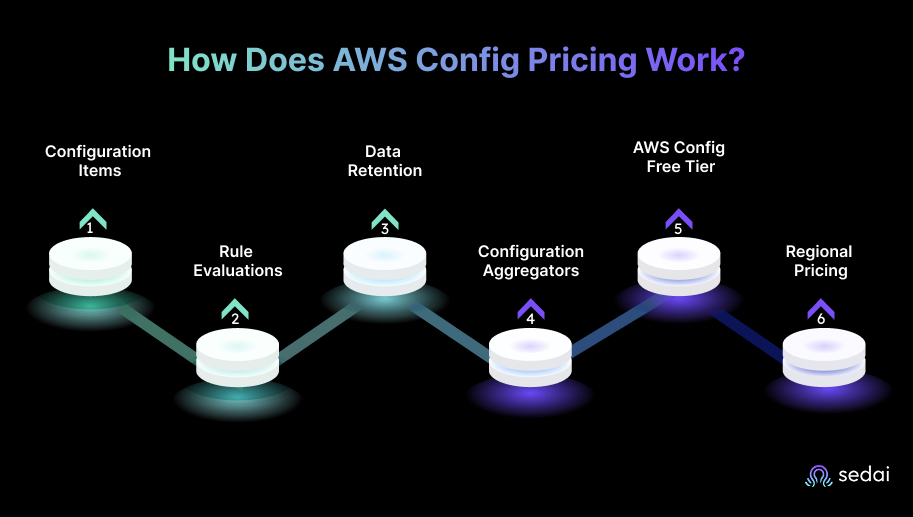
Understanding how each of these components works is critical for managing costs effectively.
Configuration items represent AWS resources and their configuration details that AWS Config tracks. Whenever a resource configuration changes, AWS Config records a new CI.
Cost impact: You are charged based on the number of CIs recorded. The more resources you track, the higher your costs will be.
Optimization:
AWS Config uses Config rules to evaluate whether your resources comply with certain standards or policies. These rules are evaluated whenever a configuration change occurs or at the frequency you set. Charges for rule evaluations are as follows:
Cost impact: The more rules you run, and the more frequently they are evaluated, the higher the cost. Custom rules and frequent evaluations can significantly increase your AWS Config bill.
Optimization:
AWS Config retains historical configuration data, allowing you to query the state of your resources at any point in time. By default, AWS Config retains this data for 7 years.
Cost impact: The longer the retention period, the higher the storage costs. Storing data for 7 years may not be necessary for every organization or workload.
Optimization:
Aggregators consolidate configuration data from multiple AWS accounts and regions into a central location.
Cost impact: Aggregators incur additional costs based on the volume of data they aggregate. The more regions/accounts you aggregate from, the higher your costs will be.
Optimization:
AWS Config includes a free tier that offers up to 1,000 configuration items recorded per month and 10 AWS Config rule evaluations per month.
AWS Config pricing is region-specific, so enabling it across multiple regions will increase costs.
Cost impact: Enabling AWS Config in several regions unnecessarily increases your costs.
Optimization:
Here are some expert tips to optimize the costs:
By effectively managing configuration item tracking, optimizing rule evaluations, and reviewing data retention needs, you can significantly reduce AWS Config costs while maintaining visibility and compliance.
This quick breakdown makes it easier to see how the pricing works in practical, real-world situations.
Suggested Read: Strategies for AWS Lambda Cost Optimization
Here are some real-world pricing examples for AWS Config and how engineers typically use them to model or optimize spend. These scenarios reflect what the bill looks like under normal, day-to-day usage patterns.
Scenario: A small environment with 100 EC2 instances. Over 24 hours, AWS Config logs around 10 configuration changes per instance, such as tag edits or volume attachment updates.
Pricing:
If you switch to periodic recording (1 CI per resource per day):
100 CIs × US$ 0.012 = US$ 1.20/day.
Optimization Tip:
Periodic recording works well for stable environments with low change rates. It usually cuts CI costs by around 60–70%.
Scenario: A mid-sized production account tracking EC2, RDS, S3, VPC, and other core resources. It runs 50,000 rule evaluations per month plus 5 conformance packs, each containing 10 rules. Total conformance pack evaluations for the month: 15,000.
Pricing:
Total Monthly Cost:
US$ 30 (CIs) + US$ 50 (rule evaluations) + US$ 15 (conformance packs) = US$ 95/month.
Optimization Tip:
Teams often forget about old rules. Reviewing and disabling non-essential rules and conformance packs helps keep evaluation volume — and cost — under control.
Scenario: A large organization monitors 10,000 resources across 5 AWS accounts. AWS Config aggregators consolidate configuration and compliance data from all accounts and regions into a central dashboard.
Pricing:
Rule Evaluations:
Conformance Pack Evaluations:
10,000 evaluations × US$ 0.001 = US$ 10/month.
Total Monthly Cost:
US$ 150 (CIs) + US$ 100 (rules) + US$ 10 (conformance packs) = US$ 260/month.
Optimization Tip:
Aggregators are great for central visibility, but they can also increase costs if enabled across too many regions. Focus on monitoring high-value resources and avoid tracking everything by default.
Once you understand how these examples play out, it becomes easier to know where to look to track your actual AWS Config spend.
Knowing where and how to monitor your AWS Config spend is critical for keeping cost control tight across your environment. AWS Config costs can climb quickly, so checking usage regularly helps you catch inefficiencies before they grow into real problems.
Proactive monitoring pays off. Use Cost Explorer, AWS Budgets, and the Config Dashboard together to stay ahead of cost spikes rather than react after they occur.
Daily budget alerts help you catch runaway usage early, giving you time to adjust the tracking scope or rule frequency before costs spiral out of control.
Once you know where your AWS Config spend appears, it becomes easier to tackle the costs and work toward reducing them.
Managing AWS Config costs is essential, especially as environments grow. You need to spot cost spikes quickly, understand what’s driving them, and take focused actions to reduce unnecessary spend.
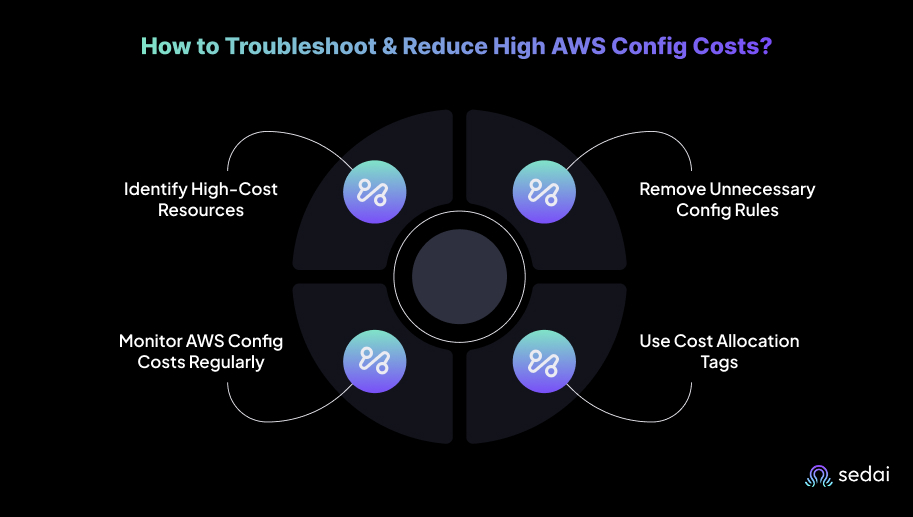
Here’s how to troubleshoot and bring down high AWS Config costs effectively:
The first step is to clearly understand where your AWS Config costs are coming from. Use AWS Cost Explorer to filter and view AWS Config costs by service, region, or account. Track your resources and regions to spot areas with unusually high costs.
Track your resources and regions to spot areas with unusually high costs. EC2, RDS, and S3 are often the most tracked services, and without proper scoping, they can easily become the biggest cost drivers.
It’s common for organizations to enable more AWS Config rules and conformance packs than they truly need, which increases the number of evaluations and overall cost.
Regularly review your active rules and conformance packs to deactivate or merge the ones that are redundant or of lower priority. AWS-managed rules are often more cost-effective than custom rules.
It’s important to monitor AWS Config usage to keep costs predictable. Use AWS Budgets to track your AWS Config spend and get alerts when your costs approach a set threshold.
AWS Cost Explorer helps you monitor spending patterns and understand where usage is increasing. Daily or weekly alerts let you make adjustments before costs exceed your plan.
Cost allocation tags make it easy to track AWS Config spend by team, project, or environment. By tagging AWS Config–related resources, such as EC2 instances or S3 buckets, you can break down costs by department using AWS Cost Explorer.
Once you have a clear handle on managing and reducing AWS Config costs, it becomes easier to decide when it’s truly the right tool compared to other options.
Also Read: AWS Fargate: Features, Pricing & Cost Optimization
AWS Config is a powerful way to track resource configurations, monitor compliance, and support auditing, but it isn’t always the right choice for every situation.
You need to recognize when AWS Config is the best fit and when it may make more sense to look at alternatives, depending on the use case, cost considerations, and operational needs.
AWS Config is crucial for tracking resource configurations and maintaining compliance, but as environments grow, associated costs can quickly become hard to manage. Traditional approaches rely heavily on manual adjustments to tracking settings, rule evaluations, and data retention, which often lead to inefficiencies and overspending.
Sedai simplifies this process by providing autonomous optimization for AWS Config. Using advanced machine learning, Sedai continuously analyzes your AWS Config usage and automatically fine-tunes tracking, rule evaluations, and data retention based on real-time usage patterns.
By proactively managing your AWS Config setup, Sedai prevents unnecessary spending while maintaining compliance, all without manual oversight.
Here’s what Sedai offers:
By automatically adjusting configurations and trimming unnecessary AWS Config tracking, Sedai keeps your cloud infrastructure optimized for cost and compliance. With Sedai, AWS Config becomes a self-optimizing resource, cutting operational costs while eliminating the need for constant manual management.
If you’re looking to optimize AWS Config costs with Sedai, use Sedai’s ROI calculator to estimate how much you can save by improving efficiency, reducing waste, and automating manual tasks.
Must Read: AWS Elasticsearch Guide 2026: Performance & Cost
To maximize your savings, it’s important to regularly review your AWS Config usage and adjust your strategies as your environment evolves. One often-overlooked step is integrating cost optimization into your team’s broader cloud governance framework.
This ensures that every decision, whether it’s a configuration change or determining which resources to track, aligns with both cost-saving goals and compliance requirements.
With Sedai, these optimizations can be automated, enabling smooth cost control and compliance. By using tools like AWS Cost Explorer and AWS Budgets alongside Sedai’s autonomous optimization, you can keep AWS Config costs in check while improving your team’s overall operational efficiency.
Take control of your AWS Config spend with full visibility and start optimizing costs immediately.
A1. To keep costs under control in a multi-account setup, use AWS Config Aggregators to centralize configuration data, but be selective with the accounts and regions you aggregate. Regularly audit the resources and rules that you’re tracking.
A2. AWS Config mainly focuses on AWS resources, but you can extend its capabilities to non-AWS systems using custom rules or third-party integrations. Typically, this involves linking Config with other tools, such as AWS CloudTrail, to monitor API-level activity.
A3. Even in large-scale environments, AWS Config generally introduces minimal overhead while continuously monitoring configurations. You can further reduce potential performance impact by using periodic recording and by prioritizing rule evaluations for only the most critical resources.
A4. Yes, you can automate rule deactivation using AWS Lambda or other automation tools. This approach allows you to regularly turn off non-critical rules, helping control costs without requiring manual oversight.
A5. In disaster recovery scenarios, focus on tracking only essential resources to keep costs manageable. Regularly test your configurations to ensure they meet compliance and recovery objectives, and adjust data retention periods to avoid unnecessary storage costs.
December 9, 2025
December 9, 2025
Optimizing AWS Config Costs requires a solid grasp of its pricing components, including configuration items (CIs), rule evaluations, and data retention. Failing to manage these aspects can lead to unnecessary costs, such as over-tracking resources or excessive rule evaluations. By optimizing the number of tracked resources, reducing evaluation frequency, and adjusting retention periods based on compliance needs, you can effectively reduce AWS Config costs.
Watching AWS Config track every change across your resources can lead to unexpected costs faster than most teams realize, especially as the environment grows.
Each configuration item recorded every time a resource changes incurs a cost of $0.003 under continuous recording and $0.012 under periodic recording. It’s easy for teams to over-track resources or run rules more frequently than needed, and that extra activity can quickly inflate the bill.
Understanding how configuration items, rule evaluations, and long-term data retention contribute to your AWS Config costs makes it much easier to spot unnecessary spend.
In this blog, you’ll get a clear breakdown of how AWS Config pricing works and effective ways to optimize it.
AWS Config is a fully managed service that offers you continuous visibility into how your AWS resources are configured and how those configurations change over time.
It tracks resource relationships, monitors configuration drift, and evaluates compliance against internal policies or regulatory standards. This turns your AWS environment into something you can audit, reason about, and enforce consistently.
AWS Config becomes essential as infrastructure grows. It provides a reliable audit trail for changes and surfaces configuration drift before it becomes an incident.
Once you know what AWS Config does, it becomes easier to understand how its pricing model is structured.
AWS Config pricing is based on three key components: the number of configuration items (CIs) recorded, the number of rule evaluations, and the duration of data retention. As your infrastructure grows, these costs can scale quickly.
Understanding how each of these components works is critical for managing costs effectively.
Configuration items represent AWS resources and their configuration details that AWS Config tracks. Whenever a resource configuration changes, AWS Config records a new CI.
Cost impact: You are charged based on the number of CIs recorded. The more resources you track, the higher your costs will be.
Optimization:
AWS Config uses Config rules to evaluate whether your resources comply with certain standards or policies. These rules are evaluated whenever a configuration change occurs or at the frequency you set. Charges for rule evaluations are as follows:
Cost impact: The more rules you run, and the more frequently they are evaluated, the higher the cost. Custom rules and frequent evaluations can significantly increase your AWS Config bill.
Optimization:
AWS Config retains historical configuration data, allowing you to query the state of your resources at any point in time. By default, AWS Config retains this data for 7 years.
Cost impact: The longer the retention period, the higher the storage costs. Storing data for 7 years may not be necessary for every organization or workload.
Optimization:
Aggregators consolidate configuration data from multiple AWS accounts and regions into a central location.
Cost impact: Aggregators incur additional costs based on the volume of data they aggregate. The more regions/accounts you aggregate from, the higher your costs will be.
Optimization:
AWS Config includes a free tier that offers up to 1,000 configuration items recorded per month and 10 AWS Config rule evaluations per month.
AWS Config pricing is region-specific, so enabling it across multiple regions will increase costs.
Cost impact: Enabling AWS Config in several regions unnecessarily increases your costs.
Optimization:
Here are some expert tips to optimize the costs:
By effectively managing configuration item tracking, optimizing rule evaluations, and reviewing data retention needs, you can significantly reduce AWS Config costs while maintaining visibility and compliance.
This quick breakdown makes it easier to see how the pricing works in practical, real-world situations.
Suggested Read: Strategies for AWS Lambda Cost Optimization
Here are some real-world pricing examples for AWS Config and how engineers typically use them to model or optimize spend. These scenarios reflect what the bill looks like under normal, day-to-day usage patterns.
Scenario: A small environment with 100 EC2 instances. Over 24 hours, AWS Config logs around 10 configuration changes per instance, such as tag edits or volume attachment updates.
Pricing:
If you switch to periodic recording (1 CI per resource per day):
100 CIs × US$ 0.012 = US$ 1.20/day.
Optimization Tip:
Periodic recording works well for stable environments with low change rates. It usually cuts CI costs by around 60–70%.
Scenario: A mid-sized production account tracking EC2, RDS, S3, VPC, and other core resources. It runs 50,000 rule evaluations per month plus 5 conformance packs, each containing 10 rules. Total conformance pack evaluations for the month: 15,000.
Pricing:
Total Monthly Cost:
US$ 30 (CIs) + US$ 50 (rule evaluations) + US$ 15 (conformance packs) = US$ 95/month.
Optimization Tip:
Teams often forget about old rules. Reviewing and disabling non-essential rules and conformance packs helps keep evaluation volume — and cost — under control.
Scenario: A large organization monitors 10,000 resources across 5 AWS accounts. AWS Config aggregators consolidate configuration and compliance data from all accounts and regions into a central dashboard.
Pricing:
Rule Evaluations:
Conformance Pack Evaluations:
10,000 evaluations × US$ 0.001 = US$ 10/month.
Total Monthly Cost:
US$ 150 (CIs) + US$ 100 (rules) + US$ 10 (conformance packs) = US$ 260/month.
Optimization Tip:
Aggregators are great for central visibility, but they can also increase costs if enabled across too many regions. Focus on monitoring high-value resources and avoid tracking everything by default.
Once you understand how these examples play out, it becomes easier to know where to look to track your actual AWS Config spend.
Knowing where and how to monitor your AWS Config spend is critical for keeping cost control tight across your environment. AWS Config costs can climb quickly, so checking usage regularly helps you catch inefficiencies before they grow into real problems.
Proactive monitoring pays off. Use Cost Explorer, AWS Budgets, and the Config Dashboard together to stay ahead of cost spikes rather than react after they occur.
Daily budget alerts help you catch runaway usage early, giving you time to adjust the tracking scope or rule frequency before costs spiral out of control.
Once you know where your AWS Config spend appears, it becomes easier to tackle the costs and work toward reducing them.
Managing AWS Config costs is essential, especially as environments grow. You need to spot cost spikes quickly, understand what’s driving them, and take focused actions to reduce unnecessary spend.
Here’s how to troubleshoot and bring down high AWS Config costs effectively:
The first step is to clearly understand where your AWS Config costs are coming from. Use AWS Cost Explorer to filter and view AWS Config costs by service, region, or account. Track your resources and regions to spot areas with unusually high costs.
Track your resources and regions to spot areas with unusually high costs. EC2, RDS, and S3 are often the most tracked services, and without proper scoping, they can easily become the biggest cost drivers.
It’s common for organizations to enable more AWS Config rules and conformance packs than they truly need, which increases the number of evaluations and overall cost.
Regularly review your active rules and conformance packs to deactivate or merge the ones that are redundant or of lower priority. AWS-managed rules are often more cost-effective than custom rules.
It’s important to monitor AWS Config usage to keep costs predictable. Use AWS Budgets to track your AWS Config spend and get alerts when your costs approach a set threshold.
AWS Cost Explorer helps you monitor spending patterns and understand where usage is increasing. Daily or weekly alerts let you make adjustments before costs exceed your plan.
Cost allocation tags make it easy to track AWS Config spend by team, project, or environment. By tagging AWS Config–related resources, such as EC2 instances or S3 buckets, you can break down costs by department using AWS Cost Explorer.
Once you have a clear handle on managing and reducing AWS Config costs, it becomes easier to decide when it’s truly the right tool compared to other options.
Also Read: AWS Fargate: Features, Pricing & Cost Optimization
AWS Config is a powerful way to track resource configurations, monitor compliance, and support auditing, but it isn’t always the right choice for every situation.
You need to recognize when AWS Config is the best fit and when it may make more sense to look at alternatives, depending on the use case, cost considerations, and operational needs.
AWS Config is crucial for tracking resource configurations and maintaining compliance, but as environments grow, associated costs can quickly become hard to manage. Traditional approaches rely heavily on manual adjustments to tracking settings, rule evaluations, and data retention, which often lead to inefficiencies and overspending.
Sedai simplifies this process by providing autonomous optimization for AWS Config. Using advanced machine learning, Sedai continuously analyzes your AWS Config usage and automatically fine-tunes tracking, rule evaluations, and data retention based on real-time usage patterns.
By proactively managing your AWS Config setup, Sedai prevents unnecessary spending while maintaining compliance, all without manual oversight.
Here’s what Sedai offers:
By automatically adjusting configurations and trimming unnecessary AWS Config tracking, Sedai keeps your cloud infrastructure optimized for cost and compliance. With Sedai, AWS Config becomes a self-optimizing resource, cutting operational costs while eliminating the need for constant manual management.
If you’re looking to optimize AWS Config costs with Sedai, use Sedai’s ROI calculator to estimate how much you can save by improving efficiency, reducing waste, and automating manual tasks.
Must Read: AWS Elasticsearch Guide 2026: Performance & Cost
To maximize your savings, it’s important to regularly review your AWS Config usage and adjust your strategies as your environment evolves. One often-overlooked step is integrating cost optimization into your team’s broader cloud governance framework.
This ensures that every decision, whether it’s a configuration change or determining which resources to track, aligns with both cost-saving goals and compliance requirements.
With Sedai, these optimizations can be automated, enabling smooth cost control and compliance. By using tools like AWS Cost Explorer and AWS Budgets alongside Sedai’s autonomous optimization, you can keep AWS Config costs in check while improving your team’s overall operational efficiency.
Take control of your AWS Config spend with full visibility and start optimizing costs immediately.
A1. To keep costs under control in a multi-account setup, use AWS Config Aggregators to centralize configuration data, but be selective with the accounts and regions you aggregate. Regularly audit the resources and rules that you’re tracking.
A2. AWS Config mainly focuses on AWS resources, but you can extend its capabilities to non-AWS systems using custom rules or third-party integrations. Typically, this involves linking Config with other tools, such as AWS CloudTrail, to monitor API-level activity.
A3. Even in large-scale environments, AWS Config generally introduces minimal overhead while continuously monitoring configurations. You can further reduce potential performance impact by using periodic recording and by prioritizing rule evaluations for only the most critical resources.
A4. Yes, you can automate rule deactivation using AWS Lambda or other automation tools. This approach allows you to regularly turn off non-critical rules, helping control costs without requiring manual oversight.
A5. In disaster recovery scenarios, focus on tracking only essential resources to keep costs manageable. Regularly test your configurations to ensure they meet compliance and recovery objectives, and adjust data retention periods to avoid unnecessary storage costs.



.svg)
.svg)


%201.svg)
%202.svg)


.svg)


