Register now



December 9, 2025
December 9, 2025
December 9, 2025
December 9, 2025
Understanding AWS Reserved Instance pricing models is key to optimizing cloud costs. By committing to specific capacities over 1 or 3 years, you can access significant discounts. The decision comes down to choosing between Standard and Convertible Reserved Instances, based on your workload stability and flexibility needs. It's crucial to track utilization closely to avoid underuse or overcommitment.
Running AWS workloads on-demand gives you flexibility, but it can be expensive. For predictable, long-running services, relying solely on on-demand pricing can quickly inflate your cloud bills.
Many teams miss out on potential savings by overlooking AWS Reserved Instances (RIs). For compute workloads like Amazon EC2, Standard Reserved Instances can offer up to 72% discount compared to On‑Demand pricing when you commit to a 1‑ or 3-year term.
This is a common scenario: with cloud costs constantly fluctuating, it’s easy to stick with on-demand pricing without realizing how much you could save by reserving stable workloads. Properly used, Reserved Instances can dramatically reduce compute costs.
In this blog, you’ll explore what AWS Reserved Instances are, how they work behind the scenes, and the strategies that help teams get the most out of them.
A Reserved Instance (RI) is a pricing commitment in which you agree to run a specific amount of compute capacity on AWS, and AWS provides a discounted rate in return.

You can use RIs to avoid paying full on-demand prices for workloads that don’t change much, such as databases, EC2 fleets backing SaaS control planes, and steady background services.
AWS offers two practical RI models that you can rely on:
Standard RIs offer the highest discount, but you give up flexibility. Once purchased, they only apply when your workloads match the same instance family, region, and attributes.
Use Standard RIs when:
Convertible RIs offer lower savings but allow you to change instance families, sizes, and attributes over time. They work well for organizations that know the workload will stay long-running, but expect the hardware mix to evolve.
Use Convertible RIs when:
Convertible RIs handle shifting workloads, but they still require discipline. Exchanges take planning, and AWS won’t automatically correct underutilized RIs.
Once the basics of Reserved Instances are clear, it becomes easier to see how they differ from On-Demand instances.
Engineers often stick to On-Demand pricing because it feels safer. There’s no commitment, no lock-in, and no upfront planning. But for workloads that run continuously, this approach quietly burns through the budget.
Reserved Instances shift that equation. They reward predictability with discounted rates, so the real decision isn’t “RI or not?” but which workloads genuinely need flexibility and which are stable enough to commit.
Once the differences are clear, it becomes easier to see why Reserved Instances hold so much value for steady, predictable workloads.
Suggested Read: AWS Savings Plans Vs Reserved Instances in K8s: Key Differences
Reserved Instances matter because most production workloads aren’t short-lived experiments. They run for months and rarely justify paying full On-Demand rates.
When you commit capacity for these stable, always-on services, AWS offers discounted pricing, effectively turning architectural predictability into measurable savings.
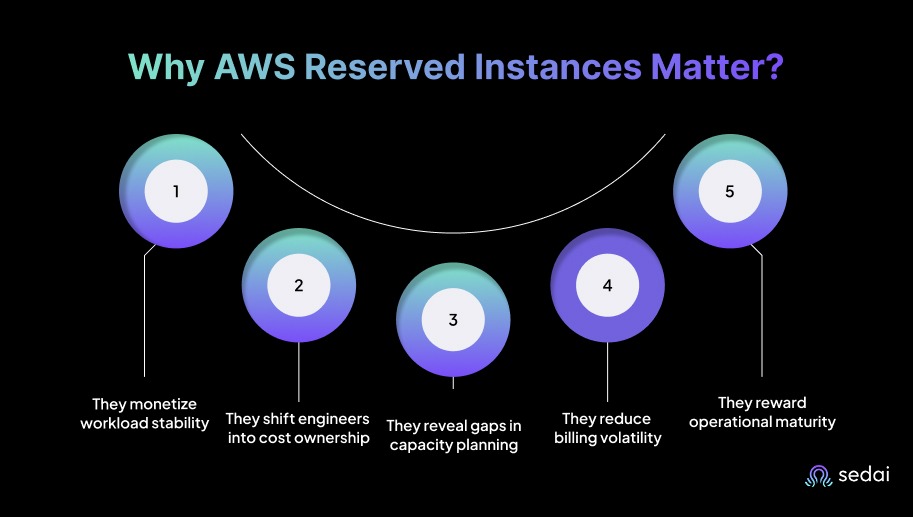
Here’s why AWS reserved instances matter:
If your EC2 fleet has been running the same instance families for multiple quarters, continuing to pay for On-Demand effectively monetizes waste. RIs let you lock in that known capacity and stop overspending on compute you already know will be consumed.
Engineering is now expected to justify why baseline workloads continue to run at the full On-Demand price. Adopting RIs shows that you understand long-running demand patterns and take active responsibility for spending rather than reacting to invoices.
RI adoption forces teams to validate baselines, maintain clean tagging, and monitor utilization, all fundamentals of healthy systems. When a team “can’t reserve,” it usually shows forecasting gaps that need attention long before any commitment is made.
On-Demand pricing causes bills to fluctuate even when traffic stays flat, creating monthly noise that’s hard to justify to finance. RIs smooth those swings because compute spend becomes fixed and predictable over the commitment period.
Teams that successfully reserve capacity typically have strong observability, disciplined change management, and workloads that don’t thrash.
This maturity shows up as fewer surprises, simpler planning, and better alignment between architecture choices and financial outcomes.
Knowing why Reserved Instances are important naturally leads to understanding how they work behind the scenes.
Reserved Instances don’t reserve hardware, but they reserve billing treatment. AWS applies RI discounts only when a running instance matches the attributes of the contract you purchased. So the hard part isn’t clicking “Buy RI.”
The real challenge is making sure your workloads stay aligned with what you committed to instance families, sizes, regions, and usage patterns. Keeping that match intact is where teams either capture savings or lose them.
Every hour, AWS evaluates three things:
If the attributes line up for that hour, AWS applies the RI discount. If the alignment breaks, the RI goes unused. This is why you sometimes see “unused RIs” even though EC2 instances are live. Something drifted, and the reservation no longer matches.
A common example is a platform team migrating worker nodes from m5 to m6g without checking RI coverage. The workloads move forward, but the billing commitments stay tied to the old family.
Regional RIs apply across an entire region and give teams room to scale and rebalance. Availability Zone–scoped RIs include capacity reservation, but they lock coverage to a single AZ.
One recurring failure mode is that teams pick AZ-scoped RIs for capacity guarantees, later rebalance workloads to another zone, and the reservation sits unused in the original AZ.
RIs offer “size flexibility,” but it only applies when:
For example, an m5.large RI can cover two m5.medium or half of an m5.xlarge. But dedicated tenancy, Windows, or switching families will break coverage.
A practical tip is to estimate how much of your RI fleet will drift before resizing or migrating, rather than assuming coverage will automatically follow.
Convertible RIs are often treated as if they automatically adapt, but in reality, they don’t. You must:
They’re great for planned family transitions, but they aren’t a “free flexibility” mechanism.
Buying an RI takes minutes. Maintaining alignment over the next one to three years is where most teams stumble. Changes in instance families, resizing, or modernization all affect RI utilization unless someone is actively watching.
Teams that don’t track utilization weekly usually run into two predictable outcomes:
A proven operating rhythm used by mature engineering and FinOps teams is as follows:
RIs don’t improve reliability, performance, or scaling. They reduce cost risk. If workloads churn through instance families or scale unpredictably, RIs quickly lose value.
The engineering mindset here is simple. You don’t buy RIs because the discount looks attractive. You buy them because your workload patterns are predictable enough that paying full On-Demand rates would be irresponsible.
Before purchasing any RI, validate these three things:
Once you understand how Reserved Instances function, it becomes easier to see the different payment options AWS offers.
Also Read: How to Choose Savings Plans & RIs for AWS, Azure & GCP
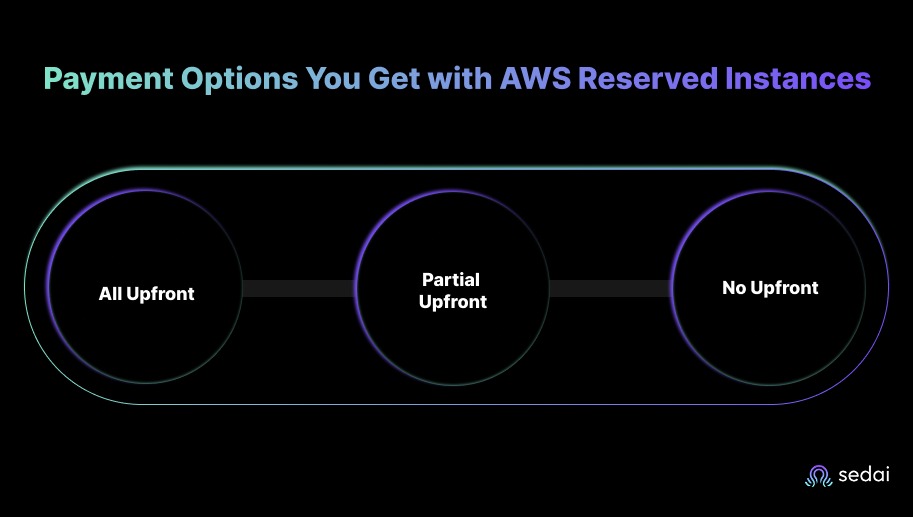
When you purchase Reserved Instances, AWS offers three payment models that trade higher discounts for deeper financial lock-in. You rarely choose these in isolation.
Finance, procurement, and engineering usually align on risk appetite, cash flow impact, and confidence in workload stability.
You pay the full contract value at purchase time. This option delivers the highest discount because AWS receives all revenue immediately. Use All Upfront only when
A common mistake is selecting All Upfront without validating workload maturity. If you later migrate instance families or shrink your fleet, you incur prepaid costs that cannot be recovered.
You pay a portion upfront, and the rest gets amortized over time. The discount is lower than All Upfront, but the cash impact is softer. It’s a fit when:
A practical FinOps guideline says partial Upfront is often the safest middle ground when you need savings but can’t justify the full commitment risk.
You pay nothing at purchase. AWS folds the contract value into your hourly rate. This option delivers the lowest discount and the lowest financial exposure. It’s useful when:
Senior engineers lean on No Upfront when they’re confident RIs will be consumed but want the option to exit cleanly if the environment changes.
The payment model doesn’t change RI coverage behavior. It changes risk posture, cash flow pressure, and who becomes accountable for the commitment.
A simple decision framework teams use:
Teams that skip this analysis typically end up overpaying early or locking themselves into commitments they can’t unwind.
After looking at the available payment options, the next thing that usually matters is understanding how much these Reserved Instances actually cost.
Reserved Instances are priced as a percentage discount off On-Demand rates. In practice, engineers typically see savings of up to 72%, depending on contract length, payment model, and RI type.
Here’s how the cost usually breaks down:
But if workloads shift families, scale unpredictably, or undergo modernization, Savings Plans or smaller RI coverage often outperform large commitments.
Once you have a clear idea of the costs, it becomes easier to see where Reserved Instances may still have limitations.
Must Read: Optimize AWS WorkSpaces Costs: 2026 Engineer’s Guide
Reserved Instances perform best for stable workloads, but they struggle when environments change faster than the commitments. You can typically see four common failure patterns.
Understanding these limitations helps clarify the situations where Reserved Instances still offer strong value.
Reserved Instances make sense when workloads are stable enough that paying On-Demand rates becomes unnecessary waste. You can typically reserve capacity in the following scenarios:
Reserve 50-80% of proven baseline capacity and keep the remaining portion On-Demand or under Savings Plans to absorb change. This captures meaningful savings without risking overcommitment.
Managing AWS Reserved Instances (RIs) can be tricky. Many teams struggle with underutilized commitments or misaligned instances because tracking usage patterns across regions, instance families, and workloads is complex.
Without active management, organizations risk wasted spend or missed savings, as static pricing models don’t adapt to evolving workloads or scaling requirements.
Sedai removes the guesswork with its autonomous optimization engine. By continuously monitoring your AWS environment, Sedai ensures your RIs are aligned with real-time workload behavior, maximizing savings without constant manual oversight.
Here’s what Sedai offers:
With Sedai, AWS Reserved Instances adjust automatically to real-time workload demands, eliminating manual tracking and guesswork. By optimizing utilization and scaling decisions, Sedai maximizes savings, improves performance, and reduces waste.
To start optimizing your AWS Reserved Instances with Sedai, try Sedai’s ROI calculator to see how aligning usage with the right pricing model can deliver measurable savings.
AWS Reserved Instances require active management. They’re not a set-and-forget solution. Without regular monitoring and adjustments, you could miss out on potential savings if workloads change.
By making tracking a routine part of your cloud cost management, you can cut waste and create a more predictable, scalable cloud environment.
This is where Sedai plays a major role. It automates the tracking and optimization of your Reserved Instances, continuously adjusting for actual usage and cost efficiency.
Sedai handles the complexity so your team can focus on scaling the business effectively, confident that cloud spending is optimized and under control.
Get full insight into your AWS Reserved Instances and begin reducing unnecessary costs instantly."
A1. Yes, Reserved Instances can be shared across accounts when you’re using consolidated billing under an AWS Organization. This setup helps teams achieve better overall coverage and maximize the RI discount across multiple accounts.
A2. Reserved Instances don’t automatically scale with your Auto Scaling groups. If your scaling policies launch more instances than the number you’ve committed to, those extra instances are billed at the on-demand rate.
A3. If an EC2 instance covered by a Reserved Instance is stopped or terminated, it simply stops consuming RI capacity. When you restart the instance or launch another one with the same attributes, the RI discount applies again.
A4. No, Reserved Instances are tied to the region where they were purchased and can’t be moved. If your workloads shift to another region, you’ll need to buy new RIs there to retain the same savings.
A5. You can’t modify the attributes of Standard Reserved Instances, such as the instance family or region. However, Convertible Reserved Instances allow you to exchange them for different configurations when your needs change.
December 9, 2025
December 9, 2025
Understanding AWS Reserved Instance pricing models is key to optimizing cloud costs. By committing to specific capacities over 1 or 3 years, you can access significant discounts. The decision comes down to choosing between Standard and Convertible Reserved Instances, based on your workload stability and flexibility needs. It's crucial to track utilization closely to avoid underuse or overcommitment.
Running AWS workloads on-demand gives you flexibility, but it can be expensive. For predictable, long-running services, relying solely on on-demand pricing can quickly inflate your cloud bills.
Many teams miss out on potential savings by overlooking AWS Reserved Instances (RIs). For compute workloads like Amazon EC2, Standard Reserved Instances can offer up to 72% discount compared to On‑Demand pricing when you commit to a 1‑ or 3-year term.
This is a common scenario: with cloud costs constantly fluctuating, it’s easy to stick with on-demand pricing without realizing how much you could save by reserving stable workloads. Properly used, Reserved Instances can dramatically reduce compute costs.
In this blog, you’ll explore what AWS Reserved Instances are, how they work behind the scenes, and the strategies that help teams get the most out of them.
A Reserved Instance (RI) is a pricing commitment in which you agree to run a specific amount of compute capacity on AWS, and AWS provides a discounted rate in return.
You can use RIs to avoid paying full on-demand prices for workloads that don’t change much, such as databases, EC2 fleets backing SaaS control planes, and steady background services.
AWS offers two practical RI models that you can rely on:
Standard RIs offer the highest discount, but you give up flexibility. Once purchased, they only apply when your workloads match the same instance family, region, and attributes.
Use Standard RIs when:
Convertible RIs offer lower savings but allow you to change instance families, sizes, and attributes over time. They work well for organizations that know the workload will stay long-running, but expect the hardware mix to evolve.
Use Convertible RIs when:
Convertible RIs handle shifting workloads, but they still require discipline. Exchanges take planning, and AWS won’t automatically correct underutilized RIs.
Once the basics of Reserved Instances are clear, it becomes easier to see how they differ from On-Demand instances.
Engineers often stick to On-Demand pricing because it feels safer. There’s no commitment, no lock-in, and no upfront planning. But for workloads that run continuously, this approach quietly burns through the budget.
Reserved Instances shift that equation. They reward predictability with discounted rates, so the real decision isn’t “RI or not?” but which workloads genuinely need flexibility and which are stable enough to commit.
Once the differences are clear, it becomes easier to see why Reserved Instances hold so much value for steady, predictable workloads.
Suggested Read: AWS Savings Plans Vs Reserved Instances in K8s: Key Differences
Reserved Instances matter because most production workloads aren’t short-lived experiments. They run for months and rarely justify paying full On-Demand rates.
When you commit capacity for these stable, always-on services, AWS offers discounted pricing, effectively turning architectural predictability into measurable savings.
Here’s why AWS reserved instances matter:
If your EC2 fleet has been running the same instance families for multiple quarters, continuing to pay for On-Demand effectively monetizes waste. RIs let you lock in that known capacity and stop overspending on compute you already know will be consumed.
Engineering is now expected to justify why baseline workloads continue to run at the full On-Demand price. Adopting RIs shows that you understand long-running demand patterns and take active responsibility for spending rather than reacting to invoices.
RI adoption forces teams to validate baselines, maintain clean tagging, and monitor utilization, all fundamentals of healthy systems. When a team “can’t reserve,” it usually shows forecasting gaps that need attention long before any commitment is made.
On-Demand pricing causes bills to fluctuate even when traffic stays flat, creating monthly noise that’s hard to justify to finance. RIs smooth those swings because compute spend becomes fixed and predictable over the commitment period.
Teams that successfully reserve capacity typically have strong observability, disciplined change management, and workloads that don’t thrash.
This maturity shows up as fewer surprises, simpler planning, and better alignment between architecture choices and financial outcomes.
Knowing why Reserved Instances are important naturally leads to understanding how they work behind the scenes.
Reserved Instances don’t reserve hardware, but they reserve billing treatment. AWS applies RI discounts only when a running instance matches the attributes of the contract you purchased. So the hard part isn’t clicking “Buy RI.”
The real challenge is making sure your workloads stay aligned with what you committed to instance families, sizes, regions, and usage patterns. Keeping that match intact is where teams either capture savings or lose them.
Every hour, AWS evaluates three things:
If the attributes line up for that hour, AWS applies the RI discount. If the alignment breaks, the RI goes unused. This is why you sometimes see “unused RIs” even though EC2 instances are live. Something drifted, and the reservation no longer matches.
A common example is a platform team migrating worker nodes from m5 to m6g without checking RI coverage. The workloads move forward, but the billing commitments stay tied to the old family.
Regional RIs apply across an entire region and give teams room to scale and rebalance. Availability Zone–scoped RIs include capacity reservation, but they lock coverage to a single AZ.
One recurring failure mode is that teams pick AZ-scoped RIs for capacity guarantees, later rebalance workloads to another zone, and the reservation sits unused in the original AZ.
RIs offer “size flexibility,” but it only applies when:
For example, an m5.large RI can cover two m5.medium or half of an m5.xlarge. But dedicated tenancy, Windows, or switching families will break coverage.
A practical tip is to estimate how much of your RI fleet will drift before resizing or migrating, rather than assuming coverage will automatically follow.
Convertible RIs are often treated as if they automatically adapt, but in reality, they don’t. You must:
They’re great for planned family transitions, but they aren’t a “free flexibility” mechanism.
Buying an RI takes minutes. Maintaining alignment over the next one to three years is where most teams stumble. Changes in instance families, resizing, or modernization all affect RI utilization unless someone is actively watching.
Teams that don’t track utilization weekly usually run into two predictable outcomes:
A proven operating rhythm used by mature engineering and FinOps teams is as follows:
RIs don’t improve reliability, performance, or scaling. They reduce cost risk. If workloads churn through instance families or scale unpredictably, RIs quickly lose value.
The engineering mindset here is simple. You don’t buy RIs because the discount looks attractive. You buy them because your workload patterns are predictable enough that paying full On-Demand rates would be irresponsible.
Before purchasing any RI, validate these three things:
Once you understand how Reserved Instances function, it becomes easier to see the different payment options AWS offers.
Also Read: How to Choose Savings Plans & RIs for AWS, Azure & GCP
When you purchase Reserved Instances, AWS offers three payment models that trade higher discounts for deeper financial lock-in. You rarely choose these in isolation.
Finance, procurement, and engineering usually align on risk appetite, cash flow impact, and confidence in workload stability.
You pay the full contract value at purchase time. This option delivers the highest discount because AWS receives all revenue immediately. Use All Upfront only when
A common mistake is selecting All Upfront without validating workload maturity. If you later migrate instance families or shrink your fleet, you incur prepaid costs that cannot be recovered.
You pay a portion upfront, and the rest gets amortized over time. The discount is lower than All Upfront, but the cash impact is softer. It’s a fit when:
A practical FinOps guideline says partial Upfront is often the safest middle ground when you need savings but can’t justify the full commitment risk.
You pay nothing at purchase. AWS folds the contract value into your hourly rate. This option delivers the lowest discount and the lowest financial exposure. It’s useful when:
Senior engineers lean on No Upfront when they’re confident RIs will be consumed but want the option to exit cleanly if the environment changes.
The payment model doesn’t change RI coverage behavior. It changes risk posture, cash flow pressure, and who becomes accountable for the commitment.
A simple decision framework teams use:
Teams that skip this analysis typically end up overpaying early or locking themselves into commitments they can’t unwind.
After looking at the available payment options, the next thing that usually matters is understanding how much these Reserved Instances actually cost.
Reserved Instances are priced as a percentage discount off On-Demand rates. In practice, engineers typically see savings of up to 72%, depending on contract length, payment model, and RI type.
Here’s how the cost usually breaks down:
But if workloads shift families, scale unpredictably, or undergo modernization, Savings Plans or smaller RI coverage often outperform large commitments.
Once you have a clear idea of the costs, it becomes easier to see where Reserved Instances may still have limitations.
Must Read: Optimize AWS WorkSpaces Costs: 2026 Engineer’s Guide
Reserved Instances perform best for stable workloads, but they struggle when environments change faster than the commitments. You can typically see four common failure patterns.
Understanding these limitations helps clarify the situations where Reserved Instances still offer strong value.
Reserved Instances make sense when workloads are stable enough that paying On-Demand rates becomes unnecessary waste. You can typically reserve capacity in the following scenarios:
Reserve 50-80% of proven baseline capacity and keep the remaining portion On-Demand or under Savings Plans to absorb change. This captures meaningful savings without risking overcommitment.
Managing AWS Reserved Instances (RIs) can be tricky. Many teams struggle with underutilized commitments or misaligned instances because tracking usage patterns across regions, instance families, and workloads is complex.
Without active management, organizations risk wasted spend or missed savings, as static pricing models don’t adapt to evolving workloads or scaling requirements.
Sedai removes the guesswork with its autonomous optimization engine. By continuously monitoring your AWS environment, Sedai ensures your RIs are aligned with real-time workload behavior, maximizing savings without constant manual oversight.
Here’s what Sedai offers:
With Sedai, AWS Reserved Instances adjust automatically to real-time workload demands, eliminating manual tracking and guesswork. By optimizing utilization and scaling decisions, Sedai maximizes savings, improves performance, and reduces waste.
To start optimizing your AWS Reserved Instances with Sedai, try Sedai’s ROI calculator to see how aligning usage with the right pricing model can deliver measurable savings.
AWS Reserved Instances require active management. They’re not a set-and-forget solution. Without regular monitoring and adjustments, you could miss out on potential savings if workloads change.
By making tracking a routine part of your cloud cost management, you can cut waste and create a more predictable, scalable cloud environment.
This is where Sedai plays a major role. It automates the tracking and optimization of your Reserved Instances, continuously adjusting for actual usage and cost efficiency.
Sedai handles the complexity so your team can focus on scaling the business effectively, confident that cloud spending is optimized and under control.
Get full insight into your AWS Reserved Instances and begin reducing unnecessary costs instantly."
A1. Yes, Reserved Instances can be shared across accounts when you’re using consolidated billing under an AWS Organization. This setup helps teams achieve better overall coverage and maximize the RI discount across multiple accounts.
A2. Reserved Instances don’t automatically scale with your Auto Scaling groups. If your scaling policies launch more instances than the number you’ve committed to, those extra instances are billed at the on-demand rate.
A3. If an EC2 instance covered by a Reserved Instance is stopped or terminated, it simply stops consuming RI capacity. When you restart the instance or launch another one with the same attributes, the RI discount applies again.
A4. No, Reserved Instances are tied to the region where they were purchased and can’t be moved. If your workloads shift to another region, you’ll need to buy new RIs there to retain the same savings.
A5. You can’t modify the attributes of Standard Reserved Instances, such as the instance family or region. However, Convertible Reserved Instances allow you to exchange them for different configurations when your needs change.



.svg)
.svg)


%201.svg)
%202.svg)


.svg)