Register now



December 5, 2025
December 5, 2025
December 5, 2025
December 5, 2025
Reducing Azure spend goes beyond basic dashboards. Engineers must track granular usage patterns, enforce tagging discipline, and identify resource drift before it becomes a budget issue. Inefficiencies often stem from oversized compute, forgotten test environments, and unnecessary data movement between regions. Azure’s built-in tools highlight these issues, but automating responses is where true savings occur. Sedai closes this gap by detecting waste in real time, optimizing resource allocation, and preventing unexpected cost spikes through continuous workload analysis.
Ever been caught off guard by an unexpectedly high Azure bill? It happens more often than you’d think, especially as workloads grow and environments scale. In fact, studies show that up to 30% of cloud spending is wasted due to inefficient usage and a lack of cost control.
The real challenge is understanding what’s causing them to rise in the first place. A small misconfiguration, an idle VM running in the background, or an auto-scaling rule that kicks in too aggressively can quietly bring costs up. That’s where Azure cost monitoring becomes essential.
It helps you spot inefficiencies early, catch unexpected usage spikes, and make smarter, data-driven decisions that keep spending aligned with actual demand. In this blog, you'll explore how using Azure cost monitoring can optimize your cloud resources and keep your cloud spend under control.
Azure cost monitoring is an essential part of Azure Cost Management and Billing. It gives you a clear view of how your cloud resources are being used, how much they cost, and where optimizations are possible. This helps you avoid surprise bills while keeping your Azure environment efficient and high-performing.
By breaking down costs and showing how each resource contributes to your cloud spend, Azure cost monitoring makes it easier to spot inefficiencies, track usage, and align your investments with what the business actually needs.
Here’s why Azure cost monitoring matters:
Azure cost monitoring gives you real-time visibility into your spending through budgets and alerts. You can set limits for subscriptions or resource groups, and get notified when usage exceeds your plan. It also highlights unusual spikes, misconfigurations, or idle services, so you can fix issues before they turn into costly surprises.
The platform points out underused or oversized resources, helping you clean up waste. You can right-size VMs, optimize storage, or shut down idle components. Regular check-ins keep your environment lean and ensure resources match actual demand.
You get detailed reports on usage and spending patterns, making it easier to plan infrastructure based on real behavior, not assumptions. This leads to smarter capacity planning, better workload distribution, and more efficient resource allocation across your environment.
Tags and cost allocation tools let you track who is using what. You can break down spending by project, department, or team, giving everyone a clear picture of their costs. This transparency makes budgeting easier and encourages teams to stay within their limits.
By grouping and tagging resources, you can distribute costs accurately and make sure high-priority projects get the resources they need. It also prevents unnecessary spending on workloads that don’t require additional capacity.
Cost monitoring tied with performance insights helps you scale resources based on real usage. You can adjust capacity up or down while keeping costs under control. Azure Advisor also provides scaling recommendations to balance performance and efficiency.
Azure cost monitoring strengthens cloud governance by enforcing spending rules and alerts. Budget thresholds and automated reports ensure you stay within approved limits and meet internal or external compliance standards.
The platform also supports long-term savings strategies like Reserved Instances and Azure Hybrid Benefit. These options help you reduce costs for predictable workloads while keeping your infrastructure flexible and scalable.
Once you understand the importance of Azure cost monitoring, it makes it easier to see how to set up Azure Cost Management for effective tracking.
Suggested Read: Azure Cost Optimization: Strategies for Engineering Leaders (2025 Guide)
Setting up Azure Cost Management is the backbone for effective Azure cost monitoring. A proper cost management setup gives engineering teams clear visibility into cloud spending, tracks usage trends, detects anomalies, and enables informed actions to prevent overspending.
Beyond following steps, it’s important to think strategically about what to monitor, what signals matter, and where mistakes often happen.
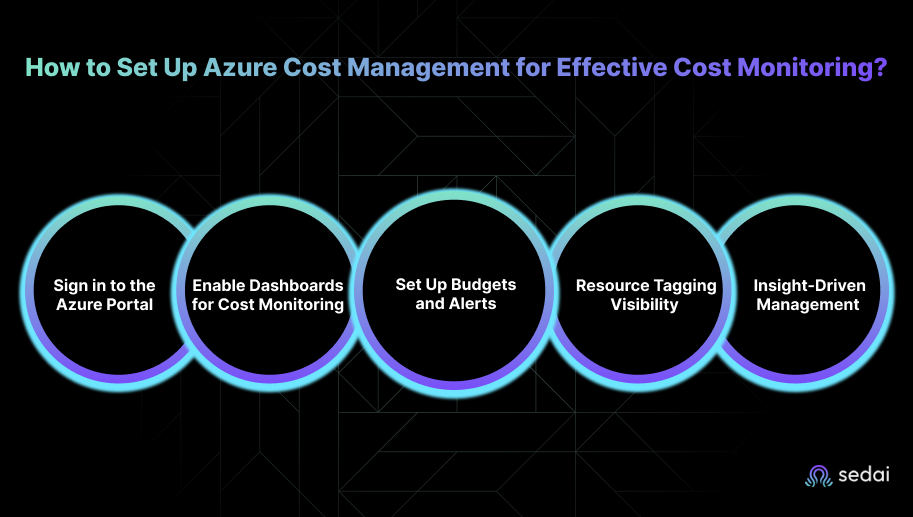
Here’s how you can set up Azure Cost Management to monitor your cloud costs effectively:
Start by signing in with an account that has the right permissions, such as Cost Management Reader or Contributor. This ensures you can view cost data, configure alerts, and access monitoring tools across your subscriptions or resource groups.
Tip: Avoid using personal accounts without proper roles. They often cannot access all subscriptions, leading to incomplete visibility.
Next, you can explore the Cost Analysis view to track detailed spending trends by subscription, project, or resource group. Focus on these dashboards:
Practical approach: Pin key charts to your dashboard so they are always visible. This makes it easier to spot unusual spending patterns at a glance instead of digging through reports.
Common mistakes:
Once dashboards are in place, create budgets to set spending limits for subscriptions or resource groups, and configure alerts for when costs approach or exceed these limits.
Engineer guidance:
Common mistakes:
After setting budgets, add tags to your resources. Tags organize resources by project, department, owner, or environment. Proper tagging helps you:
Engineer guidance:
Common mistakes:
Finally, use the insights from your dashboards, alerts, and reports to take meaningful actions, such as:
Engineer approach: Treat monitoring not as a reporting tool, but as a decision-making engine. Always ask: “What action does this insight trigger?”
Tip: Remember that cost and usage data typically update every 8–24 hours. Plan your optimizations around this cycle rather than expecting instant results.
Once Azure Cost Management is set up, you can use its tools to identify opportunities and effectively reduce cloud costs.
Azure offers several powerful tools that help you reduce cloud costs without compromising performance. By consistently using these tools, teams can monitor resources more closely, optimize usage, and manage cloud expenses more effectively. Here’s how you can reduce Azure costs using Cost Management tools:
Azure Cost Management + Billing serves as your centralized hub to track, analyze, and control Azure spending. You get real-time insights, cost breakdowns, and recommendations to reduce waste and avoid unnecessary expenses. Here’s how you can make the most of it:
Azure Advisor reviews your environment and provides best-practice recommendations to improve performance and reduce costs. The tool analyzes your workloads and suggests cost-saving actions, such as buying Reservations or Savings Plans, with potential savings of up to 72% per VM. Key areas to focus on include:
Reserved Instances are a smart way to save on long-running, predictable workloads. They offer up to 72% savings over pay-as-you-go prices. To use them effectively:
Spot VMs allow you to run workloads at up to 90% lower cost by using Azure’s unused compute capacity. They’re ideal for workloads that don’t require full availability. You need to:
Auto-scaling ensures you only pay for what you actually use by automatically adjusting resources based on demand. You need to:
If your organization already owns Windows Server or SQL Server licenses, you can apply them to Azure services and save up to 40%. You need to:
Cost allocation tags help you track exactly where your cloud budget is going by grouping resources by team, project, environment, or department.
After learning how to cut costs with key management tools, it’s essential to know how to respond to sudden spikes in Azure spending.
Handling sudden Azure cost spikes is crucial to maintaining control over your cloud spend. When a spike occurs, you must act quickly, identify its cause, and take immediate steps to reduce its impact. Here are the key actions to take the moment you notice unexpected cost increases:
The first step is figuring out which resource is responsible. Azure Cost Management and Billing, along with Azure Monitor, make this easier:
Once you know what triggered the spike, take quick corrective action to prevent further spending:
Automation reduces manual intervention and keeps cost spikes from becoming a recurring issue. Go for:
Good governance practices prevent many spikes before they even occur. Go for:
Azure Advisor also helps identify truly idle or orphaned resources. For example, unattached disks or unused gateways can be deleted to avoid wastage. In some cases, this could result in up to 100% cost savings for those unused resources.
Tackling sudden spikes in Azure costs helps create a more controlled and optimized approach to overall cloud spending.
Must Read: Top 25 Azure Cost Optimization Tools for Engineering Teams in 2025
We have seen engineering teams often struggle with the gap between monitoring and actual optimization. Even with Azure’s built-in tools, teams still spend hours investigating anomalies, rightsizing resources manually, and reacting to performance issues that could have been prevented. This makes it hard to keep costs predictable and performance stable at scale.
Sedai improves Azure cost monitoring by providing self-driving, real-time optimization for your cloud resources. The platform continuously analyzes workload telemetry, learns each application's behavior, and proactively applies scaling, rightsizing, and configuration adjustments to ensure resources are always aligned with demand.
Here's how Sedai helps in optimizing Azure cost monitoring:
Here's what Sedai has continuously achieved:
Sedai provides continuous, data-driven optimization for Azure VMs, eliminating manual adjustments, minimizing costs, and delivering predictable cloud spend while ensuring high-performing applications.
Curious about the return on your investment with Sedai? Try our ROI calculator to estimate the savings, productivity improvements, and performance gains you can expect from optimizing your cloud environment with Sedai.
Also Read: The Guide to Autonomous Kubernetes Cost Optimization
While Azure cost monitoring focuses on visibility and optimization, there’s an often-overlooked way to unlock even more savings: using Azure’s pricing flexibility. You can use options such as Reserved Instances for steady workloads or Spot VMs for non-critical tasks to significantly reduce costs over time.
Pairing these pricing models with a solid monitoring strategy adds another layer of savings without compromising performance. Sedai plays a crucial role here by continuously analyzing workload behavior and predicting resource needs, ensuring your Azure infrastructure remains optimized for both cost and performance.
The key lies in understanding when and how to align your cloud strategy with Azure’s diverse cost management options. With Sedai’s autonomous optimization, you can maintain this balance smoothly, even as your infrastructure scales.
See every detail of your Azure environment, fine-tune autoscaling, and cut unnecessary costs immediately with Sedai’s autonomous optimization.
FAQs
A1. Azure updates most cost and usage data every 8–24 hours. Engineers should review reports at least once a day for active workloads and set up automated alerts to improve visibility. In environments with frequent scaling or high volatility, reviewing data twice a day can help catch potential issues early.
A2. Yes, Azure uses historical consumption patterns to forecast future spending, which is particularly useful for seasonal spikes, marketing campaigns, or batch-heavy workloads. Engineers can compare these forecasts with planned workload changes to proactively adjust budgets and scaling policies.
A3. Start by checking Azure’s Service Health dashboard for any billing or metering delays. If no issues are reported, cross-reference the cost anomaly with actual resource metrics in Azure Monitor. Reviewing CPU, memory, network usage, and scaling logs helps determine whether the spike reflects real usage or is a reporting delay.
A4. Yes, engineers can tag shared services with cost-split identifiers and use Azure Cost Allocation to divide expenses proportionately. Services like VNets, gateways, or container registries can be allocated based on usage or percentage splits, preventing duplicated charges while keeping costs transparent.
A5. Combine Kubernetes cost-allocation tools like Kubecost with Azure Cost Management. These tools provide insights at the pod and node level, highlighting inefficiencies or over-requested CPU/memory. Engineers can then right-size AKS nodes and adjust HPA/VPA configurations to keep cluster costs aligned with actual workloads.
December 5, 2025
December 5, 2025
Reducing Azure spend goes beyond basic dashboards. Engineers must track granular usage patterns, enforce tagging discipline, and identify resource drift before it becomes a budget issue. Inefficiencies often stem from oversized compute, forgotten test environments, and unnecessary data movement between regions. Azure’s built-in tools highlight these issues, but automating responses is where true savings occur. Sedai closes this gap by detecting waste in real time, optimizing resource allocation, and preventing unexpected cost spikes through continuous workload analysis.
Ever been caught off guard by an unexpectedly high Azure bill? It happens more often than you’d think, especially as workloads grow and environments scale. In fact, studies show that up to 30% of cloud spending is wasted due to inefficient usage and a lack of cost control.
The real challenge is understanding what’s causing them to rise in the first place. A small misconfiguration, an idle VM running in the background, or an auto-scaling rule that kicks in too aggressively can quietly bring costs up. That’s where Azure cost monitoring becomes essential.
It helps you spot inefficiencies early, catch unexpected usage spikes, and make smarter, data-driven decisions that keep spending aligned with actual demand. In this blog, you'll explore how using Azure cost monitoring can optimize your cloud resources and keep your cloud spend under control.
Azure cost monitoring is an essential part of Azure Cost Management and Billing. It gives you a clear view of how your cloud resources are being used, how much they cost, and where optimizations are possible. This helps you avoid surprise bills while keeping your Azure environment efficient and high-performing.
By breaking down costs and showing how each resource contributes to your cloud spend, Azure cost monitoring makes it easier to spot inefficiencies, track usage, and align your investments with what the business actually needs.
Here’s why Azure cost monitoring matters:
Azure cost monitoring gives you real-time visibility into your spending through budgets and alerts. You can set limits for subscriptions or resource groups, and get notified when usage exceeds your plan. It also highlights unusual spikes, misconfigurations, or idle services, so you can fix issues before they turn into costly surprises.
The platform points out underused or oversized resources, helping you clean up waste. You can right-size VMs, optimize storage, or shut down idle components. Regular check-ins keep your environment lean and ensure resources match actual demand.
You get detailed reports on usage and spending patterns, making it easier to plan infrastructure based on real behavior, not assumptions. This leads to smarter capacity planning, better workload distribution, and more efficient resource allocation across your environment.
Tags and cost allocation tools let you track who is using what. You can break down spending by project, department, or team, giving everyone a clear picture of their costs. This transparency makes budgeting easier and encourages teams to stay within their limits.
By grouping and tagging resources, you can distribute costs accurately and make sure high-priority projects get the resources they need. It also prevents unnecessary spending on workloads that don’t require additional capacity.
Cost monitoring tied with performance insights helps you scale resources based on real usage. You can adjust capacity up or down while keeping costs under control. Azure Advisor also provides scaling recommendations to balance performance and efficiency.
Azure cost monitoring strengthens cloud governance by enforcing spending rules and alerts. Budget thresholds and automated reports ensure you stay within approved limits and meet internal or external compliance standards.
The platform also supports long-term savings strategies like Reserved Instances and Azure Hybrid Benefit. These options help you reduce costs for predictable workloads while keeping your infrastructure flexible and scalable.
Once you understand the importance of Azure cost monitoring, it makes it easier to see how to set up Azure Cost Management for effective tracking.
Suggested Read: Azure Cost Optimization: Strategies for Engineering Leaders (2025 Guide)
Setting up Azure Cost Management is the backbone for effective Azure cost monitoring. A proper cost management setup gives engineering teams clear visibility into cloud spending, tracks usage trends, detects anomalies, and enables informed actions to prevent overspending.
Beyond following steps, it’s important to think strategically about what to monitor, what signals matter, and where mistakes often happen.
Here’s how you can set up Azure Cost Management to monitor your cloud costs effectively:
Start by signing in with an account that has the right permissions, such as Cost Management Reader or Contributor. This ensures you can view cost data, configure alerts, and access monitoring tools across your subscriptions or resource groups.
Tip: Avoid using personal accounts without proper roles. They often cannot access all subscriptions, leading to incomplete visibility.
Next, you can explore the Cost Analysis view to track detailed spending trends by subscription, project, or resource group. Focus on these dashboards:
Practical approach: Pin key charts to your dashboard so they are always visible. This makes it easier to spot unusual spending patterns at a glance instead of digging through reports.
Common mistakes:
Once dashboards are in place, create budgets to set spending limits for subscriptions or resource groups, and configure alerts for when costs approach or exceed these limits.
Engineer guidance:
Common mistakes:
After setting budgets, add tags to your resources. Tags organize resources by project, department, owner, or environment. Proper tagging helps you:
Engineer guidance:
Common mistakes:
Finally, use the insights from your dashboards, alerts, and reports to take meaningful actions, such as:
Engineer approach: Treat monitoring not as a reporting tool, but as a decision-making engine. Always ask: “What action does this insight trigger?”
Tip: Remember that cost and usage data typically update every 8–24 hours. Plan your optimizations around this cycle rather than expecting instant results.
Once Azure Cost Management is set up, you can use its tools to identify opportunities and effectively reduce cloud costs.
Azure offers several powerful tools that help you reduce cloud costs without compromising performance. By consistently using these tools, teams can monitor resources more closely, optimize usage, and manage cloud expenses more effectively. Here’s how you can reduce Azure costs using Cost Management tools:
Azure Cost Management + Billing serves as your centralized hub to track, analyze, and control Azure spending. You get real-time insights, cost breakdowns, and recommendations to reduce waste and avoid unnecessary expenses. Here’s how you can make the most of it:
Azure Advisor reviews your environment and provides best-practice recommendations to improve performance and reduce costs. The tool analyzes your workloads and suggests cost-saving actions, such as buying Reservations or Savings Plans, with potential savings of up to 72% per VM. Key areas to focus on include:
Reserved Instances are a smart way to save on long-running, predictable workloads. They offer up to 72% savings over pay-as-you-go prices. To use them effectively:
Spot VMs allow you to run workloads at up to 90% lower cost by using Azure’s unused compute capacity. They’re ideal for workloads that don’t require full availability. You need to:
Auto-scaling ensures you only pay for what you actually use by automatically adjusting resources based on demand. You need to:
If your organization already owns Windows Server or SQL Server licenses, you can apply them to Azure services and save up to 40%. You need to:
Cost allocation tags help you track exactly where your cloud budget is going by grouping resources by team, project, environment, or department.
After learning how to cut costs with key management tools, it’s essential to know how to respond to sudden spikes in Azure spending.
Handling sudden Azure cost spikes is crucial to maintaining control over your cloud spend. When a spike occurs, you must act quickly, identify its cause, and take immediate steps to reduce its impact. Here are the key actions to take the moment you notice unexpected cost increases:
The first step is figuring out which resource is responsible. Azure Cost Management and Billing, along with Azure Monitor, make this easier:
Once you know what triggered the spike, take quick corrective action to prevent further spending:
Automation reduces manual intervention and keeps cost spikes from becoming a recurring issue. Go for:
Good governance practices prevent many spikes before they even occur. Go for:
Azure Advisor also helps identify truly idle or orphaned resources. For example, unattached disks or unused gateways can be deleted to avoid wastage. In some cases, this could result in up to 100% cost savings for those unused resources.
Tackling sudden spikes in Azure costs helps create a more controlled and optimized approach to overall cloud spending.
Must Read: Top 25 Azure Cost Optimization Tools for Engineering Teams in 2025
We have seen engineering teams often struggle with the gap between monitoring and actual optimization. Even with Azure’s built-in tools, teams still spend hours investigating anomalies, rightsizing resources manually, and reacting to performance issues that could have been prevented. This makes it hard to keep costs predictable and performance stable at scale.
Sedai improves Azure cost monitoring by providing self-driving, real-time optimization for your cloud resources. The platform continuously analyzes workload telemetry, learns each application's behavior, and proactively applies scaling, rightsizing, and configuration adjustments to ensure resources are always aligned with demand.
Here's how Sedai helps in optimizing Azure cost monitoring:
Here's what Sedai has continuously achieved:
Sedai provides continuous, data-driven optimization for Azure VMs, eliminating manual adjustments, minimizing costs, and delivering predictable cloud spend while ensuring high-performing applications.
Curious about the return on your investment with Sedai? Try our ROI calculator to estimate the savings, productivity improvements, and performance gains you can expect from optimizing your cloud environment with Sedai.
Also Read: The Guide to Autonomous Kubernetes Cost Optimization
While Azure cost monitoring focuses on visibility and optimization, there’s an often-overlooked way to unlock even more savings: using Azure’s pricing flexibility. You can use options such as Reserved Instances for steady workloads or Spot VMs for non-critical tasks to significantly reduce costs over time.
Pairing these pricing models with a solid monitoring strategy adds another layer of savings without compromising performance. Sedai plays a crucial role here by continuously analyzing workload behavior and predicting resource needs, ensuring your Azure infrastructure remains optimized for both cost and performance.
The key lies in understanding when and how to align your cloud strategy with Azure’s diverse cost management options. With Sedai’s autonomous optimization, you can maintain this balance smoothly, even as your infrastructure scales.
See every detail of your Azure environment, fine-tune autoscaling, and cut unnecessary costs immediately with Sedai’s autonomous optimization.
FAQs
A1. Azure updates most cost and usage data every 8–24 hours. Engineers should review reports at least once a day for active workloads and set up automated alerts to improve visibility. In environments with frequent scaling or high volatility, reviewing data twice a day can help catch potential issues early.
A2. Yes, Azure uses historical consumption patterns to forecast future spending, which is particularly useful for seasonal spikes, marketing campaigns, or batch-heavy workloads. Engineers can compare these forecasts with planned workload changes to proactively adjust budgets and scaling policies.
A3. Start by checking Azure’s Service Health dashboard for any billing or metering delays. If no issues are reported, cross-reference the cost anomaly with actual resource metrics in Azure Monitor. Reviewing CPU, memory, network usage, and scaling logs helps determine whether the spike reflects real usage or is a reporting delay.
A4. Yes, engineers can tag shared services with cost-split identifiers and use Azure Cost Allocation to divide expenses proportionately. Services like VNets, gateways, or container registries can be allocated based on usage or percentage splits, preventing duplicated charges while keeping costs transparent.
A5. Combine Kubernetes cost-allocation tools like Kubecost with Azure Cost Management. These tools provide insights at the pod and node level, highlighting inefficiencies or over-requested CPU/memory. Engineers can then right-size AKS nodes and adjust HPA/VPA configurations to keep cluster costs aligned with actual workloads.


.svg)
.svg)


%201.svg)
%202.svg)


.svg)