Register now




December 9, 2025
December 9, 2025
December 9, 2025
December 9, 2025
Scaling Amazon RDS efficiently requires a clear understanding of both vertical and horizontal scaling strategies. Vertical scaling involves adjusting instance sizes for predictable workloads, while horizontal scaling distributes traffic across multiple instances to handle fluctuating demand. By optimizing resource allocation and using features like read replicas, auto-scaling, and Aurora Serverless, you can improve performance without over-provisioning. Tools like Sedai help automate scaling, ensuring your RDS environment is cost-efficient, responsive, and ready for future growth.
Watching Amazon RDS handle unpredictable traffic quickly reveals where a database struggles. Slow queries, sudden connection spikes, and replication delays appear almost immediately, even while unused capacity quietly adds to your bill.
This challenge is common. AWS reports that teams moving to RDS can reduce database management costs by up to 34%, but many of those savings are lost when scaling is reactive rather than strategic.
Vertical upgrades can temporarily patch performance gaps, but without a well-architected plan, workloads eventually outgrow instances, leaving teams firefighting rather than optimizing. That’s why choosing the right scaling approach, whether vertical, horizontal, or hybrid, is essential.
In this blog, you’ll explore Amazon RDS scalability approaches and learn the right strategy to keep your RDS environment running smoothly without overspending.
Amazon Relational Database Service (RDS) is a fully managed service that simplifies database tasks such as patching, backup, scaling, and failover. Organizations using Amazon RDS report up to 38% fewer instances of unplanned downtime and 36% more efficient IT infrastructure teams.
Amazon RDS provides you with a simple way to deploy, manage, and scale relational databases in the cloud. While these features are essential, you must prioritize scalability to ensure systems handle changing traffic without affecting performance or cost efficiency.
You often notice early warning signs such as increasing query latency, increased buffer cache misses, or rising IOPS consumption. These patterns usually appear months before major performance drops. Understanding these signals is a key part of building a scalable RDS environment. Here's why Amazon RDS scalability matters:
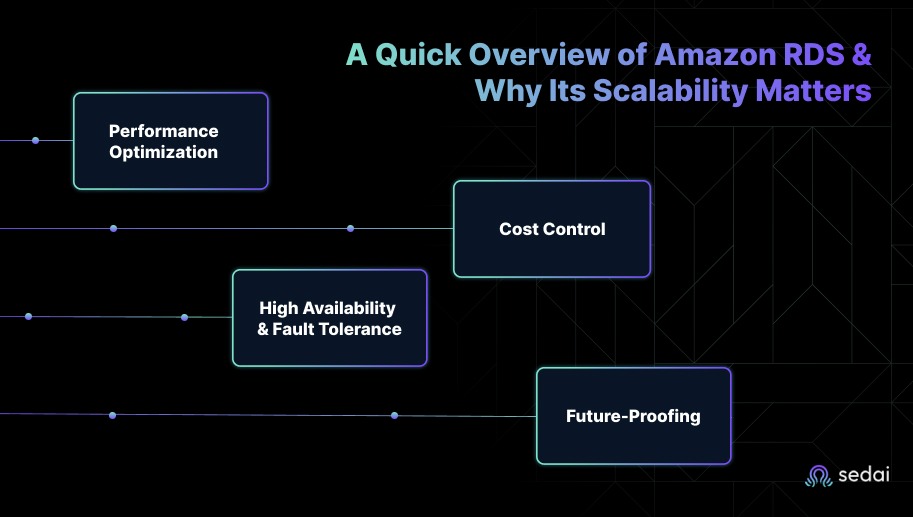
As workloads increase, RDS autoscaling adjusts storage and instance sizes automatically to meet demand. This prevents performance degradation during traffic spikes and keeps applications responsive without manual intervention.
In practice, teams monitor CPU credits, write throughput, deadlocks, open connections, and buffer pool hit ratios to understand when performance issues are tied to scaling versus poor query design.
By monitoring key metrics and scaling in real time, RDS helps your database handle higher loads while maintaining low latency during peak usage.
Autoscaling aligns resources with actual usage, helping avoid both over-provisioning and underutilization. Right-sizing instances and using reserved instances for predictable workloads further control costs while maintaining performance.
Tracking scaling activity through tools like AWS Cost Explorer also ensures scaling remains efficient and within budget, reducing the risk of unexpected expenses.
Suggested Read: Cost Optimization Strategies for Amazon RDS in 2025
RDS scalability improves availability by spreading resources across multiple availability zones and adjusting capacity as demand changes. This reduces downtime and maintains performance during failures, as the system scales automatically to handle increased load or failover events.
During failover events, instance recovery time and DNS propagation delays can still impact latency. Designing with realistic failover expectations helps teams maintain SLAs.
Without scalability, systems eventually hit capacity limits, leading to costly re-architecting. Aurora Serverless and cross-region replication scale automatically based on usage, enabling global growth and providing low-latency access without major changes to your setup.
Once you understand the importance of Amazon RDS scalability, it’s important to consider the factors that determine how to scale it effectively.
When deciding how to scale Amazon RDS, you must consider several critical factors to ensure optimal performance, cost efficiency, and long-term scalability. These decisions extend beyond choosing vertical or horizontal scaling and require a clear understanding of workload demands, traffic patterns, and infrastructure growth.
Before scaling, teams should evaluate whether the workload is compute-bound, memory-bound, storage-bound, or I/O-bound. This diagnostic step prevents unnecessary scaling and keeps costs predictable.
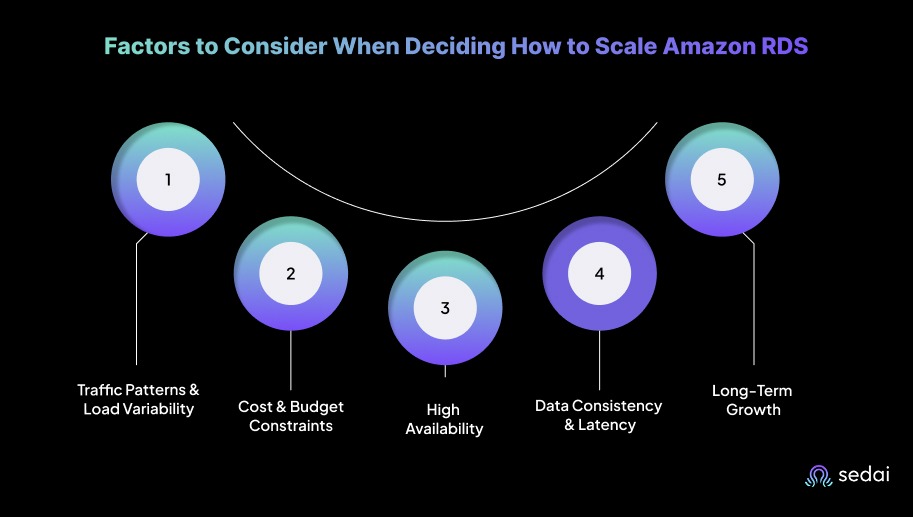
Here are some of the factors that you need to keep in mind when deciding on scaling Amazon RDS:
To pick the right scaling strategy, you first need to understand how your application traffic behaves, whether it stays steady, spikes suddenly, or changes with seasons.
For instance, SaaS platforms often see daily usage patterns with traffic peaking during business hours, whereas gaming platforms experience the opposite. Mapping these cycles helps choose the right scaling model.
Cost optimization is a key consideration for you when managing cloud infrastructure. Scaling strategies should maximize efficiency while maintaining performance.
As systems grow, maintaining availability and resilience becomes critical, particularly for mission-critical applications.
Scaling strategies must also address data consistency and latency, particularly for distributed systems serving geographically dispersed users.
It’s important to remember that cross-region replication introduces seconds of lag in normal conditions, and even more during write bursts. Applications must be designed with read-after-write expectations in mind.
Future-proofing infrastructure is essential for accommodating increasing workloads and evolving business needs.
After understanding the key factors in scaling Amazon RDS, you can explore vertical scaling to increase the power of your instance.
Vertical scaling in Amazon RDS involves increasing the size of your database instance to handle higher workload demands. This approach is particularly suited for predictable traffic and stable performance requirements.
You must understand when and how to scale vertically to maintain optimal resource utilization, cost efficiency, and performance.
Vertical scaling is ideal when a system requires additional CPU, memory, or I/O capacity but does not face the complexity or demand of distributed systems. It works best for workloads with consistent traffic and limited scaling needs.
Vertical scaling is often the first choice when an application outgrows its current resources, scaling up existing instances to handle increased demand. To keep this approach efficient and cost-effective, it's important to follow key best practices.
Once you’ve explored vertical scaling to increase your instance’s power, horizontal scaling helps distribute the load across multiple RDS instances.
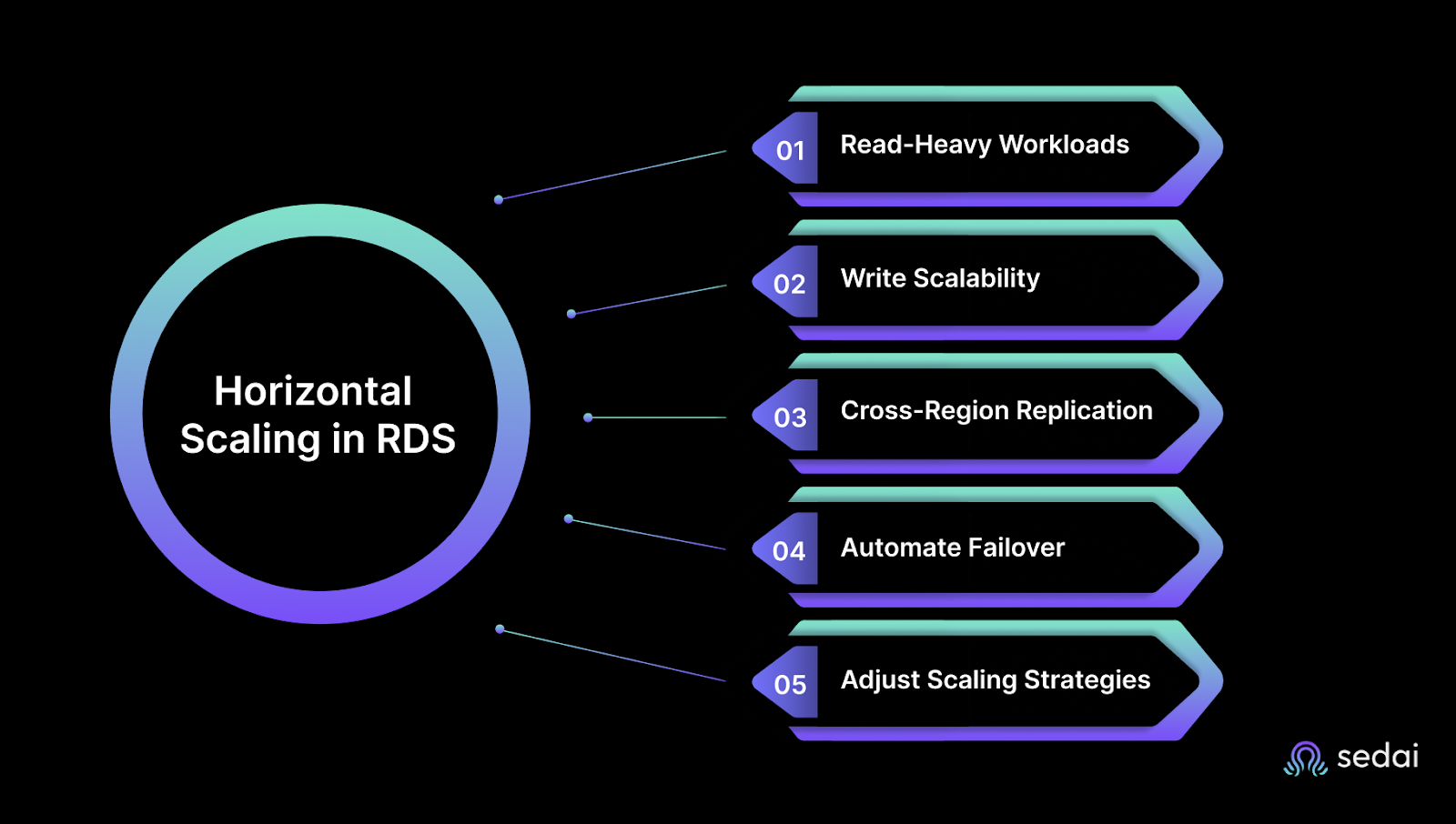
Horizontal scaling in Amazon RDS distributes database traffic across multiple instances to handle increased workloads and improve performance. This approach is essential for managing high-traffic applications, large-scale workloads, or environments that require redundancy.
Horizontal scaling is particularly effective for read-heavy applications, systems requiring high availability, or workloads with unpredictable traffic patterns.
Horizontal scaling becomes necessary when vertical scaling alone cannot meet performance requirements, or when workload demands require distributing traffic across multiple nodes to prevent single-instance blockages.
To effectively use horizontal scaling in RDS, you should distribute workloads across multiple instances to optimize both read and write performance. By following best practices, you can maintain a responsive, highly available database that scales smoothly as traffic grows.
After understanding horizontal scaling, hybrid scaling combines both vertical and horizontal approaches to achieve the best performance for your RDS setup.
Hybrid scaling combines the strengths of vertical scaling (increasing instance capacity) and horizontal scaling (distributing traffic across multiple instances) to build a scalable, cost-efficient, and resilient architecture.
You often encounter workloads where neither vertical nor horizontal scaling alone provides the optimal solution. Hybrid scaling offers the flexibility and adaptability needed for high-demand, mission-critical systems.
This approach works best when you identify which part of your workload grows vertically and which part grows horizontally. Without this clarity, hybrid scaling can add complexity without benefits.
Hybrid scaling is suitable for workloads that experience fluctuating traffic or evolving performance requirements. Vertical scaling can address short-term resource bottlenecks, while horizontal scaling ensures agility during peak traffic periods.
When you apply hybrid scaling, it’s best to tackle immediate performance needs through vertical scaling first, particularly for predictable workloads, and then expand into horizontal approaches.
After exploring RDS cost optimization strategies, it’s essential to know how to monitor and tune your databases for better performance.
Monitoring and tuning Amazon RDS are vital for optimizing performance, ensuring scalability, and achieving cost efficiency. You must go beyond basic checks and apply advanced strategies to address database blockages and optimize both resource usage and response times.
Here’s how to monitor and tune Amazon RDS for better performance:
CloudWatch Contributor Insights offers deep visibility into database performance and helps identify the top contributors to latency.
In high-traffic systems, managing database connections efficiently is key to maintaining performance. RDS Proxy provides a pooled connection mechanism that reduces overhead.
As databases grow, storage and I/O demands increase. Data compression reduces storage costs while improving I/O efficiency.
While General Purpose (SSD) and Provisioned IOPS (SSD) are common, tiered storage optimizes performance and costs simultaneously.
Beyond manual tuning, autotuning adjusts database parameters automatically to match workload changes.
Analyzing query execution plans is essential for identifying delays and improving performance.
Proper backup and storage practices prevent unnecessary costs and performance impacts.
For globally distributed applications, Aurora Global Databases provide low-latency performance through cross-region replication and automatic failover.
Also, if you stop non‑production RDS instances when not in use (e.g., outside business hours), you can save up to 70% on Amazon RDS spend.
Must Read: Top RDS Cost Optimization Tools for 2025
Scaling Amazon RDS manually often leads to trial-and-error sizing decisions, delayed response to traffic changes, and overspending on idle capacity. Engineers spend hours tuning instances, monitoring replicas, and reacting to performance dips rather than improving the architecture.
Sedai closes this operational gap by applying machine learning to real-time RDS telemetry. Instead of waiting for thresholds to breach, Sedai observes workload behavior, forecasts demand, and adjusts compute, storage, and database resources automatically.
Your RDS deployments keep pace with traffic while engineers avoid constant resizing, analysis, and troubleshooting.
Here's what Sedai offers:
With Sedai, Amazon RDS scales smoothly, remains cost-efficient, and avoids configuration drift you would otherwise fix manually. Your databases stay fast and available while you focus on higher-value engineering work.
If you're optimizing Amazon RDS scaling with vertical and horizontal strategies with Sedai, use our ROI calculator to estimate the return on investment from improved performance, cost savings, and enhanced availability for your cloud databases.
Amazon RDS scalability lets you experiment without risking production. The real benefit comes when your scaling strategy enables rapid iteration, safe testing, and predictable performance even as workloads fluctuate.
Sedai helps your RDS environment adapt in real time, keeping resources aligned with demand while maintaining peak performance.
By combining vertical and horizontal growth with Sedai’s autonomous optimization, you build an RDS setup where updates roll out faster, benchmarks are easier to track, and performance issues are detected long before they impact users.
Sedai continuously monitors and adjusts resources, ensuring your RDS environment runs smoothly with minimal manual effort, so your team can focus on innovation and growth.
Monitor your Amazon RDS environment end-to-end, fine-tune scaling, and lower wasted spend instantly using Sedai’s autonomous solutions.
A1. Aurora offers much stronger performance scalability because it separates compute from storage and automatically scales storage up to 128 TB. RDS requires manual scaling for both compute and storage. Aurora also provides faster cross-region replication and lower latency for global workloads.
A2. No, Amazon RDS is designed only for relational databases. For non-relational workloads, AWS recommends services like DynamoDB, a fully managed NoSQL database built for high performance at scale. Many teams use RDS and DynamoDB together when applications need both relational and NoSQL capabilities.
A3. Amazon RDS supports easy migrations through the AWS Database Migration Service (DMS), which enables continuous replication with minimal downtime. It works with major on-premise databases like MySQL, PostgreSQL, Oracle, and SQL Server. This helps teams migrate quickly without major application changes.
A4. Performance blockages typically involve CPU, memory, I/O, or network limits. You can reduce these by optimizing queries, using Provisioned IOPS for heavy I/O workloads, adding read replicas for read-heavy traffic, and right-sizing instances based on CloudWatch metrics.
A5. You can secure data during scaling by enabling encryption at rest and in transit, managed through AWS KMS. Multi-AZ deployments add resilience and protect data through automatic failover. It also helps to apply strict IAM access controls and regularly audit your setup using tools like AWS Security Hub and Trusted Advisor.
December 9, 2025
December 9, 2025
Scaling Amazon RDS efficiently requires a clear understanding of both vertical and horizontal scaling strategies. Vertical scaling involves adjusting instance sizes for predictable workloads, while horizontal scaling distributes traffic across multiple instances to handle fluctuating demand. By optimizing resource allocation and using features like read replicas, auto-scaling, and Aurora Serverless, you can improve performance without over-provisioning. Tools like Sedai help automate scaling, ensuring your RDS environment is cost-efficient, responsive, and ready for future growth.
Watching Amazon RDS handle unpredictable traffic quickly reveals where a database struggles. Slow queries, sudden connection spikes, and replication delays appear almost immediately, even while unused capacity quietly adds to your bill.
This challenge is common. AWS reports that teams moving to RDS can reduce database management costs by up to 34%, but many of those savings are lost when scaling is reactive rather than strategic.
Vertical upgrades can temporarily patch performance gaps, but without a well-architected plan, workloads eventually outgrow instances, leaving teams firefighting rather than optimizing. That’s why choosing the right scaling approach, whether vertical, horizontal, or hybrid, is essential.
In this blog, you’ll explore Amazon RDS scalability approaches and learn the right strategy to keep your RDS environment running smoothly without overspending.
Amazon Relational Database Service (RDS) is a fully managed service that simplifies database tasks such as patching, backup, scaling, and failover. Organizations using Amazon RDS report up to 38% fewer instances of unplanned downtime and 36% more efficient IT infrastructure teams.
Amazon RDS provides you with a simple way to deploy, manage, and scale relational databases in the cloud. While these features are essential, you must prioritize scalability to ensure systems handle changing traffic without affecting performance or cost efficiency.
You often notice early warning signs such as increasing query latency, increased buffer cache misses, or rising IOPS consumption. These patterns usually appear months before major performance drops. Understanding these signals is a key part of building a scalable RDS environment. Here's why Amazon RDS scalability matters:
As workloads increase, RDS autoscaling adjusts storage and instance sizes automatically to meet demand. This prevents performance degradation during traffic spikes and keeps applications responsive without manual intervention.
In practice, teams monitor CPU credits, write throughput, deadlocks, open connections, and buffer pool hit ratios to understand when performance issues are tied to scaling versus poor query design.
By monitoring key metrics and scaling in real time, RDS helps your database handle higher loads while maintaining low latency during peak usage.
Autoscaling aligns resources with actual usage, helping avoid both over-provisioning and underutilization. Right-sizing instances and using reserved instances for predictable workloads further control costs while maintaining performance.
Tracking scaling activity through tools like AWS Cost Explorer also ensures scaling remains efficient and within budget, reducing the risk of unexpected expenses.
Suggested Read: Cost Optimization Strategies for Amazon RDS in 2025
RDS scalability improves availability by spreading resources across multiple availability zones and adjusting capacity as demand changes. This reduces downtime and maintains performance during failures, as the system scales automatically to handle increased load or failover events.
During failover events, instance recovery time and DNS propagation delays can still impact latency. Designing with realistic failover expectations helps teams maintain SLAs.
Without scalability, systems eventually hit capacity limits, leading to costly re-architecting. Aurora Serverless and cross-region replication scale automatically based on usage, enabling global growth and providing low-latency access without major changes to your setup.
Once you understand the importance of Amazon RDS scalability, it’s important to consider the factors that determine how to scale it effectively.
When deciding how to scale Amazon RDS, you must consider several critical factors to ensure optimal performance, cost efficiency, and long-term scalability. These decisions extend beyond choosing vertical or horizontal scaling and require a clear understanding of workload demands, traffic patterns, and infrastructure growth.
Before scaling, teams should evaluate whether the workload is compute-bound, memory-bound, storage-bound, or I/O-bound. This diagnostic step prevents unnecessary scaling and keeps costs predictable.
Here are some of the factors that you need to keep in mind when deciding on scaling Amazon RDS:
To pick the right scaling strategy, you first need to understand how your application traffic behaves, whether it stays steady, spikes suddenly, or changes with seasons.
For instance, SaaS platforms often see daily usage patterns with traffic peaking during business hours, whereas gaming platforms experience the opposite. Mapping these cycles helps choose the right scaling model.
Cost optimization is a key consideration for you when managing cloud infrastructure. Scaling strategies should maximize efficiency while maintaining performance.
As systems grow, maintaining availability and resilience becomes critical, particularly for mission-critical applications.
Scaling strategies must also address data consistency and latency, particularly for distributed systems serving geographically dispersed users.
It’s important to remember that cross-region replication introduces seconds of lag in normal conditions, and even more during write bursts. Applications must be designed with read-after-write expectations in mind.
Future-proofing infrastructure is essential for accommodating increasing workloads and evolving business needs.
After understanding the key factors in scaling Amazon RDS, you can explore vertical scaling to increase the power of your instance.
Vertical scaling in Amazon RDS involves increasing the size of your database instance to handle higher workload demands. This approach is particularly suited for predictable traffic and stable performance requirements.
You must understand when and how to scale vertically to maintain optimal resource utilization, cost efficiency, and performance.
Vertical scaling is ideal when a system requires additional CPU, memory, or I/O capacity but does not face the complexity or demand of distributed systems. It works best for workloads with consistent traffic and limited scaling needs.
Vertical scaling is often the first choice when an application outgrows its current resources, scaling up existing instances to handle increased demand. To keep this approach efficient and cost-effective, it's important to follow key best practices.
Once you’ve explored vertical scaling to increase your instance’s power, horizontal scaling helps distribute the load across multiple RDS instances.
Horizontal scaling in Amazon RDS distributes database traffic across multiple instances to handle increased workloads and improve performance. This approach is essential for managing high-traffic applications, large-scale workloads, or environments that require redundancy.
Horizontal scaling is particularly effective for read-heavy applications, systems requiring high availability, or workloads with unpredictable traffic patterns.
Horizontal scaling becomes necessary when vertical scaling alone cannot meet performance requirements, or when workload demands require distributing traffic across multiple nodes to prevent single-instance blockages.
To effectively use horizontal scaling in RDS, you should distribute workloads across multiple instances to optimize both read and write performance. By following best practices, you can maintain a responsive, highly available database that scales smoothly as traffic grows.
After understanding horizontal scaling, hybrid scaling combines both vertical and horizontal approaches to achieve the best performance for your RDS setup.
Hybrid scaling combines the strengths of vertical scaling (increasing instance capacity) and horizontal scaling (distributing traffic across multiple instances) to build a scalable, cost-efficient, and resilient architecture.
You often encounter workloads where neither vertical nor horizontal scaling alone provides the optimal solution. Hybrid scaling offers the flexibility and adaptability needed for high-demand, mission-critical systems.
This approach works best when you identify which part of your workload grows vertically and which part grows horizontally. Without this clarity, hybrid scaling can add complexity without benefits.
Hybrid scaling is suitable for workloads that experience fluctuating traffic or evolving performance requirements. Vertical scaling can address short-term resource bottlenecks, while horizontal scaling ensures agility during peak traffic periods.
When you apply hybrid scaling, it’s best to tackle immediate performance needs through vertical scaling first, particularly for predictable workloads, and then expand into horizontal approaches.
After exploring RDS cost optimization strategies, it’s essential to know how to monitor and tune your databases for better performance.
Monitoring and tuning Amazon RDS are vital for optimizing performance, ensuring scalability, and achieving cost efficiency. You must go beyond basic checks and apply advanced strategies to address database blockages and optimize both resource usage and response times.
Here’s how to monitor and tune Amazon RDS for better performance:
CloudWatch Contributor Insights offers deep visibility into database performance and helps identify the top contributors to latency.
In high-traffic systems, managing database connections efficiently is key to maintaining performance. RDS Proxy provides a pooled connection mechanism that reduces overhead.
As databases grow, storage and I/O demands increase. Data compression reduces storage costs while improving I/O efficiency.
While General Purpose (SSD) and Provisioned IOPS (SSD) are common, tiered storage optimizes performance and costs simultaneously.
Beyond manual tuning, autotuning adjusts database parameters automatically to match workload changes.
Analyzing query execution plans is essential for identifying delays and improving performance.
Proper backup and storage practices prevent unnecessary costs and performance impacts.
For globally distributed applications, Aurora Global Databases provide low-latency performance through cross-region replication and automatic failover.
Also, if you stop non‑production RDS instances when not in use (e.g., outside business hours), you can save up to 70% on Amazon RDS spend.
Must Read: Top RDS Cost Optimization Tools for 2025
Scaling Amazon RDS manually often leads to trial-and-error sizing decisions, delayed response to traffic changes, and overspending on idle capacity. Engineers spend hours tuning instances, monitoring replicas, and reacting to performance dips rather than improving the architecture.
Sedai closes this operational gap by applying machine learning to real-time RDS telemetry. Instead of waiting for thresholds to breach, Sedai observes workload behavior, forecasts demand, and adjusts compute, storage, and database resources automatically.
Your RDS deployments keep pace with traffic while engineers avoid constant resizing, analysis, and troubleshooting.
Here's what Sedai offers:
With Sedai, Amazon RDS scales smoothly, remains cost-efficient, and avoids configuration drift you would otherwise fix manually. Your databases stay fast and available while you focus on higher-value engineering work.
If you're optimizing Amazon RDS scaling with vertical and horizontal strategies with Sedai, use our ROI calculator to estimate the return on investment from improved performance, cost savings, and enhanced availability for your cloud databases.
Amazon RDS scalability lets you experiment without risking production. The real benefit comes when your scaling strategy enables rapid iteration, safe testing, and predictable performance even as workloads fluctuate.
Sedai helps your RDS environment adapt in real time, keeping resources aligned with demand while maintaining peak performance.
By combining vertical and horizontal growth with Sedai’s autonomous optimization, you build an RDS setup where updates roll out faster, benchmarks are easier to track, and performance issues are detected long before they impact users.
Sedai continuously monitors and adjusts resources, ensuring your RDS environment runs smoothly with minimal manual effort, so your team can focus on innovation and growth.
Monitor your Amazon RDS environment end-to-end, fine-tune scaling, and lower wasted spend instantly using Sedai’s autonomous solutions.
A1. Aurora offers much stronger performance scalability because it separates compute from storage and automatically scales storage up to 128 TB. RDS requires manual scaling for both compute and storage. Aurora also provides faster cross-region replication and lower latency for global workloads.
A2. No, Amazon RDS is designed only for relational databases. For non-relational workloads, AWS recommends services like DynamoDB, a fully managed NoSQL database built for high performance at scale. Many teams use RDS and DynamoDB together when applications need both relational and NoSQL capabilities.
A3. Amazon RDS supports easy migrations through the AWS Database Migration Service (DMS), which enables continuous replication with minimal downtime. It works with major on-premise databases like MySQL, PostgreSQL, Oracle, and SQL Server. This helps teams migrate quickly without major application changes.
A4. Performance blockages typically involve CPU, memory, I/O, or network limits. You can reduce these by optimizing queries, using Provisioned IOPS for heavy I/O workloads, adding read replicas for read-heavy traffic, and right-sizing instances based on CloudWatch metrics.
A5. You can secure data during scaling by enabling encryption at rest and in transit, managed through AWS KMS. Multi-AZ deployments add resilience and protect data through automatic failover. It also helps to apply strict IAM access controls and regularly audit your setup using tools like AWS Security Hub and Trusted Advisor.


.svg)
.svg)


%201.svg)
%202.svg)


.svg)