Register now



December 9, 2025
December 9, 2025
December 9, 2025
December 9, 2025
Managing Kubernetes across AWS, Azure, and GCP introduces real complexity around cluster consistency, networking, security, and cost control. You must balance differences in autoscaling behavior, storage classes, and network architectures while keeping workloads reliable across clouds. By standardizing deployments, automating infrastructure, and tightening observability, teams can run multi-cloud Kubernetes without drift or downtime.
Watching Kubernetes run across AWS, Azure, and GCP quickly reveals how multi-cloud complexity shows up in real environments. Autoscaling behaves differently across platforms, networking rules don’t always translate cleanly, and identical workloads often consume different amounts of compute or storage depending on where they run.
Many teams step into multi-cloud expecting more flexibility, only to encounter configuration drift, uneven performance, and unexpected spikes in cloud bills. Studies show that when workload placement and operations aren’t aligned across providers, organizations can lose nearly 70% of the ROI they expect from a multi-cloud strategy.
This is where having a deliberate multi-cloud Kubernetes strategy becomes essential. In this blog, you'll explore how to run Kubernetes across multiple clouds so clusters remain consistent, efficient, and resilient without introducing unnecessary complexity.
Multi-Cloud Kubernetes is the practice of deploying and managing Kubernetes clusters across multiple cloud environments, such as AWS, Azure, and Google Cloud, rather than relying on a single provider. This approach enables teams to run Kubernetes workloads across different clouds without vendor lock-in.
Kubernetes abstracts the underlying infrastructure, allowing workloads to move between clouds or run across them with minimal changes to deployment configurations. The growing appeal of this strategy is evident in multi-cloud adoption, which increased from 87% in 2023 to 89% in 2024.
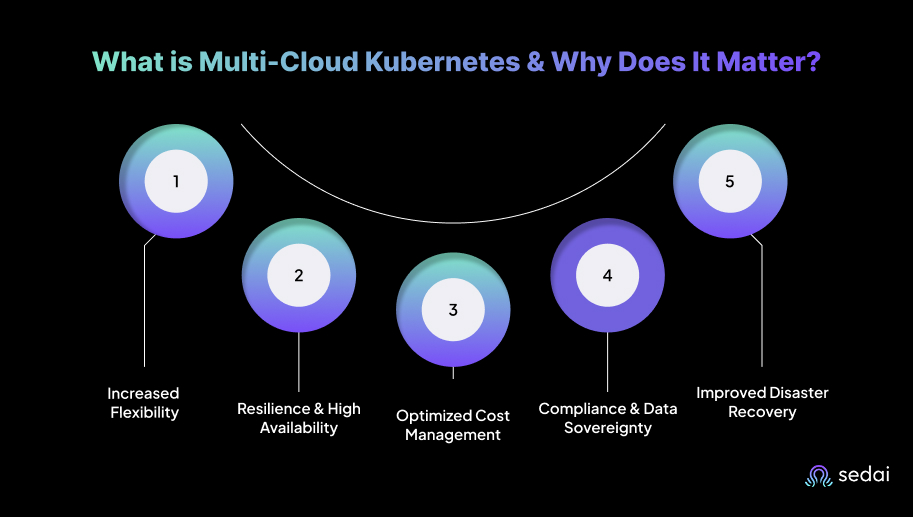
Here’s why multi-cloud Kubernetes matters:
A 2024 cloud report found that 59% of respondents use multiple public clouds, while only 14% rely on a single public cloud. Multi-Cloud Kubernetes supports this trend by allowing organizations to select the best cloud provider for each workload, avoiding dependence on a single provider’s pricing, performance, or limitations.
This lets you place workloads where they run most efficiently, such as using GCP for GPU-heavy tasks and AWS for latency-sensitive applications. In doing so, you reduce the risk of vendor lock-in and strengthen your ability to negotiate favorable contract terms.
Running Kubernetes clusters across multiple cloud providers improves uptime by spreading workloads across multiple platforms. This setup supports automatic failover between clouds, reducing the impact of provider outages.
For example, an e-commerce platform might operate clusters in both AWS and Azure, shifting traffic to the secondary cluster if one provider experiences downtime.
Multi-cloud Kubernetes helps control costs by allowing you to select the most cost-effective provider for each workload type. This minimizes spending on underutilized resources and lets you use different pricing models.
For instance, running compute-heavy workloads on AWS and storage-intensive workloads on GCP allows you to align resource usage with pricing advantages.
A multi-cloud approach makes it easier to meet regulatory requirements by placing workloads in specific regions. This is essential for industries that prioritize data residency, such as healthcare or finance.
For example, sensitive data can be stored on AWS in Europe while less-regulated services operate on Google Cloud in North America, supporting both compliance and efficiency.
Multi-cloud Kubernetes strengthens disaster recovery by enabling replication of data and workloads across cloud providers. This reduces the risk of downtime during outages. If one provider experiences an issue, Kubernetes can initiate replicas in another cloud, helping ensure uninterrupted service.
Once you understand its importance, it becomes easier to see the real challenges that show up when running Kubernetes across multiple cloud providers.
Suggested Read: Kubernetes Cluster Scaling Challenges
Managing Kubernetes across multiple cloud providers introduces challenges that affect operational efficiency and cost control. Your teams must handle complexities in cluster management, cross-cloud networking, and security policies while maintaining high availability and minimizing downtime.
Below are some common challenges faced with multi-cloud Kubernetes.
Each cloud provider has its own APIs and preferred tools for managing resources. Creating the same resource on AWS, Google Cloud, or Azure requires different steps. Multi-cloud setups need provider-specific scripts and the expertise to manage them effectively.
Each cloud comes with its own monitoring tools, and the data they provide may vary in format and scope. Integrating these into a coherent monitoring strategy across clouds can be tricky.
Clouds exist on separate networks, so it’s not just about ensuring pods can communicate, but also making sure they can discover each other across different cloud infrastructures.
Security is always a priority, but when your architecture spans multiple public clouds, risks multiply. Multi-cloud Kubernetes setups need extra attention to potential vulnerabilities and exposure points.
Once these challenges are clear, it becomes easier to shape a practical strategy for running multi-cloud, multi-cluster Kubernetes effectively.
Building an effective multi-cloud, multi-cluster Kubernetes strategy requires careful planning around workload distribution, networking, and security across cloud providers. The focus should be on automating infrastructure, controlling costs, and ensuring high availability through cross-cloud failover.
Here's a step-by-step approach to building a practical multi-cloud, multi-cluster Kubernetes strategy:
You need to analyze the resource requirements for each workload, including compute, storage, and network resources. Align workloads with the cloud provider that offers the best performance and cost profile.
For example, AWS may be suitable for low-latency compute needs, while GCP is better positioned for machine learning workloads that benefit from GPU pricing.
Tip: Map workloads by resource needs, compliance requirements, and latency expectations to avoid surprises during audits or deployments.
Then, develop a multi-cluster architecture that supports high availability and fault tolerance across providers. Use Kubernetes Federation or tools to maintain consistent configurations and centralized control. Also, distribute workloads based on each provider’s strengths while ensuring redundancy to handle provider-level failures.
Tip: Start with a small pilot cluster for each provider to validate the architecture before scaling fully. This prevents costly misconfigurations.
After that, establish secure, low-latency connectivity between clouds using VPNs, direct interconnects, or service meshes. Maintain consistent networking policies and encrypt sensitive data in transit. Use cloud-native security tools and centralized identity management, such as IAM and OPA, to enforce uniform access controls.
Tip: Regularly audit cross-cloud network routes and permissions to catch misconfigurations early.
Use Infrastructure as Code tools to automate provisioning, management, and scaling of clusters across clouds. This improves consistency and reduces operational errors. Integrate CI/CD pipelines to automate deployments and updates, enabling rapid iteration with controlled infrastructure changes.
Tip: Treat automation scripts as production-grade code with version control, code reviews, and testing. This prevents human errors and ensures consistency.
You need to track resource usage and control costs by selecting appropriate instance types and using features like reserved or spot instances. Tools help monitor spending across providers and identify underutilized resources. Configure alerts for unexpected cost spikes to enable proactive adjustments.
Tip: Regularly review billing dashboards and compare cloud pricing models. Minor adjustments can save thousands per month in multi-cloud environments.
Centralize monitoring and logging using tools. Use these systems to track cluster health, workload performance, and network behavior across clouds. Implement automated alerts to detect performance issues, failures, or resource contention early.
Tip: Use unified dashboards for cross-cloud observability. This helps your team spot patterns that may not be visible when monitoring each cloud separately.
Define disaster recovery procedures, including automated failover between providers. Replicate critical data and services across regions and clouds to maintain availability. Test failover scenarios regularly to verify that workloads can shift smoothly during a provider outage, minimizing disruption.
Tip: Simulate outages quarterly. Unexpected failures during tests often reveal hidden dependencies and gaps in disaster recovery planning.
You need to continuously assess the performance, cost, and security posture of your multi-cloud Kubernetes setup. Audit cloud usage and configurations to identify optimization opportunities. Stay updated with new tools and features from cloud providers and the Kubernetes ecosystem to improve efficiency and streamline operations.
Tip: Schedule quarterly strategy reviews with your team and iterate based on metrics.
Once the overall approach is clear, you can break it down into specific strategies that keep your multi-cloud Kubernetes setup running smoothly and efficiently.
Also Read: Detect Unused & Orphaned Kubernetes Resources
To maintain a smooth, efficient multi-cloud Kubernetes setup, you must implement strategies to manage complexity, optimize resource use, and ensure high availability across clouds. These approaches provide actionable insights for addressing the challenges of running Kubernetes clusters across multiple cloud environments.
Utilize full-stack observability with tools to collect metrics, logs, and traces across multi-cloud Kubernetes clusters. Correlating data from infrastructure, services, and applications provides end-to-end visibility, enabling faster issue detection and resolution across all clouds.
Tip: Start with critical services first, as full-stack observability for all workloads can be overwhelming if implemented at once.
You can also use blue-green deployment strategies across clouds to enable zero-downtime upgrades. By running parallel environments in different providers, traffic can be gradually shifted to new versions, ensuring production remains uninterrupted during updates or migrations.
Tip: Use feature flags and small traffic segments to validate new deployments before full rollout. This reduces the risk of service disruption.
For latency-sensitive applications, you need to deploy edge clusters using K3s or MicroK8s that integrate with main cloud clusters. This hybrid setup reduces latency and bandwidth usage while maintaining consistency with centralized Kubernetes clusters.
Tip: Only move latency-sensitive workloads to edge clusters. Non-critical workloads can stay in centralized clouds to save resources.
Use custom resource definitions to create cloud-specific abstractions for multi-cloud management. For example, a CloudResource CRD can manage provider-specific components, such as network interfaces and storage volumes, across AWS, GCP, and Azure, simplifying cross-cloud orchestration.
Tip: Maintain a central repository of CRDs and version them to ensure all clusters across clouds remain aligned.
After outlining the key strategies, the next step is to learn about how to manage multi-cloud Kubernetes with AI.
Effectively managing multi-cloud environments with AI and Kubernetes requires a structured approach. Following a clear plan helps ensure consistency, optimize resources, and maintain security across all cloud platforms. Below are the key steps.
Once you understand the steps to manage multi-cloud Kubernetes with AI, it’s useful to look at the tools that can make managing multi-cloud Kubernetes even easier.
Managing Kubernetes across multiple cloud environments requires specialized tools to maintain consistency, visibility, and performance. You need platforms that simplify cluster management, monitor resource usage, and enforce security across different cloud providers.
Below are the useful tools that make multi-cloud Kubernetes easier to manage.
Sedai is an AI-powered platform that optimizes Kubernetes workloads across multi-cloud environments by automating adjustments to compute, storage, and networking.
It continuously analyzes workloads to predict resource needs and scale clusters, delivering up to 50% in cloud cost savings and up to 75% in performance improvements.
By automating resource management and cloud selection, Sedai reduces manual intervention and allows your teams to focus on higher-value tasks.
Key Features:
Sedai provides measurable impact across key cloud operations metrics, delivering significant improvements in cost, performance, reliability, and productivity.
If you’re managing multi-cloud Kubernetes with Sedai, use our ROI calculator to estimate how much you can save by reducing cross-cloud waste, improving cluster performance, and cutting manual tuning.
Kubecost provides real-time visibility into Kubernetes costs across clusters and cloud providers. It gives you clear insight into which workloads drive cloud costs. This information enables data-driven decisions for resource allocation and scaling.
Key Features:
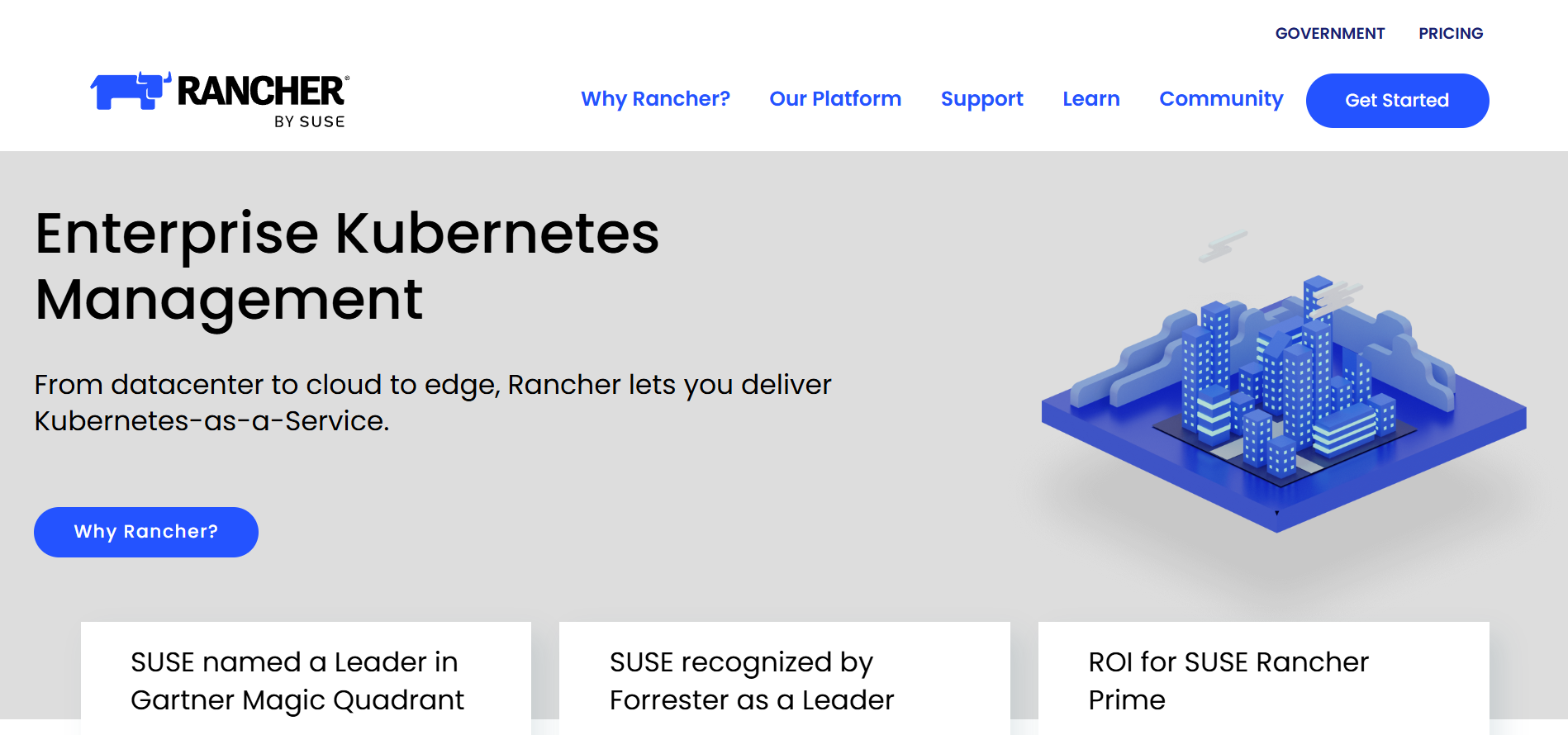
Rancher provides a unified management plane for deploying and operating Kubernetes clusters across clouds and on-premises. It abstracts cloud-specific differences, allowing all clusters to be managed consistently and simplifying multi-cloud operations and governance.
Key Features:
Helm simplifies application delivery, reducing manual manifest duplication and environment-specific drift. It also simplifies complex application configurations by using templated values, allowing you to manage dynamic environments.
Key Features:
Istio adds a service-mesh layer on Kubernetes to standardize communication between microservices across clusters, clouds, or environments. It provides consistent traffic control and security, which is particularly valuable for multi-cloud deployments.
Key Features:
Must Read: Kubernetes Cost Optimization Guide 2025-26
Running Kubernetes across AWS, Azure, and GCP gets a lot easier once you stop treating multi-cloud as a set of isolated clusters and start treating it as a long-term engineering system.
The teams that actually make it work are the ones that regularly break things on purpose to test failure paths, keep configuration drift tightly under control, and build observability into the design instead of layering it on later.
Sedai supports this approach by learning how workloads behave across providers and adjusting resources automatically, helping you maintain consistency and performance without spending hours tuning every cluster.
Take control of multi-cloud Kubernetes by letting Sedai analyze workload behavior and optimize resources in real time across every cloud you run.
A1. A reliable approach is to use a global registry such as Docker Hub or replicate images into each provider’s native registry (AWS ECR, Azure ACR, and GCP Artifact Registry). This ensures consistent authentication during deployments and keeps images available even if one provider experiences a regional issue.
A2. You can standardize on a common ingress controller like NGINX or Kong, but each cluster will run its own instance. The goal is to maintain aligned configuration patterns across clouds. This keeps routing predictable even when workloads run in different environments.
A3. Using an external DNS provider that updates records across all three clouds helps avoid fragmentation. It removes dependency on cloud-specific DNS services and ensures smooth failover when applications shift between providers or during outages.
A4. A centralized certificate authority, such as cert-manager, paired with an external issuer, maintains unified TLS certificate issuance and renewal. This avoids managing certificates separately in each cloud and reduces configuration drift along with renewal errors.
A5. Kubernetes autoscaling works at the cluster level, but you can build shared metrics pipelines to coordinate scaling behavior. This helps clusters scale based on global demand patterns rather than isolated workloads, improving responsiveness during large traffic spikes.
December 9, 2025
December 9, 2025
Managing Kubernetes across AWS, Azure, and GCP introduces real complexity around cluster consistency, networking, security, and cost control. You must balance differences in autoscaling behavior, storage classes, and network architectures while keeping workloads reliable across clouds. By standardizing deployments, automating infrastructure, and tightening observability, teams can run multi-cloud Kubernetes without drift or downtime.
Watching Kubernetes run across AWS, Azure, and GCP quickly reveals how multi-cloud complexity shows up in real environments. Autoscaling behaves differently across platforms, networking rules don’t always translate cleanly, and identical workloads often consume different amounts of compute or storage depending on where they run.
Many teams step into multi-cloud expecting more flexibility, only to encounter configuration drift, uneven performance, and unexpected spikes in cloud bills. Studies show that when workload placement and operations aren’t aligned across providers, organizations can lose nearly 70% of the ROI they expect from a multi-cloud strategy.
This is where having a deliberate multi-cloud Kubernetes strategy becomes essential. In this blog, you'll explore how to run Kubernetes across multiple clouds so clusters remain consistent, efficient, and resilient without introducing unnecessary complexity.
Multi-Cloud Kubernetes is the practice of deploying and managing Kubernetes clusters across multiple cloud environments, such as AWS, Azure, and Google Cloud, rather than relying on a single provider. This approach enables teams to run Kubernetes workloads across different clouds without vendor lock-in.
Kubernetes abstracts the underlying infrastructure, allowing workloads to move between clouds or run across them with minimal changes to deployment configurations. The growing appeal of this strategy is evident in multi-cloud adoption, which increased from 87% in 2023 to 89% in 2024.
Here’s why multi-cloud Kubernetes matters:
A 2024 cloud report found that 59% of respondents use multiple public clouds, while only 14% rely on a single public cloud. Multi-Cloud Kubernetes supports this trend by allowing organizations to select the best cloud provider for each workload, avoiding dependence on a single provider’s pricing, performance, or limitations.
This lets you place workloads where they run most efficiently, such as using GCP for GPU-heavy tasks and AWS for latency-sensitive applications. In doing so, you reduce the risk of vendor lock-in and strengthen your ability to negotiate favorable contract terms.
Running Kubernetes clusters across multiple cloud providers improves uptime by spreading workloads across multiple platforms. This setup supports automatic failover between clouds, reducing the impact of provider outages.
For example, an e-commerce platform might operate clusters in both AWS and Azure, shifting traffic to the secondary cluster if one provider experiences downtime.
Multi-cloud Kubernetes helps control costs by allowing you to select the most cost-effective provider for each workload type. This minimizes spending on underutilized resources and lets you use different pricing models.
For instance, running compute-heavy workloads on AWS and storage-intensive workloads on GCP allows you to align resource usage with pricing advantages.
A multi-cloud approach makes it easier to meet regulatory requirements by placing workloads in specific regions. This is essential for industries that prioritize data residency, such as healthcare or finance.
For example, sensitive data can be stored on AWS in Europe while less-regulated services operate on Google Cloud in North America, supporting both compliance and efficiency.
Multi-cloud Kubernetes strengthens disaster recovery by enabling replication of data and workloads across cloud providers. This reduces the risk of downtime during outages. If one provider experiences an issue, Kubernetes can initiate replicas in another cloud, helping ensure uninterrupted service.
Once you understand its importance, it becomes easier to see the real challenges that show up when running Kubernetes across multiple cloud providers.
Suggested Read: Kubernetes Cluster Scaling Challenges
Managing Kubernetes across multiple cloud providers introduces challenges that affect operational efficiency and cost control. Your teams must handle complexities in cluster management, cross-cloud networking, and security policies while maintaining high availability and minimizing downtime.
Below are some common challenges faced with multi-cloud Kubernetes.
Each cloud provider has its own APIs and preferred tools for managing resources. Creating the same resource on AWS, Google Cloud, or Azure requires different steps. Multi-cloud setups need provider-specific scripts and the expertise to manage them effectively.
Each cloud comes with its own monitoring tools, and the data they provide may vary in format and scope. Integrating these into a coherent monitoring strategy across clouds can be tricky.
Clouds exist on separate networks, so it’s not just about ensuring pods can communicate, but also making sure they can discover each other across different cloud infrastructures.
Security is always a priority, but when your architecture spans multiple public clouds, risks multiply. Multi-cloud Kubernetes setups need extra attention to potential vulnerabilities and exposure points.
Once these challenges are clear, it becomes easier to shape a practical strategy for running multi-cloud, multi-cluster Kubernetes effectively.
Building an effective multi-cloud, multi-cluster Kubernetes strategy requires careful planning around workload distribution, networking, and security across cloud providers. The focus should be on automating infrastructure, controlling costs, and ensuring high availability through cross-cloud failover.
Here's a step-by-step approach to building a practical multi-cloud, multi-cluster Kubernetes strategy:
You need to analyze the resource requirements for each workload, including compute, storage, and network resources. Align workloads with the cloud provider that offers the best performance and cost profile.
For example, AWS may be suitable for low-latency compute needs, while GCP is better positioned for machine learning workloads that benefit from GPU pricing.
Tip: Map workloads by resource needs, compliance requirements, and latency expectations to avoid surprises during audits or deployments.
Then, develop a multi-cluster architecture that supports high availability and fault tolerance across providers. Use Kubernetes Federation or tools to maintain consistent configurations and centralized control. Also, distribute workloads based on each provider’s strengths while ensuring redundancy to handle provider-level failures.
Tip: Start with a small pilot cluster for each provider to validate the architecture before scaling fully. This prevents costly misconfigurations.
After that, establish secure, low-latency connectivity between clouds using VPNs, direct interconnects, or service meshes. Maintain consistent networking policies and encrypt sensitive data in transit. Use cloud-native security tools and centralized identity management, such as IAM and OPA, to enforce uniform access controls.
Tip: Regularly audit cross-cloud network routes and permissions to catch misconfigurations early.
Use Infrastructure as Code tools to automate provisioning, management, and scaling of clusters across clouds. This improves consistency and reduces operational errors. Integrate CI/CD pipelines to automate deployments and updates, enabling rapid iteration with controlled infrastructure changes.
Tip: Treat automation scripts as production-grade code with version control, code reviews, and testing. This prevents human errors and ensures consistency.
You need to track resource usage and control costs by selecting appropriate instance types and using features like reserved or spot instances. Tools help monitor spending across providers and identify underutilized resources. Configure alerts for unexpected cost spikes to enable proactive adjustments.
Tip: Regularly review billing dashboards and compare cloud pricing models. Minor adjustments can save thousands per month in multi-cloud environments.
Centralize monitoring and logging using tools. Use these systems to track cluster health, workload performance, and network behavior across clouds. Implement automated alerts to detect performance issues, failures, or resource contention early.
Tip: Use unified dashboards for cross-cloud observability. This helps your team spot patterns that may not be visible when monitoring each cloud separately.
Define disaster recovery procedures, including automated failover between providers. Replicate critical data and services across regions and clouds to maintain availability. Test failover scenarios regularly to verify that workloads can shift smoothly during a provider outage, minimizing disruption.
Tip: Simulate outages quarterly. Unexpected failures during tests often reveal hidden dependencies and gaps in disaster recovery planning.
You need to continuously assess the performance, cost, and security posture of your multi-cloud Kubernetes setup. Audit cloud usage and configurations to identify optimization opportunities. Stay updated with new tools and features from cloud providers and the Kubernetes ecosystem to improve efficiency and streamline operations.
Tip: Schedule quarterly strategy reviews with your team and iterate based on metrics.
Once the overall approach is clear, you can break it down into specific strategies that keep your multi-cloud Kubernetes setup running smoothly and efficiently.
Also Read: Detect Unused & Orphaned Kubernetes Resources
To maintain a smooth, efficient multi-cloud Kubernetes setup, you must implement strategies to manage complexity, optimize resource use, and ensure high availability across clouds. These approaches provide actionable insights for addressing the challenges of running Kubernetes clusters across multiple cloud environments.
Utilize full-stack observability with tools to collect metrics, logs, and traces across multi-cloud Kubernetes clusters. Correlating data from infrastructure, services, and applications provides end-to-end visibility, enabling faster issue detection and resolution across all clouds.
Tip: Start with critical services first, as full-stack observability for all workloads can be overwhelming if implemented at once.
You can also use blue-green deployment strategies across clouds to enable zero-downtime upgrades. By running parallel environments in different providers, traffic can be gradually shifted to new versions, ensuring production remains uninterrupted during updates or migrations.
Tip: Use feature flags and small traffic segments to validate new deployments before full rollout. This reduces the risk of service disruption.
For latency-sensitive applications, you need to deploy edge clusters using K3s or MicroK8s that integrate with main cloud clusters. This hybrid setup reduces latency and bandwidth usage while maintaining consistency with centralized Kubernetes clusters.
Tip: Only move latency-sensitive workloads to edge clusters. Non-critical workloads can stay in centralized clouds to save resources.
Use custom resource definitions to create cloud-specific abstractions for multi-cloud management. For example, a CloudResource CRD can manage provider-specific components, such as network interfaces and storage volumes, across AWS, GCP, and Azure, simplifying cross-cloud orchestration.
Tip: Maintain a central repository of CRDs and version them to ensure all clusters across clouds remain aligned.
After outlining the key strategies, the next step is to learn about how to manage multi-cloud Kubernetes with AI.
Effectively managing multi-cloud environments with AI and Kubernetes requires a structured approach. Following a clear plan helps ensure consistency, optimize resources, and maintain security across all cloud platforms. Below are the key steps.
Once you understand the steps to manage multi-cloud Kubernetes with AI, it’s useful to look at the tools that can make managing multi-cloud Kubernetes even easier.
Managing Kubernetes across multiple cloud environments requires specialized tools to maintain consistency, visibility, and performance. You need platforms that simplify cluster management, monitor resource usage, and enforce security across different cloud providers.
Below are the useful tools that make multi-cloud Kubernetes easier to manage.
Sedai is an AI-powered platform that optimizes Kubernetes workloads across multi-cloud environments by automating adjustments to compute, storage, and networking.
It continuously analyzes workloads to predict resource needs and scale clusters, delivering up to 50% in cloud cost savings and up to 75% in performance improvements.
By automating resource management and cloud selection, Sedai reduces manual intervention and allows your teams to focus on higher-value tasks.
Key Features:
Sedai provides measurable impact across key cloud operations metrics, delivering significant improvements in cost, performance, reliability, and productivity.
If you’re managing multi-cloud Kubernetes with Sedai, use our ROI calculator to estimate how much you can save by reducing cross-cloud waste, improving cluster performance, and cutting manual tuning.
Kubecost provides real-time visibility into Kubernetes costs across clusters and cloud providers. It gives you clear insight into which workloads drive cloud costs. This information enables data-driven decisions for resource allocation and scaling.
Key Features:
Rancher provides a unified management plane for deploying and operating Kubernetes clusters across clouds and on-premises. It abstracts cloud-specific differences, allowing all clusters to be managed consistently and simplifying multi-cloud operations and governance.
Key Features:
Helm simplifies application delivery, reducing manual manifest duplication and environment-specific drift. It also simplifies complex application configurations by using templated values, allowing you to manage dynamic environments.
Key Features:
Istio adds a service-mesh layer on Kubernetes to standardize communication between microservices across clusters, clouds, or environments. It provides consistent traffic control and security, which is particularly valuable for multi-cloud deployments.
Key Features:
Must Read: Kubernetes Cost Optimization Guide 2025-26
Running Kubernetes across AWS, Azure, and GCP gets a lot easier once you stop treating multi-cloud as a set of isolated clusters and start treating it as a long-term engineering system.
The teams that actually make it work are the ones that regularly break things on purpose to test failure paths, keep configuration drift tightly under control, and build observability into the design instead of layering it on later.
Sedai supports this approach by learning how workloads behave across providers and adjusting resources automatically, helping you maintain consistency and performance without spending hours tuning every cluster.
Take control of multi-cloud Kubernetes by letting Sedai analyze workload behavior and optimize resources in real time across every cloud you run.
A1. A reliable approach is to use a global registry such as Docker Hub or replicate images into each provider’s native registry (AWS ECR, Azure ACR, and GCP Artifact Registry). This ensures consistent authentication during deployments and keeps images available even if one provider experiences a regional issue.
A2. You can standardize on a common ingress controller like NGINX or Kong, but each cluster will run its own instance. The goal is to maintain aligned configuration patterns across clouds. This keeps routing predictable even when workloads run in different environments.
A3. Using an external DNS provider that updates records across all three clouds helps avoid fragmentation. It removes dependency on cloud-specific DNS services and ensures smooth failover when applications shift between providers or during outages.
A4. A centralized certificate authority, such as cert-manager, paired with an external issuer, maintains unified TLS certificate issuance and renewal. This avoids managing certificates separately in each cloud and reduces configuration drift along with renewal errors.
A5. Kubernetes autoscaling works at the cluster level, but you can build shared metrics pipelines to coordinate scaling behavior. This helps clusters scale based on global demand patterns rather than isolated workloads, improving responsiveness during large traffic spikes.


.svg)
.svg)


%201.svg)
%202.svg)


.svg)


