Register now



December 5, 2025
December 5, 2025
December 5, 2025
December 5, 2025
Choosing between AWS S3 and Google Cloud Storage depends on factors like pricing, storage classes, and performance needs. Both services offer flexible, cost-efficient storage solutions, but key differences in retrieval costs, security features, and data availability impact how they fit into your infrastructure. By analyzing your data access patterns, budget, and required performance, you can determine which service offers the best balance
Choosing the right cloud storage can be tricky. AWS S3 and Google Cloud Storage (GCS) are both reliable, but how do you know which one fits your workload, budget, and performance needs?
For engineering teams, the challenge goes beyond capacity or retrieval speed. It’s about controlling costs, ensuring security, and keeping data accessible across regions.
Both platforms deliver exceptional durability. S3 is designed for 99.999999999% durability, and GCS matches this with 11-nines backed by multi-zone redundancy. Still, differences in storage classes, replication, and ecosystem support can make the choice feel complex.
In this blog, you’ll explore the key differences between AWS S3 and Google Cloud Storage, covering pricing, performance, security, and more, so you can confidently choose the service that fits your workloads.
AWS S3, or Simple Storage Service, is a scalable object storage platform that helps you store and access almost any amount of data whenever you need it. It’s built for high availability and durability, which is why it works so well for unstructured data like backups, logs, images, and videos.
Beyond storage, S3 also provides teams with easy ways to organize, secure, and manage their data, making it a reliable foundation for many cloud applications.
AWS S3 provides a wide range of powerful features that help you store, manage, and optimize large amounts of data efficiently. These capabilities make it a dependable choice for both day-to-day operations and large-scale data workloads.
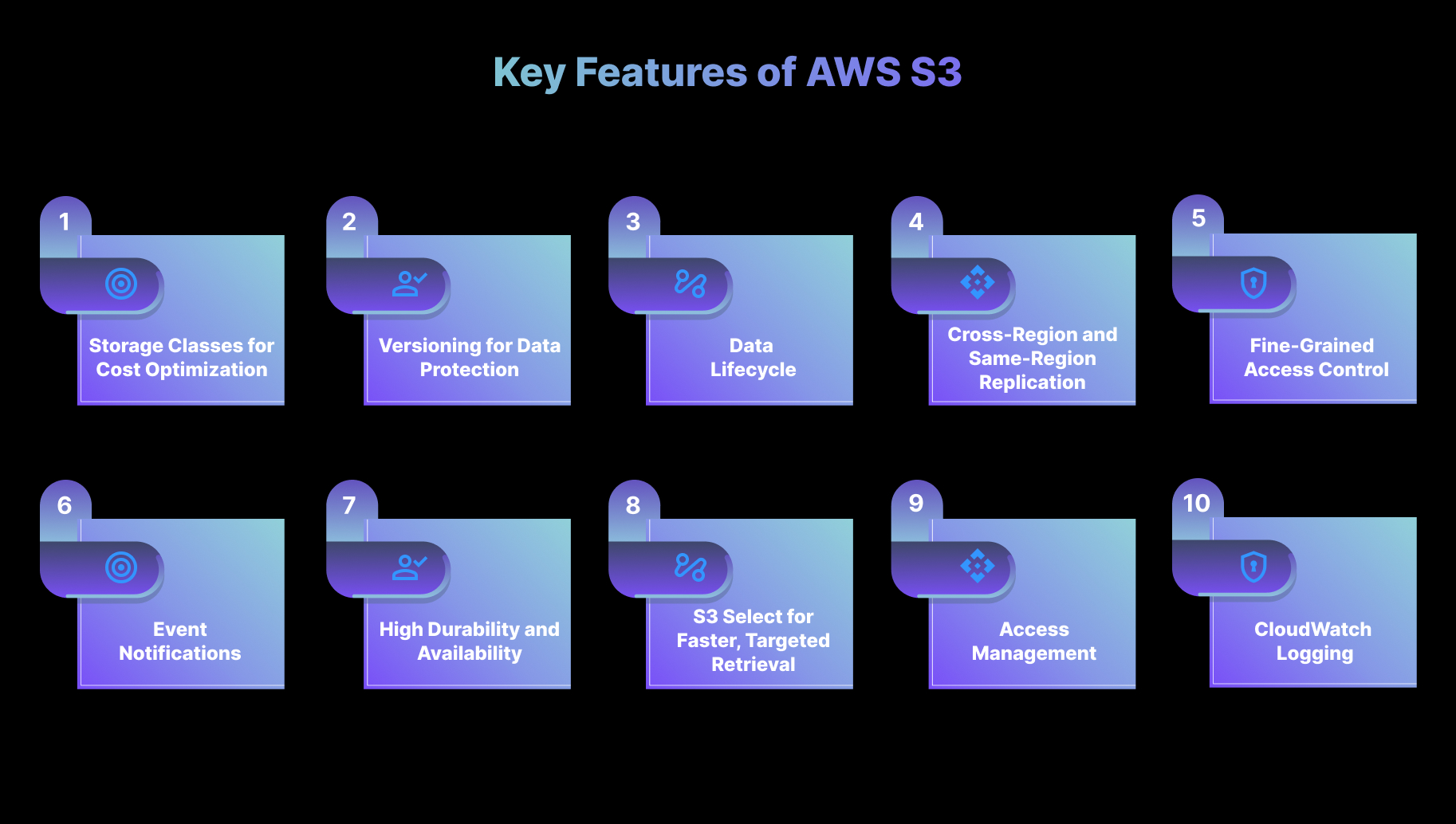
Below are the key features that deliver direct value to engineering teams.
AWS S3 includes multiple storage classes designed to optimize cost based on how often the data is accessed:
S3 also offers unlimited storage (subject to your AWS account quotas) and supports individual objects up to 5 TB.
How engineers benefit:
Lifecycle policies can automatically transition data between these classes, helping your teams reduce storage costs without needing frequent manual updates.
Teams often start with Standard for active projects and automatically archive older logs to Glacier, saving up to 60% on storage while ensuring regulatory compliance.
S3 Versioning keeps multiple versions of an object every time it is updated or deleted. You can retrieve older versions or restore objects that may have been removed accidentally.
How engineers benefit:
If a file is overwritten or deleted by mistake, previous versions can be recovered easily, allowing teams to maintain data integrity without relying on external backup systems.
This feature is a lifesaver for engineering teams. If a critical file is accidentally deleted during deployment, you can recover it immediately without disrupting workflows.”
Lifecycle policies help you automate how objects are managed over time. These rules can transition data to lower-cost storage classes or automatically delete objects that are no longer needed, depending on age or access frequency.
For example, a video streaming company stores raw videos in S3 Standard while they are being edited. After 30 days, lifecycle rules automatically move the files to S3 Infrequent Access.
After 180 days, older videos are archived in S3 Glacier to reduce long-term storage costs by nearly 60 percent.
How engineers benefit:
This automation helps reduce storage costs, keeps environments clean, and ensures long-term data is archived appropriately without requiring manual involvement.
S3 supports both Cross-Region Replication (CRR) and Same-Region Replication (SRR), enabling automatic copying of objects across different AWS regions or within the same region.
How engineers benefit:
CRR improves global availability by placing data closer to users worldwide and strengthening disaster recovery strategies.
For instance, A financial services company replicates logs from the Mumbai region to Singapore using S3 CRR to meet their compliance requirement for off-site disaster recovery. During a regional outage simulation, the team could still access all logs instantly from the replicated bucket.
SRR helps maintain redundant copies of data within the same region, enhancing availability and resilience for regional applications.
S3 integrates closely with AWS IAM, bucket policies, and ACLs to provide detailed access control for both buckets and individual objects. It also supports multiple encryption options, including server-side encryption (SSE-S3, SSE-KMS) and client-side encryption.
Amazon S3 supports at least 3,500 requests per second for writes (PUT/POST/DELETE) and 5,500 requests per second for reads (GET) per prefix. Since prefixes scale linearly, performance increases automatically as you add more prefixes.
How engineers benefit:
Teams can enforce strict, role-based access policies and ensure data is encrypted both at rest and in transit, reducing risk and maintaining compliance with security standards. Using fine-grained IAM policies, teams can prevent accidental public access while enforcing encryption at rest and in transit.
S3 can generate event notifications for activities such as file uploads, modifications, or deletions. These events integrate with services such as AWS Lambda, SNS, and SQS to enable automated workflows.
How engineers benefit:
This feature helps you build responsive pipelines, such as automatically processing uploaded files, sending alerts, or triggering downstream systems for additional tasks like data indexing or video transcoding.
S3 Select enables engineers to retrieve only the specific portions of an object they need, instead of downloading entire large files. This is especially helpful for structured files such as logs, CSV datasets, or analytics inputs.
How engineers benefit:
By pulling only the required data, your teams can reduce retrieval time and lower data transfer costs, which is particularly valuable in analytics and log-processing workflows.
Access Points allow engineers to create dedicated access configurations for specific applications or teams. Each access point has its own policy and can be restricted to particular VPC networks.
How engineers benefit:
This simplifies permissions management for shared datasets, especially in large environments where multiple teams or services require controlled access to different segments of the same data.
After learning about AWS S3, it is easier to understand where Google Cloud Storage stands.
Suggested Read: The Practical Guide to AWS S3 Cost Management in 2025
Google Cloud Storage (GCS) is a scalable and secure object storage service designed to handle large volumes of unstructured data, including backups, logs, images, videos, and more. It’s built for high availability and durability, making it a reliable choice for applications that require resilient, scalable data storage.
GCS offers you a strong set of tools to organize, secure, and manage data across globally distributed regions, while also integrating smoothly with other Google Cloud services to support a wide range of workloads.
Google Cloud Storage offers a powerful set of features that manage data efficiently across the cloud. Below are the key features that deliver practical, real-world value to engineering teams.
Google Cloud Storage provides a range of storage classes designed for different access patterns:
For example, a healthcare analytics startup keeps patient report PDFs in GCS Standard for daily queries. Reports older than 90 days are automatically moved to Nearline, and yearly archives are moved to Coldline. This setup reduced their cloud bill by nearly 40 percent without slowing down their operations.
How Engineers Benefit:
You can manage storage costs more effectively by choosing the right class based on how often data is accessed. Lifecycle policies make this even easier by automatically transitioning data to more cost-efficient tiers when usage patterns change.
GCS enables object versioning for buckets, ensuring that multiple versions of an object are retained. Any update creates a new version, offering a straightforward way to roll back to earlier states when needed.
How Engineers Benefit:
Versioning gives you an extra layer of protection by making it easy to restore previous versions of an object if something is overwritten or deleted accidentally, all without relying on external backup systems. Versioning ensures you can roll back patient data after accidental edits, avoiding compliance risks.
Lifecycle policies in GCS automate how data is stored and managed over time. Objects can be transitioned between storage classes or deleted according to predefined rules based on age or access frequency.
How Engineers Benefit:
This automation ensures that data stays optimized without ongoing manual effort. You can reduce spending, simplify data retention, and maintain compliance with organizational policies. Teams can set rules to archive data automatically, reducing manual maintenance and errors.
GCS offers dual-region and multi-region storage options that automatically replicate objects across different regions or multiple locations within the same region. These options help teams distribute data intelligently based on performance, availability, and resilience needs.
How Engineers Benefit:
Dual-Region Replication improves performance by keeping data closer to users and supports disaster recovery. Multi-Region Replication, on the other hand, provides redundancy across multiple regions, helping teams maintain availability and resilience during regional outages.
GCS integrates with Google Cloud IAM to provide detailed access control at both the bucket and object levels. It also offers encryption at rest and in transit, ensuring strong data security.
How Engineers Benefit:
You can precisely control who can access what, enforce strict security standards, and ensure compliance with regulatory requirements, keeping sensitive data protected throughout its lifecycle.
GCS configures event notifications that trigger workflows whenever objects are added, updated, or deleted. These events can be routed to Google Cloud Pub/Sub, Cloud Functions, or Cloud Run for automated processing.
How Engineers Benefit:
This feature helps teams build event-driven systems that react instantly to data changes, whether it's processing uploaded files, kicking off analysis jobs, or alerting downstream systems.
GCS supports an S3-compatible API that simplifies migrating workloads from AWS S3 or other object storage systems.
How Engineers Benefit:
Teams can move applications and datasets to GCS with minimal code changes, simplifying migrations and reducing the effort typically required to shift storage backends.
With the basics of Google Cloud Storage in place, you can now see how it stacks up against AWS S3.
AWS S3 and Google Cloud Storage (GCS) are both widely used object storage services, but they differ in how you manage and access data. Here’s a closer look at the main distinctions:
Let’s take an example. A SaaS analytics company chose AWS S3 because they process billions of log files and needed prefix-based scaling for high request throughput. Another media-tech firm chose Google Cloud Storage because multi-region buckets gave them better latency for a global audience without configuring replication manually.
Once the key differences are clear, many teams consider how each service is priced and how its storage models work.
Also Read: Best Cloud Storage Providers in 2025: What You Need to Know
When choosing a cloud storage solution, engineers need to consider both pricing models and storage options offered by AWS S3 and Google Cloud Storage. Both platforms provide scalable, highly durable storage.
Still, their cost structures and available storage classes differ, making it essential to select the one that aligns with your data needs and budget.
AWS S3 offers multiple storage classes, allowing you to optimize costs based on how often data is accessed and retrieved. Key storage classes include:
Google Cloud Storage has a simpler pricing structure with fewer storage classes, yet it still offers flexibility for cost optimization:
Once you know how the platforms differ in cost and storage, it is helpful to see how they handle security.
Amazon S3 and Google Cloud Storage (GCS) both offer strong security features, but they differ in how they handle access control, encryption, and overall data protection.
You need to understand these differences to make informed decisions and ensure their data remains secure, compliant, and protected across cloud storage environments.
Amazon S3 provides a comprehensive set of security features designed to protect data, with a focus on granular control and compliance support. Key capabilities include:
Google Cloud Storage also offers robust security tools to protect data and support compliance. Key features include:
S3 offers granular IAM + ACLs for detailed control, whereas GCS focuses on simplicity with IAM roles. Your choice depends on whether you need flexibility or straightforward management.
After looking at their security capabilities, it's easier to compare them overall and see which one aligns better with your needs.
Amazon S3 and Google Cloud Storage offer scalable, highly durable storage, but their feature sets differ in ways that can significantly impact your infrastructure. Here’s a detailed comparison to help engineers make an informed choice:
Must Read: Complete Guide to Cloud Computing Costs 2026
Many tools claim to optimize cloud storage, but most depend on static setups like fixed storage classes or manual cost adjustments. These methods often lead to inefficient storage use, higher retrieval costs, and extra work for engineering teams.
Sedai takes a different approach with autonomous storage optimization. The platform continuously analyzes how your data is accessed and automatically adjusts storage configurations in real time. This keeps your AWS S3 environment both cost-efficient and high-performing, without the need for constant manual tuning.
Here’s what Sedai offers for AWS S3 optimization:
Sedai offers a fully automated way to manage and optimize AWS S3 storage, reducing manual work for engineering teams. By continuously analyzing usage patterns and adjusting storage settings, Sedai ensures you pay only for what you need while maintaining strong performance and reliability.
When optimizing AWS S3 and Google Cloud Storage with Sedai, use the ROI calculator to estimate potential savings from reduced storage waste, improved data retrieval efficiency, and automated resource management.
Choosing between AWS S3 and Google Cloud Storage is just the first step. As your storage needs grow, continuously optimizing your setup becomes key to balancing cost and performance.
Teams that succeed automate and refine their strategies with tools like Sedai, which analyze usage patterns and adjust storage settings in real-time.
With Sedai, your cloud storage stays efficient, cost-effective, and aligned with changing demands, allowing your team to focus on building solutions instead of managing infrastructure.
Take control of your storage environment and immediately start reducing wasteful spending.
A1. Glacier Deep Archive is ideal for data you rarely access but must store for years, such as compliance records or large backup sets. It offers the lowest storage cost in S3, with longer retrieval times and higher retrieval fees.
A2. Google Cloud Storage reduces latency by using multi-region and dual-region setups that automatically replicate data across multiple locations. This ensures faster access for global users and improves resilience.
A3. Google’s multi-region storage automatically spreads data across multiple locations within a continent, giving faster access for global users. AWS CRR lets you choose specific regions for replication, offering more control but potentially higher costs depending on the destinations you select.
A4. AWS S3 uses IAM, bucket policies, and ACLs, which can get complex at scale. Google Cloud Storage relies on IAM with fine-grained controls, but managing policies across regions and teams can still be challenging.
A5. Nearline is a cost-effective option for backups you access once a month or less. It offers lower storage costs but applies retrieval fees if accessed too often, making it suitable for medium-term, infrequently accessed data.
December 5, 2025
December 5, 2025
Choosing between AWS S3 and Google Cloud Storage depends on factors like pricing, storage classes, and performance needs. Both services offer flexible, cost-efficient storage solutions, but key differences in retrieval costs, security features, and data availability impact how they fit into your infrastructure. By analyzing your data access patterns, budget, and required performance, you can determine which service offers the best balance
Choosing the right cloud storage can be tricky. AWS S3 and Google Cloud Storage (GCS) are both reliable, but how do you know which one fits your workload, budget, and performance needs?
For engineering teams, the challenge goes beyond capacity or retrieval speed. It’s about controlling costs, ensuring security, and keeping data accessible across regions.
Both platforms deliver exceptional durability. S3 is designed for 99.999999999% durability, and GCS matches this with 11-nines backed by multi-zone redundancy. Still, differences in storage classes, replication, and ecosystem support can make the choice feel complex.
In this blog, you’ll explore the key differences between AWS S3 and Google Cloud Storage, covering pricing, performance, security, and more, so you can confidently choose the service that fits your workloads.
AWS S3, or Simple Storage Service, is a scalable object storage platform that helps you store and access almost any amount of data whenever you need it. It’s built for high availability and durability, which is why it works so well for unstructured data like backups, logs, images, and videos.
Beyond storage, S3 also provides teams with easy ways to organize, secure, and manage their data, making it a reliable foundation for many cloud applications.
AWS S3 provides a wide range of powerful features that help you store, manage, and optimize large amounts of data efficiently. These capabilities make it a dependable choice for both day-to-day operations and large-scale data workloads.
Below are the key features that deliver direct value to engineering teams.
AWS S3 includes multiple storage classes designed to optimize cost based on how often the data is accessed:
S3 also offers unlimited storage (subject to your AWS account quotas) and supports individual objects up to 5 TB.
How engineers benefit:
Lifecycle policies can automatically transition data between these classes, helping your teams reduce storage costs without needing frequent manual updates.
Teams often start with Standard for active projects and automatically archive older logs to Glacier, saving up to 60% on storage while ensuring regulatory compliance.
S3 Versioning keeps multiple versions of an object every time it is updated or deleted. You can retrieve older versions or restore objects that may have been removed accidentally.
How engineers benefit:
If a file is overwritten or deleted by mistake, previous versions can be recovered easily, allowing teams to maintain data integrity without relying on external backup systems.
This feature is a lifesaver for engineering teams. If a critical file is accidentally deleted during deployment, you can recover it immediately without disrupting workflows.”
Lifecycle policies help you automate how objects are managed over time. These rules can transition data to lower-cost storage classes or automatically delete objects that are no longer needed, depending on age or access frequency.
For example, a video streaming company stores raw videos in S3 Standard while they are being edited. After 30 days, lifecycle rules automatically move the files to S3 Infrequent Access.
After 180 days, older videos are archived in S3 Glacier to reduce long-term storage costs by nearly 60 percent.
How engineers benefit:
This automation helps reduce storage costs, keeps environments clean, and ensures long-term data is archived appropriately without requiring manual involvement.
S3 supports both Cross-Region Replication (CRR) and Same-Region Replication (SRR), enabling automatic copying of objects across different AWS regions or within the same region.
How engineers benefit:
CRR improves global availability by placing data closer to users worldwide and strengthening disaster recovery strategies.
For instance, A financial services company replicates logs from the Mumbai region to Singapore using S3 CRR to meet their compliance requirement for off-site disaster recovery. During a regional outage simulation, the team could still access all logs instantly from the replicated bucket.
SRR helps maintain redundant copies of data within the same region, enhancing availability and resilience for regional applications.
S3 integrates closely with AWS IAM, bucket policies, and ACLs to provide detailed access control for both buckets and individual objects. It also supports multiple encryption options, including server-side encryption (SSE-S3, SSE-KMS) and client-side encryption.
Amazon S3 supports at least 3,500 requests per second for writes (PUT/POST/DELETE) and 5,500 requests per second for reads (GET) per prefix. Since prefixes scale linearly, performance increases automatically as you add more prefixes.
How engineers benefit:
Teams can enforce strict, role-based access policies and ensure data is encrypted both at rest and in transit, reducing risk and maintaining compliance with security standards. Using fine-grained IAM policies, teams can prevent accidental public access while enforcing encryption at rest and in transit.
S3 can generate event notifications for activities such as file uploads, modifications, or deletions. These events integrate with services such as AWS Lambda, SNS, and SQS to enable automated workflows.
How engineers benefit:
This feature helps you build responsive pipelines, such as automatically processing uploaded files, sending alerts, or triggering downstream systems for additional tasks like data indexing or video transcoding.
S3 Select enables engineers to retrieve only the specific portions of an object they need, instead of downloading entire large files. This is especially helpful for structured files such as logs, CSV datasets, or analytics inputs.
How engineers benefit:
By pulling only the required data, your teams can reduce retrieval time and lower data transfer costs, which is particularly valuable in analytics and log-processing workflows.
Access Points allow engineers to create dedicated access configurations for specific applications or teams. Each access point has its own policy and can be restricted to particular VPC networks.
How engineers benefit:
This simplifies permissions management for shared datasets, especially in large environments where multiple teams or services require controlled access to different segments of the same data.
After learning about AWS S3, it is easier to understand where Google Cloud Storage stands.
Suggested Read: The Practical Guide to AWS S3 Cost Management in 2025
Google Cloud Storage (GCS) is a scalable and secure object storage service designed to handle large volumes of unstructured data, including backups, logs, images, videos, and more. It’s built for high availability and durability, making it a reliable choice for applications that require resilient, scalable data storage.
GCS offers you a strong set of tools to organize, secure, and manage data across globally distributed regions, while also integrating smoothly with other Google Cloud services to support a wide range of workloads.
Google Cloud Storage offers a powerful set of features that manage data efficiently across the cloud. Below are the key features that deliver practical, real-world value to engineering teams.
Google Cloud Storage provides a range of storage classes designed for different access patterns:
For example, a healthcare analytics startup keeps patient report PDFs in GCS Standard for daily queries. Reports older than 90 days are automatically moved to Nearline, and yearly archives are moved to Coldline. This setup reduced their cloud bill by nearly 40 percent without slowing down their operations.
How Engineers Benefit:
You can manage storage costs more effectively by choosing the right class based on how often data is accessed. Lifecycle policies make this even easier by automatically transitioning data to more cost-efficient tiers when usage patterns change.
GCS enables object versioning for buckets, ensuring that multiple versions of an object are retained. Any update creates a new version, offering a straightforward way to roll back to earlier states when needed.
How Engineers Benefit:
Versioning gives you an extra layer of protection by making it easy to restore previous versions of an object if something is overwritten or deleted accidentally, all without relying on external backup systems. Versioning ensures you can roll back patient data after accidental edits, avoiding compliance risks.
Lifecycle policies in GCS automate how data is stored and managed over time. Objects can be transitioned between storage classes or deleted according to predefined rules based on age or access frequency.
How Engineers Benefit:
This automation ensures that data stays optimized without ongoing manual effort. You can reduce spending, simplify data retention, and maintain compliance with organizational policies. Teams can set rules to archive data automatically, reducing manual maintenance and errors.
GCS offers dual-region and multi-region storage options that automatically replicate objects across different regions or multiple locations within the same region. These options help teams distribute data intelligently based on performance, availability, and resilience needs.
How Engineers Benefit:
Dual-Region Replication improves performance by keeping data closer to users and supports disaster recovery. Multi-Region Replication, on the other hand, provides redundancy across multiple regions, helping teams maintain availability and resilience during regional outages.
GCS integrates with Google Cloud IAM to provide detailed access control at both the bucket and object levels. It also offers encryption at rest and in transit, ensuring strong data security.
How Engineers Benefit:
You can precisely control who can access what, enforce strict security standards, and ensure compliance with regulatory requirements, keeping sensitive data protected throughout its lifecycle.
GCS configures event notifications that trigger workflows whenever objects are added, updated, or deleted. These events can be routed to Google Cloud Pub/Sub, Cloud Functions, or Cloud Run for automated processing.
How Engineers Benefit:
This feature helps teams build event-driven systems that react instantly to data changes, whether it's processing uploaded files, kicking off analysis jobs, or alerting downstream systems.
GCS supports an S3-compatible API that simplifies migrating workloads from AWS S3 or other object storage systems.
How Engineers Benefit:
Teams can move applications and datasets to GCS with minimal code changes, simplifying migrations and reducing the effort typically required to shift storage backends.
With the basics of Google Cloud Storage in place, you can now see how it stacks up against AWS S3.
AWS S3 and Google Cloud Storage (GCS) are both widely used object storage services, but they differ in how you manage and access data. Here’s a closer look at the main distinctions:
Let’s take an example. A SaaS analytics company chose AWS S3 because they process billions of log files and needed prefix-based scaling for high request throughput. Another media-tech firm chose Google Cloud Storage because multi-region buckets gave them better latency for a global audience without configuring replication manually.
Once the key differences are clear, many teams consider how each service is priced and how its storage models work.
Also Read: Best Cloud Storage Providers in 2025: What You Need to Know
When choosing a cloud storage solution, engineers need to consider both pricing models and storage options offered by AWS S3 and Google Cloud Storage. Both platforms provide scalable, highly durable storage.
Still, their cost structures and available storage classes differ, making it essential to select the one that aligns with your data needs and budget.
AWS S3 offers multiple storage classes, allowing you to optimize costs based on how often data is accessed and retrieved. Key storage classes include:
Google Cloud Storage has a simpler pricing structure with fewer storage classes, yet it still offers flexibility for cost optimization:
Once you know how the platforms differ in cost and storage, it is helpful to see how they handle security.
Amazon S3 and Google Cloud Storage (GCS) both offer strong security features, but they differ in how they handle access control, encryption, and overall data protection.
You need to understand these differences to make informed decisions and ensure their data remains secure, compliant, and protected across cloud storage environments.
Amazon S3 provides a comprehensive set of security features designed to protect data, with a focus on granular control and compliance support. Key capabilities include:
Google Cloud Storage also offers robust security tools to protect data and support compliance. Key features include:
S3 offers granular IAM + ACLs for detailed control, whereas GCS focuses on simplicity with IAM roles. Your choice depends on whether you need flexibility or straightforward management.
After looking at their security capabilities, it's easier to compare them overall and see which one aligns better with your needs.
Amazon S3 and Google Cloud Storage offer scalable, highly durable storage, but their feature sets differ in ways that can significantly impact your infrastructure. Here’s a detailed comparison to help engineers make an informed choice:
Must Read: Complete Guide to Cloud Computing Costs 2026
Many tools claim to optimize cloud storage, but most depend on static setups like fixed storage classes or manual cost adjustments. These methods often lead to inefficient storage use, higher retrieval costs, and extra work for engineering teams.
Sedai takes a different approach with autonomous storage optimization. The platform continuously analyzes how your data is accessed and automatically adjusts storage configurations in real time. This keeps your AWS S3 environment both cost-efficient and high-performing, without the need for constant manual tuning.
Here’s what Sedai offers for AWS S3 optimization:
Sedai offers a fully automated way to manage and optimize AWS S3 storage, reducing manual work for engineering teams. By continuously analyzing usage patterns and adjusting storage settings, Sedai ensures you pay only for what you need while maintaining strong performance and reliability.
When optimizing AWS S3 and Google Cloud Storage with Sedai, use the ROI calculator to estimate potential savings from reduced storage waste, improved data retrieval efficiency, and automated resource management.
Choosing between AWS S3 and Google Cloud Storage is just the first step. As your storage needs grow, continuously optimizing your setup becomes key to balancing cost and performance.
Teams that succeed automate and refine their strategies with tools like Sedai, which analyze usage patterns and adjust storage settings in real-time.
With Sedai, your cloud storage stays efficient, cost-effective, and aligned with changing demands, allowing your team to focus on building solutions instead of managing infrastructure.
Take control of your storage environment and immediately start reducing wasteful spending.
A1. Glacier Deep Archive is ideal for data you rarely access but must store for years, such as compliance records or large backup sets. It offers the lowest storage cost in S3, with longer retrieval times and higher retrieval fees.
A2. Google Cloud Storage reduces latency by using multi-region and dual-region setups that automatically replicate data across multiple locations. This ensures faster access for global users and improves resilience.
A3. Google’s multi-region storage automatically spreads data across multiple locations within a continent, giving faster access for global users. AWS CRR lets you choose specific regions for replication, offering more control but potentially higher costs depending on the destinations you select.
A4. AWS S3 uses IAM, bucket policies, and ACLs, which can get complex at scale. Google Cloud Storage relies on IAM with fine-grained controls, but managing policies across regions and teams can still be challenging.
A5. Nearline is a cost-effective option for backups you access once a month or less. It offers lower storage costs but applies retrieval fees if accessed too often, making it suitable for medium-term, infrequently accessed data.




.svg)
.svg)


%201.svg)
%202.svg)


.svg)


