Breaking Down Cloud Computing Costs
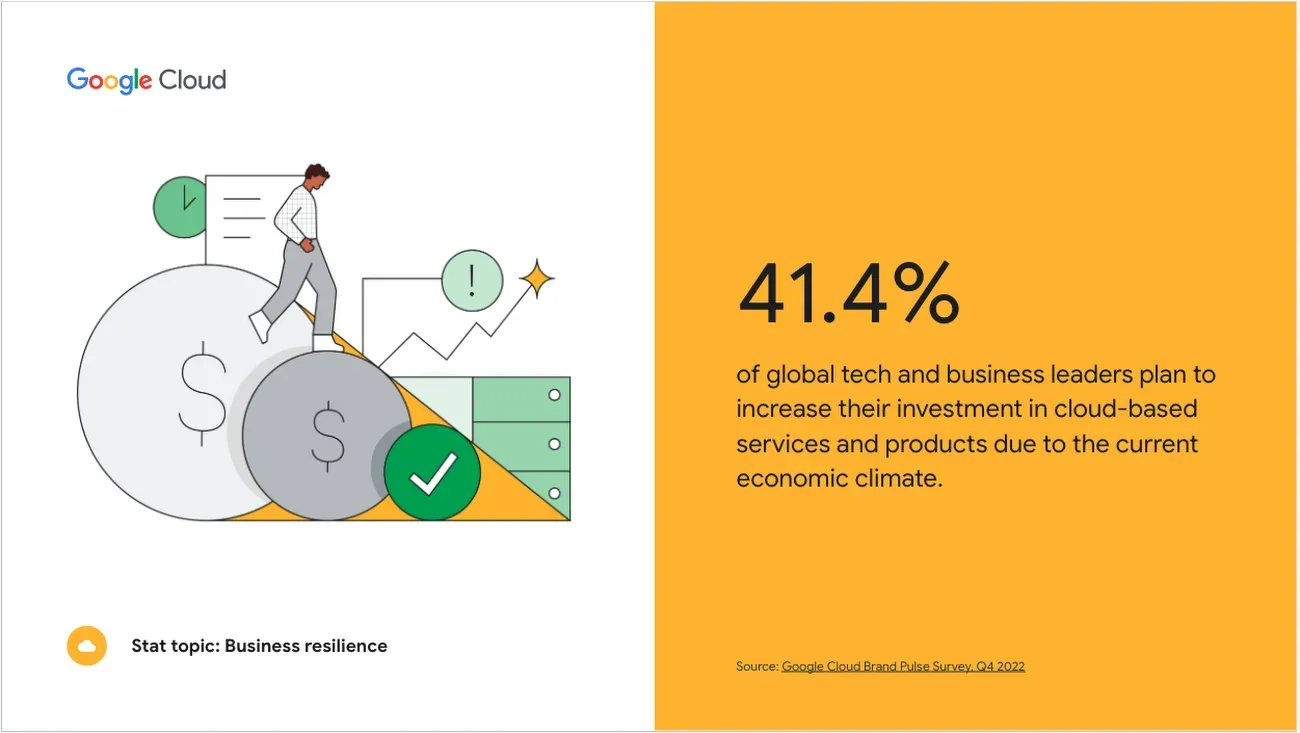
Source: Google Cloud Customer Newsletter: March 2023
Cloud computing continues to drive innovation and efficiency across industries, becoming an essential component of modern IT infrastructure. As businesses increasingly migrate their operations to the cloud, understanding the cost structures associated with these services has never been more important. Whether deciding between major providers like AWS, Azure, and Google Cloud Platform (GCP) or evaluating the trade-offs between Infrastructure as a Service (IaaS) and Platform as a Service (PaaS), a clear grasp of cloud pricing models is critical.
Optimizing cloud costs in 2025 can determine whether your organization maximizes the value of its cloud investment or faces unexpected budget overruns. This article will break down the key factors influencing cloud costs and provide strategies for controlling expenses in today’s cloud-driven landscape.
The Importance of Understanding Cloud Cost Structures

Understanding and managing cloud cost structures is not just a financial exercise; it's a strategic imperative that empowers decision-makers to make informed choices. Here is the part that explains the importance of the cloud cost structure.
- Optimizing Cloud Computing Costs: The primary goal for businesses already employing cloud services is to optimize their bills. This process not only presents a significant opportunity for cost reduction but also assures scalability and performance, offering a promising outlook for the financial benefits of cloud migration.
- Selecting the Right Cloud Provider: It is crucial to understand the cost implications, especially during migration to a cloud platform like AWS, Azure, or Google Cloud (GCP). This decision directly impacts the long-term cost efficiency of any business, providing reassurance about the potential return on investment.
- Setting up Migration from On-Premise to Cloud: With more secure and better cloud platforms, more companies are considering moving on-premise data centers to the cloud. This process involves evaluating the total cost of ownership (TCO) in a private or public cloud environment. Ahead of TCO, calculating the migration costs, possible savings, and hidden costs can undoubtedly influence the decision between public and private cloud environments.
In 2025, cloud costs will be determined by analyzing several factors, including types of services, region-based pricing, and hidden fees. Understanding these costs will help businesses make future strategic cloud management and migration decisions.
Overview Of Common Cloud Cost Components And Considerations
Cloud computing costs are typically broken down into the following components:
- Computing: The compute portion generally includes the virtual machines (VMs), instances, or containers that run applications. It typically has a time-based vs. usage-based pricing structure. Several cloud providers offer variations in pricing models for computing, like pay-as-you-go, reserved instances, and spot instances.
- Storage: Businesses experience cloud costs based on the type of storage they choose. This storage can be a block, object, or file storage. Factors like access frequency, durability, and geographic redundancy also influence pricing.
- Networking: Data transfer costs can significantly impact the bill, particularly for egress (data leaving the cloud). Networking costs vary based on services like load balancers, VPNs, and direct connections.
- Hidden Costs: Many businesses need to pay more attention to charges for services such as support, data retrieval, and cross-region traffic. These hidden costs, which are not immediately apparent but can quickly add up, leading to unexpected expenses, are an essential consideration in cloud cost management. For instance, data retrieval from a cloud storage service can incur additional charges, and cross-region traffic can lead to unexpected costs if not managed properly.
Components of Cloud Computing Costs
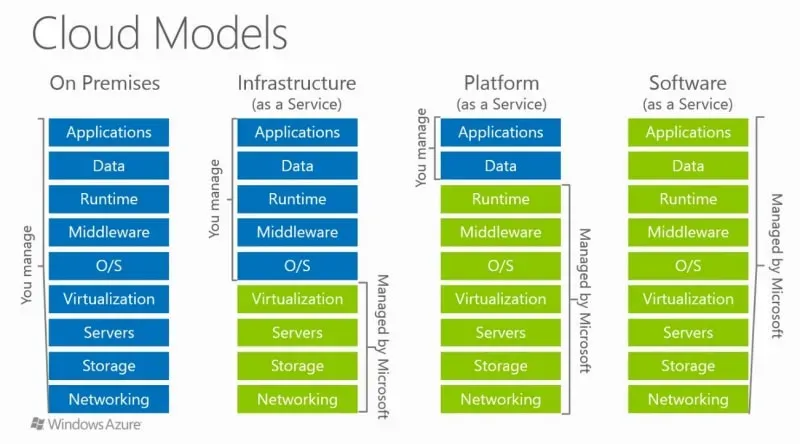
(Source: IaaS vs. PaaS vs. SaaS )
Infrastructure as a Service and Platform as a Service are significant segments of cloud computing costs. Both of these components are important in presenting overall cloud expenditures for businesses, and understanding their smaller sections is essential for companies willing to upgrade their cloud strategies.
According to Gartner's estimates, global spending on IaaS and PaaS has grown immensely. Infrastructure-as-a-service (IaaS) is expected to experience the highest end-user spending growth at 25.6%, subsequently led by platform-as-a-service (PaaS) at 20.6% after IaaS:
These figures show that cloud adoption concerns more than IaaS (compute, storage, network). The increase in the relevance of PaaS services is vital for cloud users who continuously offer integrated tools for app development, middleware, and databases. Since cloud computing organizations are expanding their cloud usage, PaaS costs will also become a big chunk of overall cloud expenses.
Though many factors can affect the cost of cloud services, and costs can vary widely between vendors, the following table gives an overview of the most significant factors.
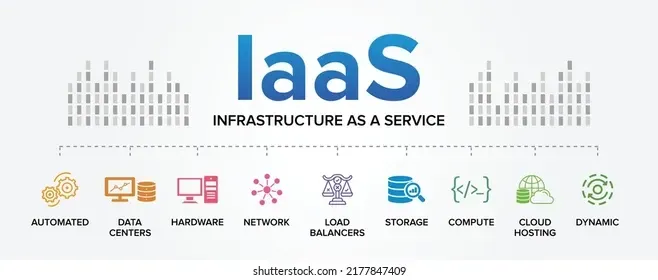
1. IaaS: Compute, Networking, Storage, and Hidden Costs
(Source: Tips on infrastructure and platform services for small and midsize businesses )
Computing Cloud Costs: The backbone of IaaS is mainly formed by compute resources that offer on-demand virtual machines and other types of serverless options such as AWS EC2, Lambda, Azure Virtual Machines, and Google Cloud Compute Engine. These services provide businesses with extensible computing power without actually letting them invest in physical infrastructure.
- Cost Breakdown: Compute typically accounts for the most considerable portion of a cloud bill, often ranging from 30% to 70%, depending on the workloads and usage. For example, data-intensive applications like AI or machine learning may require more computing resources, driving costs higher.
- Examples: AWS EC2 instances are charged based on instance type, size, and usage. AWS Lambda charges by the number of requests and compute duration (measured in GB seconds).
Networking Costs: Cloud costs arise due to networking, which mainly transfers data in and out of the cloud. While data transfer is primarily free, retrieving data leads to higher charges. Networking consists of DNS routing (e.g., AWS Route 53), load balancing, and VPN connectivity.
- Cost Breakdown: Networking costs typically account for around 5-15% of total cloud bills. Egress charges are a significant consideration for companies with global operations or those frequently transferring large datasets.
- Examples: AWS business-grade users are charged for data based on the transferred volume. As more data is moved, the pricing tiers become expensive for the business. The amount of data processed and the number of requests dictate the billing of a load balancer service like AWS Elastic Load Balancer.
Storage Costs: Storage expenses in cloud environments depend on the type of storage used—a block, object, or file—and the total data stored. Services like AWS S3, Azure Blob Storage, and Google Cloud Storage bill their users based on the volume of data stored and the frequency with which it is accessed.
- Cost Breakdown: As per Canalys, Cloud storage costs can be at least 10% to 20% of total cloud spending. However, this figure can increase for organizations dealing with large datasets or requiring high-durability storage solutions.
- Examples: AWS S3 charges are divided into multiple tiers, with S3 Standard for frequently accessed data, S3 Infrequent Access, and S3 Glacier for archival storage. Additionally, there are charges for data retrieval and API requests.
Additional Hidden Expenses Beyond the prominent computing, storage, and networking costs, organizations must account for several hidden expenses that can significantly impact their cloud bills. These include:
- Support and Maintenance Charges: Platforms often charge businesses for premium services like support services, which are crucial for enterprise-level cloud operations.
- Data Retrieval Charges: A significant charge is billed on retrievals from AWS Glacier as storing data in cloud archives is affordable, while retrieving it is costly.
- Cross-Region Traffic Charges: When companies transfer data from one region to another, extra charges can be applied to the bill, especially if it’s a multi-region deployment.
By taking suggested steps to avoid these budget overruns, companies can understand hidden costs and build a complete picture of cloud expenses, resulting in better outcomes.
2. PaaS: Platform as a Service – Managed Services
Source: Platform as a Service
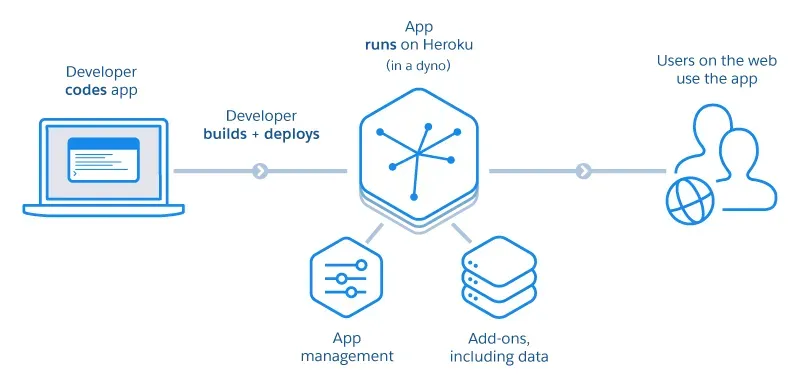
Organizations increasingly adopt PaaS because they want to concentrate solely on developing their applications rather than on the complexity of operations and managing the necessary infrastructure. Comparatively, these services often have higher charges than IaaS; however, companies save a lot of time and resources by automating functions such as updates, scaling, and security.
Through PaaS, organizations can use managed services such as databases, container orchestration platforms, and monitoring tools. This helps eliminate the operational burden of each separate service and supports growth and flexibility by default.
1. Database Services
Database services are among the most frequent PaaS offerings and significantly affect cloud costs. These managed databases manage everything from backups to scaling, allowing software teams to concentrate on building applications rather than running infrastructure.
- Managed Relational Databases: Various solutions, such as Amazon RDS, Google Cloud SQL, and Azure SQL Database, are widely used for managing relational data. Users don't need to install, configure, and maintain database instances manually. They also provide features like automated backups, scaling, and patching that allow businesses to focus on their applications rather than handling database administration.
- NoSQL Databases: Amazon DynamoDB or Google Cloud Datastore are some managed NoSQL databases developed for applications requiring low latency access to significant volumes of data that can be structured or unstructured at times. These services automatically manage data partitioning, replication, and failover without requiring manual intervention and certifying high availability.
- For applications that require real-time performance, fast in-memory data caching options like Amazon ElastiCache and Azure Cache for Redis are good options. These controlled services create instances and scale, among other things, making it easy for IT teams to handle operations.
2. Container Services
As containerization becomes more popular, PaaS solutions for container arrangement and management will become more critical for cloud-native environments.
- Managed Kubernetes Services: Platforms like Amazon EKS, Google Kubernetes Engine (GKE), and Azure Kubernetes Services (AKS) provide automated environments for Kubernetes. These solutions take care of services from version upgrades to security upgrades so that developers can spend their valuable time managing and deploying applications instead of worrying about the underlying infrastructure.
- The standalone management of Kubernetes helps users, and deep knowledge and messages are an effort towards guaranteeing their stability, effectiveness, and insecurity. Generally, dealing with Kubernetes services reduces operational tasks if there are Managed Kubernetes Services. This makes them more approachable and cost-effective than self-hosting Kubernetes clusters.
- Container Registry Tools: Amazon ECR, Google Container Registry, and Azure Container Registry are some solutions that make it easier for users to reserve, manage, and use their Docker container images. These tools help containerized applications sprint by providing security access, variable scan functions, and version determination.
3. Serverless Computing
Function as a service, also known as serverless computing, is a top-rated PaaS offering. By responding to events or managing servers, developers can run different functions responding to specific events without provisioning.
- Function-as-a-Service (FaaS): Developers start deploying codes in a serverless environment, where cloud providers handle infrastructure and scaling with platforms like AWS Lambda, Google Cloud Functions, and Azure Functions. The generated bill relies on the function's number of requests and response times, making FaasS a better and more cost-lenient solution for periodical or unpredictable workloads.
- App Hosting Platforms: Many users consider platforms like AWS Elastic Beanstalk, Azure App Service, and Google App Engine as their first choice for automating, deploying, and managing web applications. These platforms can automate tasks for managing infrastructure and offer more monitoring and auto-scaling features.
4. Data Analytics and Big Data Services
PaaS services for data analytics and big data processing are essential for businesses handling large amounts of data. These services provide managed environments without the need to maintain complex infrastructure for processing and analyzing data.
- Data Warehousing: Most well-known data warehousing services, such as Amazon Redshift, Azure Synapse Analytics, and Google BigQuery, provide more scalable environments for large datasets with complex queries. Platforms automate data partitioning storage tiers and regular compression by optimizing performance and cost.
- Stream Processing: Several platforms offer data processing services for applications that require data Analytics and low latency. These platforms include Google Cloud Dataflow, Amazon Kinesis, and Azure Stream Analytics. By having a scaling and fall tolerance operation system, these services reduce the need for manual intervention.
5. Integration and Messaging Services
As cloud-native applications become more complex, maintaining application functionality through PaaS services, which enable communication between various components, becomes more critical.
- Message Queues: For businesses needing messaging solutions for different distributed applications, services like Google Cloud Pub/Sub, Amazon SQS, and Azure Service Bus are scalable and reliable options. These managed solutions ensure reliable communication between services by offering features like retries, dead-letter queries, and message persistence.
- API Management: Some managed API gateways help businesses manage, secure, and monitor APIs without hindering the underlying infrastructure. These platforms include Google Cloud Endpoints, AWS API Gateway, and Azure API Management. These platforms offer integrated security and real-time analysis with rate limiting to ensure that APIs can scale efficiently and remain secure.
Payment Structures of Major Cloud Providers
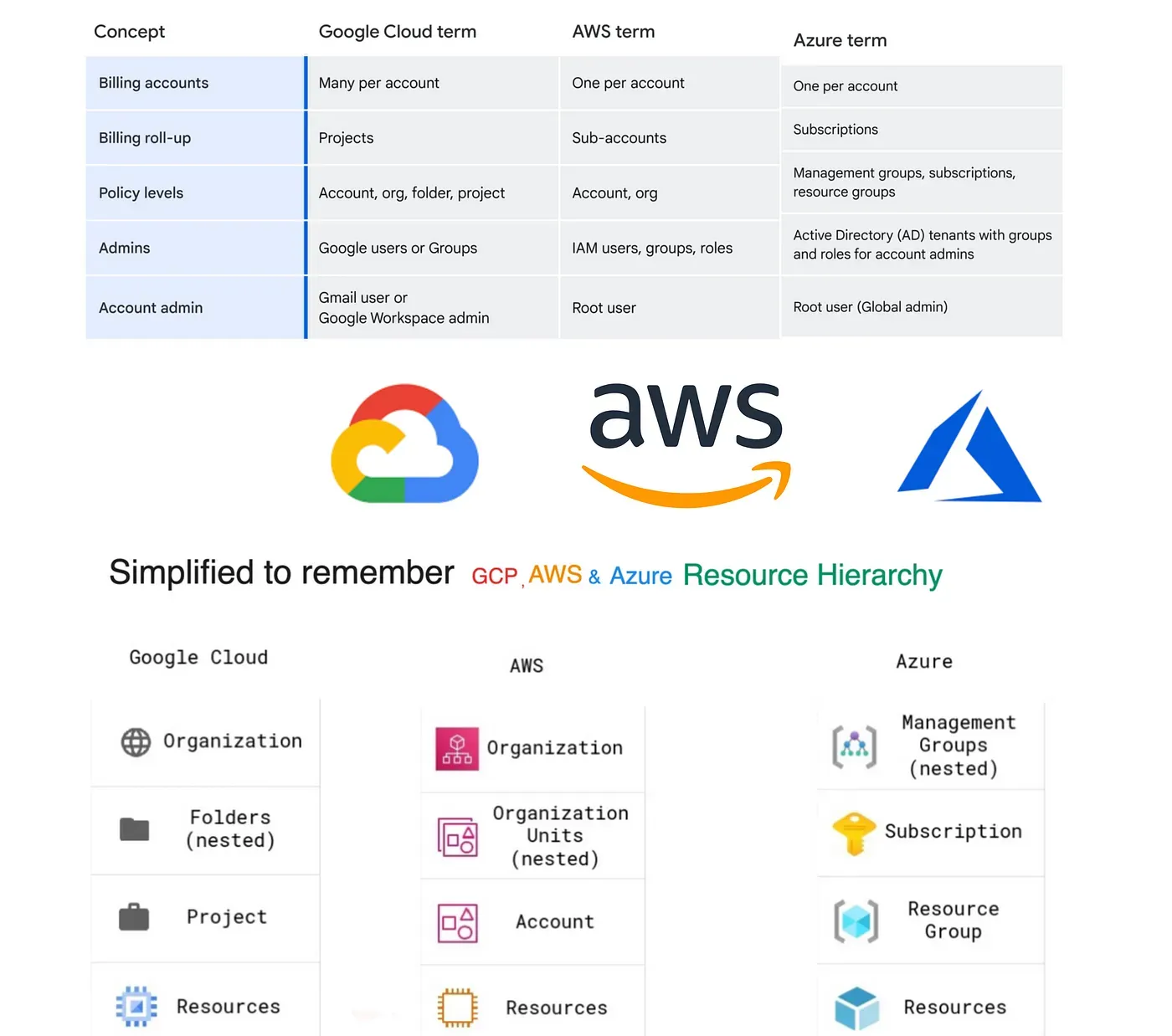
Source: GCP, AWS & Azure Cloud Resource Hierarchies and Billing Management simplified guide
Knowing about significant cloud providers' payment structures is very important for businesses. To manage enterprises efficiently, each cloud provider offers services for specific business needs.
1. Amazon Web Services (AWS) Pricing
AWS’s pay-as-you-go model charges users for their actual resource use. It offers services like S3 and EC2 and long-term discounted options like reserved and spot instances. AWS also provides saving plans for businesses that commit to a certain usage level for one to three years at lower rates.
2. Microsoft Azure Pricing
Although Microsoft Azure’s pay-as-you-go approach is identical to AWS, they also offer additional Reserved VM Instances that increaseraise the cost savings by up to 72%. This hybrid benefit allows users to use their existing Windows on-premise server and SQL license, which further leads to cloud cost savings. Their Spot VM focuses on interruptible workloads by offering discounted prices that, in return, maximize savings in development tasks.
3. Google Cloud Platform (GCP) Pricing
GCP’s pay-as-you-go service offers discounts that are automatically applied for consistent usage without interruption. Google offers committed use contracts for planned workloads, where users can get up to 57% off for a 1—to 3-year workload commitment. Preemptible VMs like AWS Spot Instances are excellent for more temporary workloads and cost-saving computing options.
4. Oracle Cloud Infrastructure (OCI) Pricing
OCI’s pricing structure is a bit more flexible. They offer universal credit pricing, allowing people to pay for any service anytime. This plan provides both pay-as-you-go and yearly workload commitment options. OCI’s rates are also consistent in all regions, which helps businesses predict prices if they wish to scale globally.
Pricing Models and Strategies
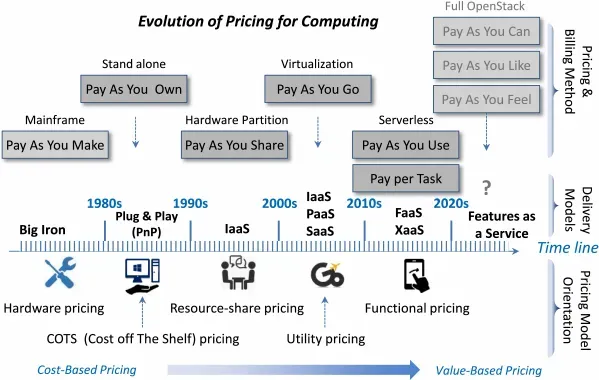
Source: Cloud Pricing Models
Whether there are numerous business needs right around the clock, cloud providers offer diverse pricing options and strategies to cater to different business needs. Before we move on to cloud platform pricing comparisons like AWS vs Azure vs GCP pricing, we need to understand the critical models used across cloud platforms:
1. Pay-As-You-Go
This is the most common and flexible model option, allowing businesses to pay only for the resources they use without making any commitments. It is ideal for unstable workloads but can become costly if resources are not optimized. The billing structure also uses computing, storage, and networking services.
2. Reserved Instances
This model allows businesses to use specific resources for 1 to 3 years. It generally requires partial or complete upfront payment as it has long-term cost predictability. Providers like Azure and AWS offer 72% savings compared to on-demand prices, which makes it a good solution for predictable workloads.
3. Spot Instances
AWS vs Azure vs GCP pricing models like Spot Instances, Spot VMs, and Preemptible VMs offer significant discounts of up to 90% on computing costs. These models utilize spare cloud capacity for these discounts. However, they come with a risk of being terminated with a shorter notice period. This makes them suitable for fault-tolerant or flexible workload environments.
4. Savings Plans
Saving plans are considered one of the most flexible pricing models as they offer saving options for more than just one service range. They go as much as committing to charge for specific dollar amounts per hour over a more extended time. In terms of AWS vs Azure vs GCP cost, AWS’s computing savings plans cover multiple services like EC2, Lambda, and more for lower cloud costs. Azure and GCP also have similar options available in the market. This model is ideal for businesses that have predictable spending but variable workloads.
5. Fixed Subscriptions
This model has a predictable pricing structure, with all the services divided at monthly or yearly rates. Microsoft Azure and Oracle Cloud providers make it ideal for businesses looking for simplicity in cost control by offering subscription pricing options for services like virtual machines and databases.
Comparative Cost Analysis of Major Cloud Providers
This section compares key cost components across major cloud service providers for both IaaS and PaaS services.
Cloud Cost Management Strategies
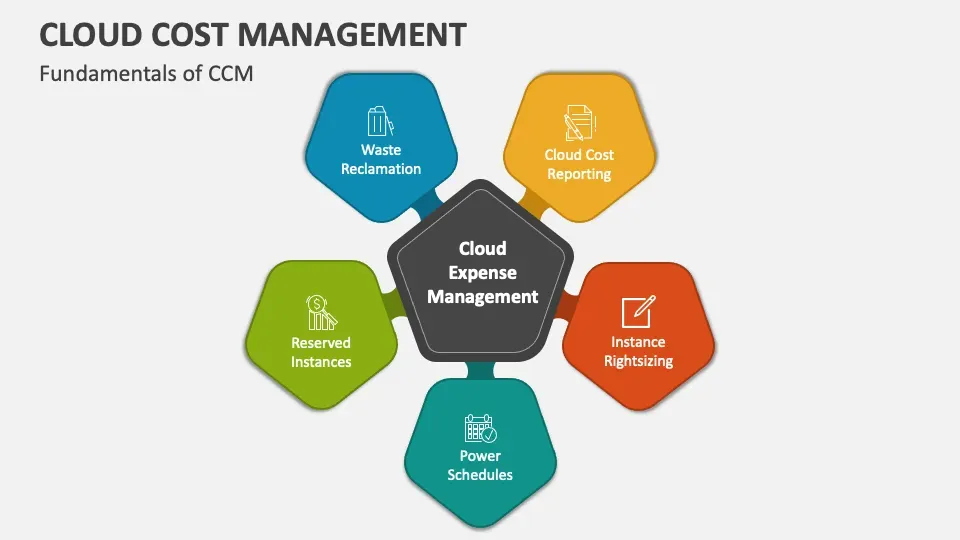
Source: Cloud Cost Management
Managing the cloud cost-efficiently is essential for businesses to keep their expenses in line to leverage the full potential of cloud services. Below are six top strategies to manage cloud costs effectively:
- Budget Control: Develop a clear budget strategy for cloud services and monitor expenses periodically to prevent unexpected charges.
- Proper Sizing: Ensure that the sizing of computing instances and storage volumes is appropriate and per your actual usage requirement. Over-storage and unnecessary provisioning can lead to higher bills.
- Autoscaling: Enabling the autoscaling feature is the ideal option to ensure that businesses only pay for the resources they use. This feature allows resources to be actively adjusted based on specific business demands.
- Scheduling: When not in use, schedule services to automatically shut down. This needs to be done especially on weekends or during non-productive times, i.e., non-business hours, to reduce idle resource costs.
- Detecting Unused Resources: Regularly audit and remove unused or idle resources, such as unfunctioning VMs or unattached storage, which can lead to extra charges.
- Applying Discounts Strategically: To optimize costs, it is advised to take advantage of cloud pricing models. AWS, Azure, and GCP all offer good discounts, helping businesses reduce costs quickly.
You can also read more about the most effective approaches to cloud cost management and optimization.
Calculating Cloud Costs vs. Traditional On-Premises for Migration Decisions
When comparing AWS vs Azure vs GCP pricing for cloud migration, it’s essential to evaluate the following factors:
- Capital and Operational Costs: Cloud services eliminate upfront capital expenses like hardware, focusing more on operational costs that are spread over time.
- Direct vs. Indirect Expenses: The cloud offers transparency in direct costs like computing and storage. However, businesses must also consider indirect expenses such as downtime and maintenance, which are often lower than on-premises.
- Comprehensive IT Infrastructure Audits: Before migrating, a thorough audit of the current infrastructure helps identify costs that can be reduced or eliminated through cloud migration.
Importance of Optimization
In the AWS vs Azure vs GCP cost comparison, public cloud scalability shifts the focus from utilization to cost control. While on-premises environments focus on maximizing limited resources, the cloud allows infinite scalability. However, the benefits can be quickly lost if cloud resources are not managed efficiently. Critical points for optimization include:
- Focus on cost control through monitoring and cost-management tools.
- Ensure cloud resources are used efficiently to avoid waste.
Cost Optimization Tools
- First-Party Cloud Cost Management Tools: AWS Cost Explorer, Azure Cost Management, and GCP’s Cloud Billing provide built-in solutions for monitoring and managing costs across their respective platforms.
- Multi-Cloud Management using Third-Party Tools: Tools like CloudHealth and Spot by NetApp provide multi-cloud management abilities, enabling businesses to manage costs across AWS, Azure, and GCP environments.
Key Takeaways in Computing Costs in 2025
Today, lower costs are among the most promising benefits of cloud computing and services, as per Statista's report. Therefore, making a well-thought-out plan and breaking down cloud costs is very important. Businesses can switch to AI-driven cloud cost optimization and practice understanding cloud adoption's financial indications by analyzing direct and indirect costs.
AWS vs Azure vs GCP pricing should be broken down into smaller versions to find the most cost-effective choice for businesses. Once a company realizes the benefits of cloud scalability without an unnecessary financial burden, there is undoubtedly a more stable route toward optimizing expenses.
In addition to these strategies, the Sedai.io solution can further enhance cloud cost efficiency by autonomously optimizing Kubernetes workloads. Sedai ensures that your resources are right-sized, autoscaled, and running efficiently, allowing you to maximize performance while minimizing costs.
Book a Demo today to learn more about how we can help you maximize your Kubernetes investments and enhance the operational efficiency of your cloud workloads.


